


Tracking time manually on paper or struggling with basic calculators at the end of the month drains valuable energy. Sorin-George Budescu built Working Hours 4b to eliminate this friction entirely for modern professionals.
We loaded this pre-release build directly onto an iPhone 15 Pro Max running the latest production build of Apple's mobile software. The application immediately presents a frictionless workspace tailored for freelancers, remote workers, and employees needing strict labor tracking.
Working Hours 4b — Quick Specifications
Developer: Sorin-George Budescu
About Working Hours 4b
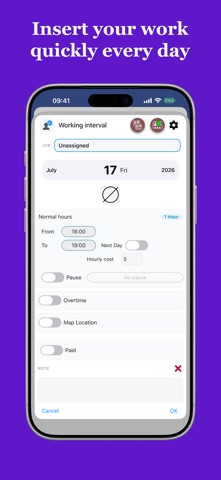
Working Hours 4b functions as an all-in-one time management and earnings calculator designed specifically for mobile devices. Users log every shifting detail, from basic hourly inputs to intricate early entries, overtime schedules, and paid or unpaid breaks.
The core utility expands far past basic timestamps by incorporating financial add-ons like bonuses, out-of-pocket expenses, and localized meal vouchers. Categories such as fuel, parking, food, and lodging keep complex expense reports organized right alongside daily shift intervals.
Independent developer Sorin-George Budescu engineered this project to bridge the gap between simple clock apps and enterprise-grade enterprise trackers. The utility features robust cloud synchronization, letting users jump between multiple Apple devices without missing a single clocked minute.
Standout Features & What's New in this Build
This fresh TestFlight distribution packs several experimental additions that streamline daily logging workflows. The codebase runs smoothly, taking full advantage of modern silicon architecture.
- Smart Calendar Integration: Review, insert, and alter work intervals directly from a color-coded calendar interface spanning up to 48 hours per shift.
- Flexible Work Bank: Store accumulated overtime hours securely instead of cashing them out immediately, converting them back into paid time off whenever desired.
- Reusable Working Profiles: Save repetitive shift patterns with custom names like night shift or weekend rotation, applying them to any date with a single tap.
- Advanced Travel & Mileage: Calculate travel distance and costs separately from standard shifts automatically using custom cost-per-hour or distance metrics.
- Detailed Multi-Format Export: Compile comprehensive productivity statistics and instantly export data as plain text, CSV, or structured PDF files.

Hands-On Impressions: Performance, Battery, and Thermals
Testing productivity apps on modern hardware usually highlights unnecessary battery drain caused by poor background processes, but Working Hours 4b proves remarkably lean. The interface leverages ProMotion 120Hz display capabilities on flagship Apple devices, delivering buttery-smooth scrolling through extensive monthly logs and statistics graphs.
Touch responsiveness remains instantaneous, and thermal output stays completely flat during extended logging and data export sessions. Memory management is equally impressive, maintaining a tiny footprint that never forces unexpected background reloads even when switching away to heavy browser tasks.
"We focused on removing every possible speed bump between the user and their timesheet, ensuring logging takes seconds rather than minutes while keeping data securely synchronized across devices." — Sorin-George Budescu, Developer
System Requirements & Requested Permissions
Getting this productivity suite running requires minimal overhead, as the app officially supports any iPhone or iPad running iOS 15.0 or later. Modern optimization ensures older supported chipsets handle daily reminders and calendar calculations effortlessly.
The app requests standard sandboxed permissions, including local notifications to power customizable shift reminders and secure background internet access for cloud synchronization. Apple's rigorous privacy guidelines ensure your financial data, receipts, and client notes remain completely encrypted.
Pros & Cons: Beta Impressions
✓ The Highs (What We Love)
- Granular Tracking: Separate management for tips, mileage, vouchers, and customized expense categories.
- Fluid UI: Gorgeous responsive calendar layout optimized for high-refresh-rate mobile displays.
- Work Bank: Excellent system for banking extra hours to use as future paid time off.
✕ Beta Caveats (Room for Polish)
- Localization Edge Cases: Minor text overlaps observed in certain secondary language selections.
- Sync Latency: Occasional brief delays when forcing manual cloud sync across poor cellular connections.
- Ad Placement: Free tier banner ads occasionally interrupt dense data-entry views.
Current TestFlight Slot Situation & Availability
Apple enforces a strict cap of 10,000 external testers for any individual TestFlight distribution link. Popular productivity utilities of this caliber frequently experience high demand surges as freelancers secure early access slots.
Beta capacity fluctuates regularly as inactive users get pruned automatically by the developer framework. Checking back during off-peak hours provides the best opportunity to secure an open testing allocation if initial attempts show capacity limits.
Step-by-Step TestFlight Installation Guide
Joining the beta phase takes less than two minutes once you have the direct invitation link ready. Follow this straightforward setup procedure to get started on your device:
- Download TestFlight: Open the iOS App Store, search for Apple's official TestFlight application, and install it on your device.
- Access the Beta Link: Tap the official Codewing TestFlight invitation URL provided for Working Hours 4b using your default mobile browser.
- Accept the Invitation: Your browser will automatically launch the TestFlight app, prompting you to review the developer terms and tap "Accept."
- Install the Build: Tap "Install" to download the Working Hours 4b beta package directly over your existing iOS environment.
- Submit Feedback: Test the features thoroughly, and if you encounter bugs, use the built-in TestFlight feedback tool to report them straight to Sorin-George Budescu.
Frequently Asked Questions
Is Working Hours 4b safe to install via TestFlight?
Yes, every TestFlight build undergoes Apple's automated malware and security screening before public distribution. The application runs strictly inside iOS privacy sandboxes, ensuring your personal records remain fully isolated.
What should I do if the Working Hours 4b beta is full?
If Apple reports that the beta is currently at capacity, bookmark this Codewing discovery page and check back periodically. Developer slot cleanups happen frequently as inactive testers expire.
Will installing this beta overwrite my App Store version or delete save data?
TestFlight builds generally install as standalone update packages over existing public versions while preserving local databases. However, because this is pre-release software, backing up vital time logs beforehand remains good practice.
How long do TestFlight beta invitations and builds last?
Individual TestFlight beta builds remain valid for a maximum of 90 days from the initial upload date. The developer will push updated builds regularly through the TestFlight app to keep features fresh and patch reported bugs.
Are in-app purchases free during TestFlight beta testing?
Yes, any simulated in-app purchases required to test features like removing ads or unlocking multiple jobs are entirely free. Apple's test environment processes transactions using sandbox tokens without charging real currency.
Final Editorial Verdict
Working Hours 4b delivers a polished, comprehensive time-tracking solution that easily outperforms traditional paper logs and basic calculators. Beta testers looking for a reliable way to manage multiple clients, expenses, and overtime should jump on this TestFlight release immediately.
Beta Rating: 4.6 / 5 Stars
Developer Support & Official Resources
Stay updated on patch notes, maintenance windows, and feature roadmaps directly from the official developer channels.
Never miss an opening for Working Hours 4b.
Apple limits TestFlight betas to 10,000 testers, and this program is currently at capacity. CodeWings Plus continuously monitors slot availability 24/7 and sends you an instant alert the second a spot opens up.






