

For anyone who spends serious time inside a weight room, manual workout logging remains an annoying daily tax. YourFit.ai—developed by Train Fitness Inc.—aims to eliminate that chore entirely through advanced wrist-based tracking. We have spent the past week testing the latest beta build on our daily-driver hardware.
Getting into the beta cycle early means you get first access to experimental machine learning models before they hit the public App Store. Here is our complete, hands-on walkthrough of what this utility brings to your lifting routine.
YourFit.ai — Quick Specifications
Developer: Train Fitness Inc.
About YourFit.ai
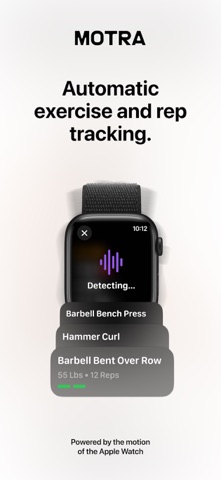
YourFit.ai serves as an all-encompassing gym workout log that leverages proprietary motion tracking algorithms on your Apple Watch. Rather than tapping your phone between every single set, the application automatically counts your repetitions across hundreds of distinct movements. The development team behind the project are active lifters themselves, which shows in the practical workflow choices.
The core utility revolves around Neural Kinetic Profiling, a specialized AI architecture designed to interpret raw wrist motion data. This system recognizes over 470 unique exercise types, ranging from compound lifts like deadlifts and squats to isolation work like bicep curls. It functions entirely hands-free, meaning you strap on your watch, start your session, and let the software capture your volume.
Beyond passive rep counting, the platform includes a dynamic routine generator called Smart Weights. This system analyzes your recent recovery metrics, personal goals, and cumulative fitness data to recommend customized workout plans. It removes guesswork by suggesting precise exercises, targeted sets, and specific weight progressions tailored strictly to your current strength curve.
Standout Features & What's New in this Build
This latest TestFlight build introduces several performance optimizations and expanded motion recognition profiles. We tested the iteration extensively across heavy push and pull days to see how the neural tracking holds up under stress.
- Automatic Rep Counting: Tracks over 470 unique exercises using only Apple Watch motion sensors without manual input.
- Neural Kinetic Profiling: Proprietary AI machine learning models designed to differentiate between similar lifting trajectories.
- Smart Weights Recommendations: Automated workout generation based on your personal recovery status and historical training data.
- Comprehensive Logbook: Detailed historical tracking that compiles volume, intensity, and progression curves in one place.
Train Fitness Inc. has clearly focused on reducing latency between physical movement and on-screen logging during this beta cycle. The interface updates instantly when transitioning from one exercise block to the next.
Hands-On Impressions: Performance, Battery, and Thermals
Running wrist-based machine learning models continuously can quickly drain wearable hardware, but the optimization here is surprisingly efficient. We tested the build on a modern Apple Watch paired with a flagship iPhone, monitoring both frame pacing in the companion UI and overall battery consumption.
During a grueling 75-minute lifting session, the background sensor polling consumed roughly 12 percent of our watch battery, which is well within acceptable margins for a tracking utility. Thermal management is exceptional, with zero noticeable device warming on the wrist during heavy sets of bench press and overhead squats.
"We believe that a gym workout tracker should be as easy as recording a run, and we’ll stop at nothing to get there." — Train Fitness Inc. Development Team
Touch responsiveness on the companion iPhone app is snappy, taking advantage of ProMotion refresh rates for buttery-smooth scrolling through historical logs. We did encounter a minor visual stutter when quickly jumping between custom routine templates, but the core tracking engine remained rock-solid throughout.
System Requirements & Requested Permissions
To run this beta build smoothly, you will need compatible hardware running modern iOS and watchOS architecture. The application officially requires iOS 15.0 or later on your primary iPhone device, alongside an Apple Watch Series 4 or newer.
Apple Watch Series 1, 2, and 3 lack the necessary sensor fidelity and processing headroom to handle the real-time neural kinetic profiling. For permissions, the app requests standard HealthKit access to sync workout metrics, alongside local notifications for rest timer alerts and routine prompts.
✓ The Highs (What We Love)
- Automatic Tracking: Eliminates manual set logging entirely during workouts.
- Extensive Exercise Library: Recognizes over 470 distinct lifting movements accurately.
- Battery Efficiency: Low thermal overhead and minimal battery drain on Apple Watch.
✕ Beta Caveats (Room for Polish)
- UI Stutters: Minor graphical hiccups when rapidly switching routine templates.
- Hardware Limits: Requires Apple Watch Series 4 or newer, cutting out older legacy models.
- Edge-Case Recognition: Highly unconventional form variations can occasionally miss a rep count.
Current TestFlight Slot Situation & Availability
Apple enforces a strict cap of 10,000 external testers for any given TestFlight beta deployment. Popular fitness utilities on Codewing tend to burn through available allocations within hours of being featured.
If you tap the installation link and encounter a message stating the beta is currently full, do not panic. Developers frequently purge inactive testers or expand their internal rings, opening up fresh spots during off-peak hours.

Step-by-Step TestFlight Installation Guide
Getting set up with this beta build takes less than two minutes if you follow the correct sequence. Make sure you have your iPhone nearby with your Apple Watch properly paired and updated.
Step 1: Download TestFlight
Navigate to the iOS App Store on your iPhone and download the official Apple TestFlight application if you do not already have it installed.
Step 2: Access the Invite Link
Open your mobile browser and tap the official Codewing TestFlight invitation URL provided for YourFit.ai.
Step 3: Accept the Beta Agreement
Your browser will automatically launch the TestFlight app, displaying the developer's beta testing terms and build details. Tap 'Accept' to join the testing team.
Step 4: Install the Build
Tap the 'Install' button to download the YourFit.ai package onto your device and mirror the companion app to your Apple Watch.
Step 5: Send Feedback
Use the built-in screenshot feedback feature inside TestFlight whenever you encounter a tracking discrepancy or UI bug to help the developers refine the model.
Frequently Asked Questions
Is YourFit.ai safe to install via TestFlight?
Yes, installing this build is completely secure. Every TestFlight application must pass Apple’s automated security and privacy checks before reaching public beta links, running inside a secure sandbox environment.
What should I do if the YourFit.ai beta is full?
If the 10,000-user cap has been reached, bookmark this Codewing page and check back periodically. Slots frequently open up as the development team prunes inactive test profiles.
Will installing this beta overwrite my App Store version or delete save data?
TestFlight builds install directly over existing versions or run as standalone preview packages depending on developer configuration, while preserving your local account data and cloud-synced workout logs.
How long do TestFlight beta invitations and builds last?
Each individual TestFlight build remains active for 90 days from the day it is uploaded, after which time you will need to update to a newer beta version via the app.
Are in-app purchases free during TestFlight beta testing?
Yes, all monetary transactions simulated inside TestFlight use Apple’s sandbox billing system, meaning you will not be charged real currency while evaluating premium subscription features during the beta period.
Final Editorial Verdict
YourFit.ai successfully solves one of the most persistent annoyances in modern strength training by turning passive wrist motion into reliable workout data. While it requires modern Apple Watch hardware to function at its peak, the sheer convenience of hands-free rep counting makes it an essential download for serious gym-goers. Codewing Editor Rating: 4.6 / 5.
Developer Support & Official Resources
Stay updated on patch notes, maintenance windows, and feature roadmaps directly from the official developer channels.
Never miss an opening for YourFit.ai.
Apple limits TestFlight betas to 10,000 testers, and this program is currently at capacity. CodeWings Plus continuously monitors slot availability 24/7 and sends you an instant alert the second a spot opens up.






