Getting Started with the DayPilot: One Task at a Time Beta




About DayPilot: One Task at a Time
Every to-do app hands you a list and wishes you luck.
DayPilot shows you one thing.
One card, at a time. What to do right now, when to start it, and when to
leave. Swipe it away and the next one comes up.
WORKS BACKWARDS, NOT FORWARDS
A deadline is a place you have to be by a certain time. If a meeting is at
3:00 and it's forty minutes away, you don't need a reminder at 3:00 — you
need one at 2:05. DayPilot does that maths for every event, using real
drive times.
The same works for tasks. Something that takes three hours and is due at
midnight isn't a midnight problem. It's a 9pm problem. Tell DayPilot how
long a task takes and it surfaces at the last moment you could still start
and be fine.
ONE CARD, FIVE STATES
Red — time to leave, with the drive and directions
Yellow — a deadline close enough that you need to start now
Green — a routine that's due
Blue — nothing pressing, pick something
Grey — genuinely done for the day
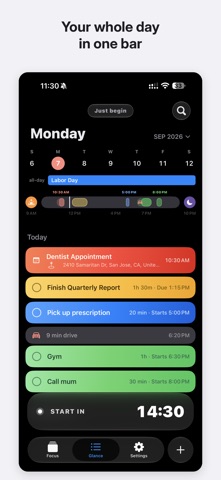
THE GLANCE
Your whole day as one bar: what's committed, what's free, when you're
waking up, when you're winding down. Tap any gap to drop something in.
FOR STUDENTS
Subscribe to your Canvas calendar and your assignments stop being invisible
all-day entries. DayPilot turns them into real deadlines with start times,
grouped by course, so a term paper doesn't ambush you at 11:44pm. Set once
how long a course's work usually takes and every assignment inherits it.
ALSO
Live Activities on your lock screen · Home screen widgets · Smart alarms
that wake you in time for your first commitment, travel included ·
Checklists for the things that aren't tasks · Works with Apple Reminders
and Calendar, nothing to migrate
No account. No sign-up.