Getting Started with the InfiniteX2P Pro — Desktop Mode Beta



About InfiniteX2P Pro — Desktop Mode
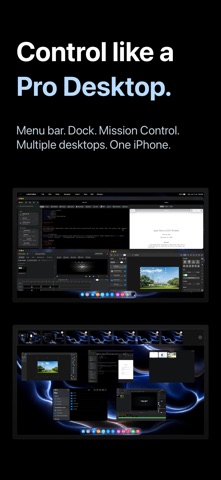
InfiniteX2P Pro transforms iPhone into a Pro Desktop and gives iPad a powerful desktop-style creative workspace.
Built for both iPhone and iPad, InfiniteX2P Pro brings movable windows, pro creation tools, Files integration, iCloud Calendar, Contacts, Apple Music, a rebuilt Web Browser, rebuilt Web Apps, and external display support into one unified environment.
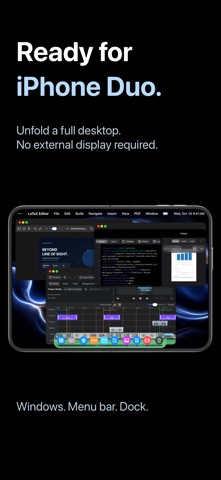
Use it directly on iPhone with external display as a pocket Pro Desktop Computer. Connect an external display when you want more room for editing, browsing, writing, files, and multitasking.
PRO TOOLS BUILT IN
Video Editor:
- Create video projects
- Import media
- Arrange clips on a timeline
- Work with video and audio tracks
- Preview edits
- Adjust audio and color settings
- Configure export options
- Export completed videos
Image Editor:
- Create image projects with layers
- Add text, shapes, fills, brush strokes, and effects
- Crop, arrange, rotate, resize, and flip content
- Adjust opacity and blend modes
- Export as PNG, JPEG, or HEIC
LaTeX Editor:
- Create and manage LaTeX projects
- Edit source files and compile locally with bundled LaTeX/Tectonic support
- Preview generated PDFs and view compile logs
- Use templates, snippets, symbols, tables, images, citations, and bibliography tools
- Run package, document class, accessibility, arXiv, and review checks
- Export ZIP projects and app archives
IPHONE & IPAD INTEGRATION
InfiniteX2P Pro works with the tools and data already on your device.
- Files integration for browsing, organizing, importing, and exporting documents
- iCloud Calendar access for viewing, creating, and editing events
- Contacts access for browsing your address book
- Apple Music access inside the workspace
- Photo and media import workflows for creative projects
- Local document, download, and project storage
DESKTOP-STYLE WORKSPACE
InfiniteX2P Pro gives iPhone and iPad a flexible window-based interface.
- Movable, resizable app windows
- Minimize and maximize controls
- Dock, Launchpad, Mission Control, and multiple Spaces
- Keyboard shortcut support
- Pointer and touch-friendly controls
- Workspace restoration and profiles
Keep your browser, files, calendar, contacts, music, notes, and creative editors open together instead of constantly switching between separate full-screen apps.
REBUILT WEB BROWSER
The Web Browser in InfiniteX2P Pro has been reworked from the ground up.
- Rebuilt browser architecture
- Improved SSO sign-in flow
- Tab view with page previews
- Tabbed browsing
- Bookmarks and downloads
- Address and search tools
- Mobile/desktop website switching
- Find and page tools
- Better workspace integration
REBUILT WEB APPS
Web Apps have also been reworked from the ground up, making websites feel more integrated inside the InfiniteX2P Pro workspace.
- Add websites as workspace apps
- Launch saved web apps from the desktop-style environment
- Keep web apps alongside files, editors, calendar, contacts, and other tools
- Use web apps as part of a larger multitasking workflow
FILES & DOCUMENT MANAGEMENT
Manage documents and project files from inside InfiniteX2P Pro.
- Browse Documents and Downloads
- Create files and folders
- Rename, move, copy, and delete items
- Add sidebar shortcuts
- Switch between list and icon views
- Use drag-and-drop where supported
- Preview files through Lookup
- Import and export project content
- Work with documents used by the Pro editors
EXTERNAL DISPLAY SUPPORT
Use InfiniteX2P Pro directly on iPhone or iPad, or connect to an external display for a larger desktop-style setup with mirroring support, external display resolution options, and more room for editing, browsing, writing, and file management.
Terms of Use (EULA): https://www.apple.com/legal/internet-services/itunes/dev/stdeula/
Privacy Policy: https://github.com/kjwamlex/InfiniteX2P-Pro-Privacy-Policy/blob/main/README.md