Open now
Spot availability
Open right now · since Nov 17Public TestFlight betas are capped at 10,000 testers, so spots open only now and then. Here is when they opened recently and how long they lasted.
Recent openings
- Nov 17 · 4:12 PMstill open
Spots are open right now.
Getting Started with the KeyboardKit Beta





About KeyboardKit
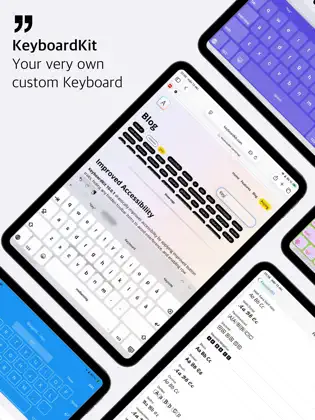
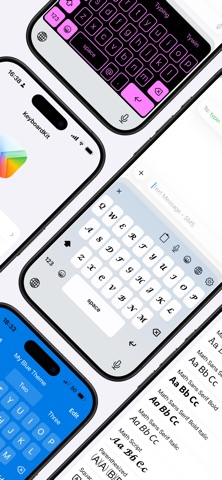
KeyboardKit lets you replace the system keyboard with a custom keyboard that is truly yours.
KeyboardKit:
- Works with all apps
- Supports 75 languages
- Has many settings and themes
KeyboardKit supports:
- 75 languages
- QWERTY, QWERTZ, AZERTY
- Colemak, Dvorak
- Vietnamese TELEX, VIQR, VNI
KeyboardKit lets you:
- Apply more settings
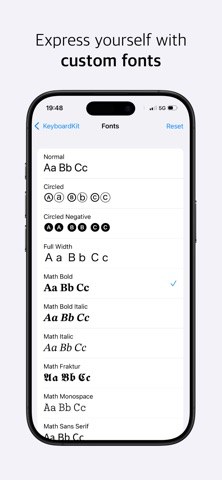
- Type with custom fonts
- Add an extra row of buttons
- Add buttons to the main toolbar
- Add buttons next to the spacebar
- Paste into any app from a list of clips
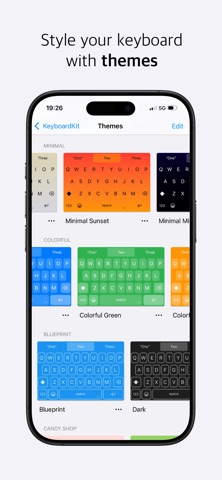
- Style your keyboard with beautiful themes
- Make your keyboard keys bigger and bolder
KeyboardKit settings:
- Keyboard:
One-Handed Keyboard, Character Preview, Haptic Feedback, Sound,
Auto-Capitalization, Auto-Collapse, Enable Caps Lock,
Predictive Text, "." Shortcut,
Spacebar Long Press, Spacebar Menus,
Toolbar Menu, Input Toolbar,
Spacebar Actions, Toolbar Actions
- Accessibility:
Bold Text, Custom Button Height
- Languages:
English, Albanian, Arabic, Arabic (PC), Armenian, Azerbaijani, Belarusian, Bengali, Bulgarian, Catalan, Cherokee, Croatian, Czech, Danish, Dutch, Dutch (Belgium), English (Australia), English (Canada), English (United Kingdom), English (United States), Estonian, Faroese, Filipino, Finnish, French, French (Canada), French (Belgium), French (Switzerland), Georgian, German, German (Austria), German (Switzerland), Greek, Hawaiian, Hebrew (Israel), Hungarian, Icelandic, Inari Sami, Indonesian, Irish (Ireland), Italian, Kazakh, Kurdish, Sorani, Kurdish, Sorani (Iraq), کوردیی ناوەندی (PC), Latvian, Lithuanian, Macedonian, Malay, Maltese, Mongolian, Northern Sami, Norwegian Bokmål, Norwegian Nynorsk, Pamiri Shughni (Shughni Tajik), Persian, Polish, Portuguese (Portugal), Portuguese (Brazil), Romanian, Russian, Serbian, Serbian (Latin), Slovak, Slovenian, Spanish, Spanish (Latin America), Spanish (Mexico), Swedish, Swahili, Turkish, Ukrainian, Uzbek, Welsh, Vietnamese
- Autocomplete:
Auto-Complete, Auto-Correction, Auto-Ignore Words, Auto-Learn Words,
Emoji Suggestions, Next Character Prediction, Text Replacements,
Ignored Words, Number of Suggestions, Next Word Prediction, Hide toolbar
- Clipboard:
Add Clipboard Content, Create Custom Clips
- Dictation:
Silence Limit (before dictation ends)
- Emoji:
Default Emoji Skin Tone
- Feedback:
Audio & Haptic Feedback
- Fonts:
Select Custom Font
- Theme:
Pick Theme, Create Custom Themes (Premium)
We hope that you will love using KeyboardKit!
Terms & Conditions:
https://apple.com/legal/internet-services/itunes/dev/stdeula/
Latest App Store version: 5.0 · 11/18/2026
What's new, from the App Store
KeyboardKit 5.0 is a big update, with more reliable typing, improved iPhone Duo support, new actions, and a brand new GIF keyboard. - Improved Typing - The keyboard has been adjusted to reduce the risk of lost key presses. - iPhone Duo - When the iPhone Duo is unfolded in landscape, the toolbar has a new button for changing the keyboard placement. - GIFs - Find and send GIFs, right from the keyboard. Choose between GIPHY and Klipy in the GIF settings. - Themes - Your favorite themes are now at the very top of the themes screen. - New Actions - You can now add GIF keyboard toggles to the keyboard and toolbars. Thank you for using KeyboardKit! If you like the app, please consider leaving a review. It helps a lot.