How to Join NsoZ220 Beta on iOS





About NsoZ220
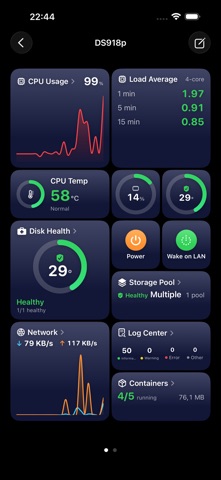
NASmeister puts your Synology NAS on your iPhone: live vitals, storage, files, containers and virtual machines, on a dashboard you arrange yourself.
Add your NAS in seconds and watch it come alive: everything updates in real time, and one glance tells you whether all is well.
A DASHBOARD THAT'S YOURS
- Drag, drop and resize tiles until the layout fits the way you work
- Multiple pages, plus layout templates that sync through iCloud
- Rotate to landscape for a full-screen view of one tile at a time
- Kiosk mode cycles through your tiles and keeps the screen awake
LIVE VITALS AT A GLANCE
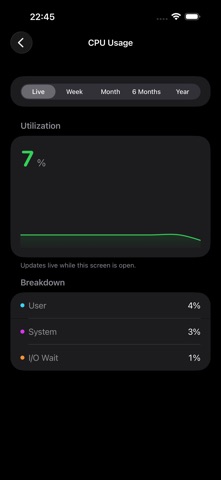
- CPU usage, load and temperature
- Memory usage and network throughput with live graphs
- Disk activity and drive temperatures
- Usage history by day, week, month, 6 months or year; press and hold a graph for exact values
YOUR FILES, WHEREVER YOU ARE
- Browse the shared folders on your NAS, with photo thumbnails in the list
- Tap a file for its details and a preview: photos, PDFs, text and more
- Download a file, or zip several on the NAS, then share or save to Files
- Upload from your device or photo library, create folders, rename, copy, move and delete
- Search subfolders, pack or extract archives, and create a sharing link with a QR code
STORAGE AND HEALTH
- Volumes, capacity and physical disks
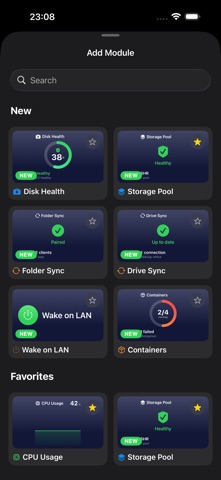
- Disk Health with drive temperatures and S.M.A.R.T. status
- Storage Pool with RAID and pool status
- UPS status, battery charge and remaining runtime
APPS AND SERVICES ON YOUR NAS
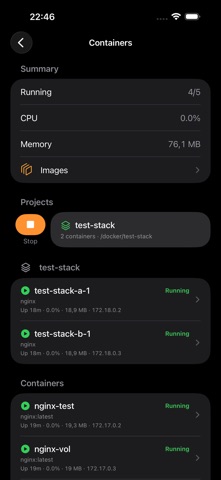
- Containers: Docker and Container Manager. Status and resource use, start, stop and restart, logs, Compose projects and image updates
- Virtual Machines: power guests on and off, view details, edit or delete them, and browse the VMM log
- Folder Sync and Drive Sync: the status of Shared Folder Sync tasks and Synology Drive ShareSync connections
EVERYTHING ABOUT YOUR NAS
- System information: model, uptime, firmware and health
- Log Center, connected users and scheduled tasks
- DSM update status at a glance
MORE THAN ONE NAS
- Server Groups combine two to four devices into one shared dashboard
- Each tile is color-coded to show which NAS it is reading from
STAY IN CONTROL
- Restart or shut down your NAS
- Wake it with Wake on LAN, even from outside your home through QuickConnect
- Locate it with Find Me (beep), run scheduled tasks, disconnect users
GET CONNECTED IN SECONDS
- Automatically discover Synology devices on your network
- Connect using an address or Synology QuickConnect
- Two-factor authentication, with the option to remember your device
- Clear prompts for self-signed certificates, reviewable any time in Settings
MADE TO FIT YOU
- English, German, French and Slovenian
- Light, Dark, or Match System
- VoiceOver and Dynamic Type throughout
PRIVATE BY DESIGN
- Your password is stored only in the device Keychain and sent directly to your NAS, never to us
- Files move between your device and your own NAS. No file, name or path is ever sent to us
- No account required, no ads, and no third-party tracking
- Optional iCloud backup of your server list (metadata only)
TRY BEFORE YOU CONNECT
- Explore the whole app in demo mode with sample data: files, containers, virtual machines and usage history. No server required
NASmeister PRO
Free covers one server with live vitals, storage and system information. NASmeister Pro adds unlimited servers, Server Groups, every module and action including Files, usage history, and iCloud backup.
NASmeister Pro is available as a monthly or yearly auto-renewable subscription, or as a one-time lifetime purchase. Subscriptions renew automatically unless canceled at least 24 hours before the end of the current period; manage or cancel anytime in your Apple Account settings.
Terms of Use (EULA): https://www.apple.com/legal/internet-services/itunes/dev/stdeula/
—
NASmeister is an independent app and is not affiliated with Synology Inc.