Open right now, similar to Pinple
Betas taking testers at the moment, checked by CodeWing.
Getting Started with the Pinple Beta


About Pinple
Three steps to a finished collage: pick backgrounds → add subjects → export.
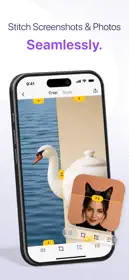
Pinple cuts people out of your photos automatically and layers them over a grid of backgrounds — turn everyday moments into a designed collage in seconds: trips, hangouts, food, pets, the small stuff.
Live Photo cutouts keep subjects and backgrounds moving; for still photos, you can fine-tune the cutout edges by hand.
THREE STEPS
· Tap the canvas to add background photos (multi-select for grids)
· Tap [+] to add subjects — cut out automatically, stack as many as you like
· Drag, pinch, rotate, then export and share
11 layouts, from a single frame to multi-photo grids
MORE
· Manual refine — brush to erase or restore edges on still-photo cutouts
· Auto crop keeps faces and subjects in frame
· Border styles: Minimal / Narrow / Instant / Film Strip
· Adjustable vignette and blur
· Export in 4:3, 1:1, or 9:16
· No account needed
· Works fully offline
· Your photos never leave your device