
Open now
Spot availability
Open right now · since Oct 29Public TestFlight betas are capped at 10,000 testers, so spots open only now and then. Here is when they opened recently and how long they lasted.
Recent openings
- Oct 29 · 2:34 AMstill open
Spots are open right now.
Getting Started with the Slips - Quick Notes Beta




About Slips - Quick Notes
Slips — Five notes, made yours
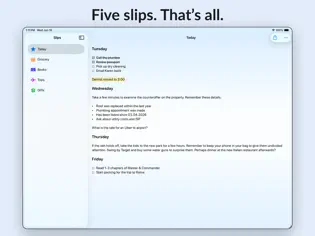
Five slips. That's all.
Slips is a notes app built on a simple idea: five fixed notes are enough for the things you actually return to, and few enough that you always know where everything is. No folders to organize, no archive to dig through, no blank-page guilt. Pick a slip and write.
MADE YOURS
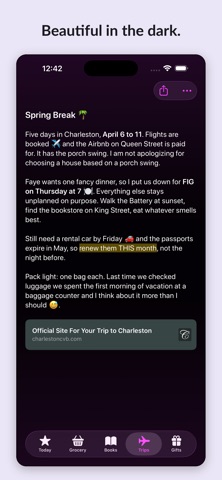
Name each slip, choose an icon from hundreds of symbols, and give it a color. Groceries, Books, Trips, Meds, Faith, Projects, whatever your five are. Reorder them any time.
ALWAYS IN SYNC
Your slips live in your own private iCloud and stay current on iPhone, iPad, and Mac. Edit on one device, and it's on the others. Nothing is collected, nothing is tracked, and there are no accounts to create.
BACKED UP, JUST IN CASE
Every device quietly saves a daily backup of your slips, keeping the last three. Restoring takes one tap, and a safety copy is made first, so even a restore can be undone. You can also export your slips to a file and keep it anywhere.
RICH WHERE IT COUNTS
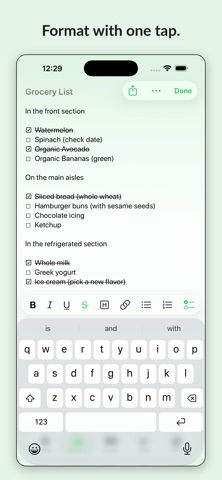
Bold, italic, underline, highlight, headers, bulleted and numbered lists, tap-to-check checklists, dividers, and links that turn into preview cards.
FAST WAYS IN
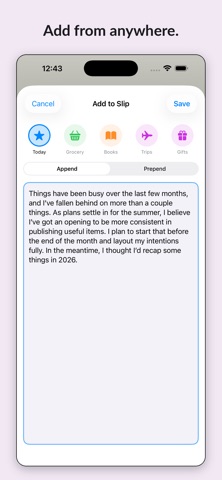
Add to a slip from any app with the share sheet. Automate with Siri and Shortcuts. Put a slip on your Home Screen or Lock Screen with widgets, or capture instantly from Control Center.
AT HOME ON THE MAC
A real Mac app: your slips in the sidebar, formatting in the menu bar, Cmd+1 through Cmd+5 to switch slips, an optional menu bar icon, and sharing straight from Safari.
SIMPLE PRICING
Try a single Slip for free forever. Slips Plus unlocks all five. One purchase covers iPhone, iPad, and Mac, and is shareable with your family.
Slips Plus subscriptions renew automatically until canceled in your App Store account settings, at least 24 hours before the current period ends. Lifetime is a one-time purchase.
Privacy policy: https://mattlangford.com/slips-privacy
Terms of use: Apple's standard EULA
Latest App Store version: 1.0.2 · 07/02/2026
What's new, from the App Store
- Improved Siri support - More reliable syncing - Better backups - Better settings organization