Getting Started with the Stash: Clipboard & Snippets Beta


About Stash: Clipboard & Snippets
Stash is the fastest place to put the things you'll need again.
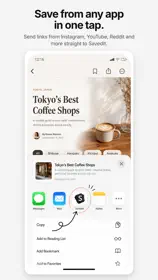
Save a snippet of text, a link, a photo, a GIF, or any file, from the share sheet, the clipboard, a drag and drop, or a Shortcut, and Stash keeps it one tap from your clipboard on iPhone, iPad, Mac, and Apple Vision Pro.
SAVE FROM ANYWHERE
- Share to Stash from any app. Text, links, images, and files are sorted into the right category automatically.
- One-tap "Add from Clipboard" button, no "Allow Paste?" prompt.
- Drag anything onto the Stash window on Mac or iPad.
- Save a photo or GIF from a direct image URL.
- Save whatever's on your clipboard straight from Control Center, on the Lock Screen, or with the Action button, and tag it on the way in.
COPY IN ONE TAP
- Tap any item to copy it. Photos, GIFs, and files copy as the real thing, ready to paste into Messages, Mail, Notes, or anywhere else.
- Select several items and copy them together.
- Quick Look any file without leaving Stash.
STAY ORGANIZED
- Five categories, Text Snippets, Links, Photos, GIFs, Documents, plus your own color-coded tags.
- Recents gathers new saves until you've reviewed them. Clear it with one tap, or let tagged items age out on their own.
- Pin favorites to the top. Drag to reorder. Search everything.
- Rename anything. Links pick up their page title automatically.
- Choose your own color for every category.
PRIVATE iCLOUD SYNC
- Your library syncs across iPhone, iPad, and Mac through your personal iCloud.
- No account, no sign-up, no analytics, no tracking. Your data stays in your iCloud and on your devices.
- A Sync status screen shows exactly when items were last sent and received, with a one-tap repair if you ever need it.
BUILT FOR MAC TOO
- A native Mac app with a sidebar, drag and drop, and keyboard shortcuts.
- Menu bar icon for quick access from any app.
- Global hotkeys: open Stash, open a category, or copy the latest item in a category without touching the mouse.
CONTROL CENTER, WIDGETS & SHORTCUTS
- Three Control Center controls: open Stash, jump to a category, or save the clipboard with a tag.
- App Intents for Shortcuts: Save to Stash, Copy from Stash, Get Stash Items, Get Stash Files, and Open Category.
FREE TO TRY
Stash is free and holds up to 10 items. A single one-time purchase removes the limit on every device. No subscription.