How to Join Filamingo Beta Beta on macOS






About Filamingo Beta
You have 40 spools. You're about to start a 12-hour print. How much PETG do you actually have?
Spool is precision filament inventory for 3D printing. Know what you have, what it costs, and what's running low. Built by a maker tired of guessing. Now on Mac too.
TRACK YOUR COLLECTION
Fast spool entry with auto-fill from screenshots and product links. Material, brand, colour, weight, cost, storage. Remaining weight tracked to the gram, with low-stock warnings at the levels you set.
THE HUB
Tap the centre tab and a glass command centre opens over any screen. Add a spool, log a print, scan a tag, open analytics or your printers, all from one place.
IMPORT FROM YOUR SLICER
Send a sliced .gcode or .3mf to Spool and the print writes itself up from what the file carries: name, print time, filament weight, material and colour. Spool suggests the matching spool and finds the printer in your Workshop. Not every slicer's files can be read yet.
THE PRINT TRAY
Imported files wait in the tray with Bambu Cloud prints you have not logged yet. Nothing is recorded until you review it. With iCloud on, logging or discarding on one device clears it on the others.
PRINT LOG & PRINT STORY
Every print holds its full process settings, filled in for you when the print comes from Bambu Cloud. Rate each one and record why it failed. Tap any print and its story opens full screen: costs, telemetry and spool gauges, with previous attempts on Pro.
YOUR INVENTORY AS A SPREADSHEET
Choose your columns, sort and resize them, group your spools and total up their count and weight. Save the arrangement as a named view: free, with no limit. Exports to CSV.
BAMBU LAB INTEGRATION
Connect your Bambu Cloud account and your prints fill the tray ready to log. Free for everyone. AMS multi-material prints split per slot, and Spool remembers your last match.
CATEGORIES
Built-in categories, plus as many of your own as you like. Spool suggests one per print and learns your overrides. Colour, emoji, auto-tagging and per-category insights are Pro.
PRINTER MAINTENANCE
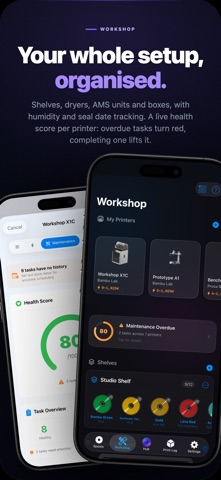
Schedules drawn from manufacturer documentation for popular Bambu Lab, Prusa, Creality, Anycubic and Elegoo models, with a standard task set for the rest. A live health score per printer: overdue tasks turn red, completing one lifts it.
SPOOLTAG
Tap your iPhone to an NFC-tagged spool and everything opens instantly. Every label carries a QR code that scans from the camera. Spool reads and writes filament tags. Label Studio designs labels for thermal rolls, sticker sheets or A4, or exports vector PDF. AR Inventory overlays live data above every tagged spool.
ANALYTICS & INTELLIGENCE
Dashboards for Pulse, Economics, Energy, Material and Hardware. Add your electricity rate once and prints show material and energy cost together.
WORKSHOP MANAGEMENT
Shelves, dryers, AMS units and boxes, with humidity and seal date tracking. Shopping list and batch management for multi-packs.
START FREE
20 spools, 2 printers, 4 storage locations, 30 days of analytics. Bambu Cloud sync, slicer import, the Print Tray, Saved Views, CSV import, SpoolTag, AR Inventory, widgets and Print Story included.
GO PRO
Unlimited spools, printers and storage. Lifetime analytics, category insights and print lineage. Label Studio with thermal, sticker sheet and vector PDF exports. Batch printing, category customisation, inventory value totals, maintenance notifications and Live Activities.
SUBSCRIPTION & PURCHASE INFO
Spool offers a one-time Spool Pack, which permanently adds 10 slots to a free account, and two auto-renewing subscriptions, Spool Pro Monthly and Yearly. Payment is charged to your Apple Account at confirmation and renews unless cancelled 24 hours before the period ends. Manage in Account Settings.
Terms of Use (EULA): https://www.apple.com/legal/internet-services/itunes/dev/stdeula/
Privacy Policy: https://lance-studio.com/privacy.html