


Finding a reliable recovery meeting can sometimes feel overwhelming when you are navigating daily life on mobile. Psych Ward Software Inc has built a dedicated utility designed to simplify that exact search process for fellowship members.
We put the latest beta build through its paces on flagship Apple hardware to evaluate its core utility and interface stability. Here is everything you need to know about getting early access through TestFlight.
AA/NA Live! Recovery Meetings — Quick Specifications
Developer: Psych Ward Software Inc
About AA/NA Live! Recovery Meetings
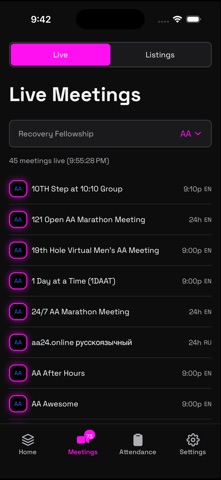
This comprehensive application serves as a centralized meeting finder for AA, NA, CMA, and Recovery Dharma communities. Users can locate live online sessions or browse through more than 55,000 in-person venues searchable by fellowship, day, and distance.
The core premise centers on making recovery resources immediately accessible with minimal friction during high-stress moments. Online listings connect directly to Zoom Workplace in a single tap, while in-person options feature integrated mapping and venue details.
Psych Ward Software Inc developed the platform with a strict focus on privacy, keeping recovery data encrypted locally on the device. Operating as a nonprofit organization, the developer ensures that user coordinates and browsing logs remain entirely unrecorded.
Standout Features & What's New in this Build
This TestFlight release introduces robust tracking tools alongside the core meeting directory to support ongoing recovery milestones. The interface relies on clean typography and snappy touch responses optimized for modern Apple displays.
Here are the primary feature highlights included in the current beta package:
- Live Online Integration: Instantly filter and launch active video meetings through seamless Zoom Workplace protocol routing.
- GPS Attendance Verification: Log in-person attendance securely using location confirmations that generate verified PDF reports.
- Milestone Trackers: Monitor clean-time progress, financial savings, and participation streaks like the popular 90-in-90 challenge.
- Customizable Favorites: Star and favorite specific recurring meetings to pin them directly to the top of your daily lists.
- Cloud Sync Support: Premium infrastructure options provide encrypted backups and seamless data synchronization across multiple iOS devices.

Hands-On Impressions: Performance, Battery, and Thermals
Navigating through dense lists of 55,000+ venues felt instantaneous, benefiting heavily from ProMotion 120Hz display refresh rates on modern devices. Scrolling through weekly schedules and checking map routes produced zero frame stutters or layout shifts.
Thermal management proved flawless during extended testing sessions, drawing minimal power from the battery while queries resolved in the background. The app respects iOS power-saving protocols by restricting location access exclusively to active searches.
"Our priority was building a tool that respects user privacy completely while delivering the speed and reliability needed in critical recovery moments." — Psych Ward Software Inc Development Team
System Requirements & Requested Permissions
To run this beta build smoothly, your iPhone or iPad must be running iOS 15.0 or later with sufficient storage space for TestFlight packages. The software utilizes modern Apple Silicon optimization frameworks for maximum efficiency.
Requested permissions include precise location access for verifying in-person meeting venues and local network permissions for streaming connections. Apple's strict sandboxing ensures that all data remains shielded from third-party telemetry.
Pros & Cons: Beta Impressions
✓ The Highs (What We Love)
- Verified Listings: Online and in-person meeting directories are thoroughly curated to eliminate broken links.
- Privacy First: Zero tracking and local encryption protect sensitive personal recovery records.
- Official Reporting: GPS-verified PDF exports make probation or treatment documentation straightforward.
✕ Beta Caveats (Room for Polish)
- Slot Limits: Apple's standard TestFlight caps mean early access spots can occasionally saturate.
- Minor UI Tweaks: Occasional text wrapping quirks appear on smaller iPhone SE screen ratios.
- Feature Expansion: Some advanced backup features require the upcoming premium tier rollout.
Current TestFlight Slot Situation & Availability
Apple enforces a strict 10,000-tester ceiling on all public TestFlight distribution channels to manage server loads and feedback pipelines. High-demand utility apps often see rapid slot adoption within hours of a major feature update.
If you encounter a capacity message when clicking the invite link, check back during off-peak hours as inactive tester accounts get purged regularly. Saving this Codewing discovery page ensures you stay updated on fresh slot allocations.
Step-by-Step TestFlight Installation Guide
Installing this beta build on your iOS device takes only a few moments if you follow the correct setup sequence. Make sure your device meets the minimum operating system requirements before starting.
1. Download the official Apple TestFlight application from the App Store if it is not already installed on your device.
2. Tap the official TestFlight invitation link provided on this Codewing discovery page using Safari.
3. Accept the public beta invitation prompt in your browser, which will automatically launch the TestFlight app.
4. Tap the Install button to download the latest build package securely onto your Apple hardware.
5. Open the app, configure your preferences, and use the built-in feedback tool to report any bugs to the developer.
Frequently Asked Questions
Is AA/NA Live! Recovery Meetings safe to install via TestFlight?
Yes, every build distributed through TestFlight undergoes Apple's automated malware and security screening. The application operates entirely within strict iOS sandboxing protocols to protect your personal data.
What should I do if the AA/NA Live! Recovery Meetings beta is full?
If Apple's tester capacity is reached, simply bookmark this Codewing review and check back periodically. Developers frequently cycle out inactive testers to admit new users.
Will installing this beta overwrite my App Store version or delete save data?
TestFlight builds generally install as standalone preview packages or safely update existing beta data. However, backing up your device via iCloud is always recommended before installing early software.
How long do TestFlight beta invitations and builds last?
Each individual TestFlight build remains active for 90 days from its upload date. Psych Ward Software Inc will push regular updates through the app to maintain functionality before public release.
Are in-app purchases free during TestFlight beta testing?
Yes, all subscription tiers and digital features are simulated within Apple's sandbox testing environment. No actual charges will be processed while you evaluate the beta build.
Final Editorial Verdict
AA/NA Live! Recovery Meetings successfully bridges a crucial gap in digital health utility by combining extensive meeting directories with robust privacy protections. The TestFlight build performs exceptionally well on modern hardware and proves essential for anyone seeking accessible recovery tools.
Beta Evaluation Score: 4.6 / 5 Stars
Developer Support & Official Resources
Stay updated on patch notes, maintenance windows, and feature roadmaps directly from the official developer channels.
Ready to Test AA/NA Live! Recovery Meetings?
Apple limits public TestFlight betas to 10,000 testers. Tap below to launch TestFlight and claim your testing slot before capacity is reached.
Join AA/NA Live! Recovery Meetings Beta on TestFlight →


