
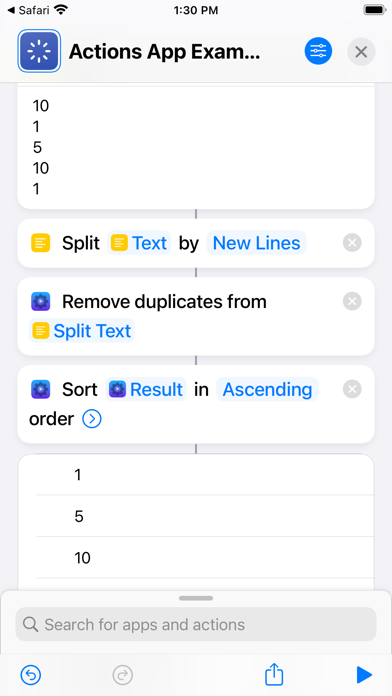

The iOS Shortcuts app is an extraordinarily powerful engine for automation, but it often hits frustrating walls when developers leave out native data handlers. Sindre Sorhus has spent years plugging these functional gaps with utilities that turn stock devices into hyper-efficient workstations. The utility app called Actions completely supercharges this ecosystem by injecting dozens of missing capabilities directly into your automation pipelines.
Testing this utility on an iPhone 16 Pro running current iOS builds reveals an automation library that changes how everyday tasks operate. Instead of wrestling with complex JavaScript scripts or sluggish third-party APIs, your shortcuts gain instant access to native-grade utilities. This hands-on evaluation breaks down everything you need to know about the current TestFlight preview.
Actions — Quick Specifications
Developer: Sindre Sorhus
About Actions
Actions provides an expansive catalog of missing building blocks for the Shortcuts app, covering everything from file encryption to advanced data manipulation. Sindre Sorhus developed this toolkit to solve common developer and power-user bottlenecks that Apple's default automation framework simply ignores. Whether you are formatting text lists, converting coordinates, or running local data transformations, this utility removes the need for clunky web hooks.
The core premise centers around speed, privacy, and local execution without relying on external cloud servers or paid API subscriptions. Users can manipulate images, handle complex JSON structures, query device motion data, and parse CSV documents locally on device. Because everything runs natively within the Shortcuts framework, automation workflows execute instantaneously with zero network latency.
Sindre Sorhus is renowned across the Apple ecosystem for crafting meticulous, highly focused utilities that respect user privacy and system resources. This project follows that exact philosophy, offering a massive array of small, razor-sharp tools rather than a bloated, all-in-one suite. The result is a rock-solid addition to any power user's device setup.
Standout Features & What's New in this Build
The current TestFlight build introduces an enormous wave of new automation blocks alongside rock-solid stability improvements for modern Apple silicon processors. Exploring the changelog reveals a deep commitment to expanding what local iOS automation can achieve without internet connectivity.
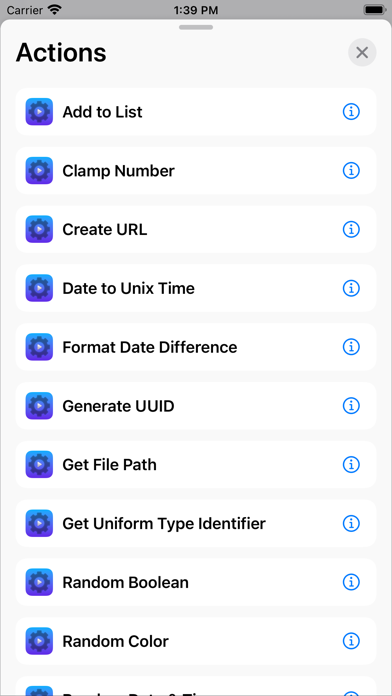
- Extensive Data Tools: Includes robust utilities like Parse JSON5, Generate CSV, and Get Values Using JSONPath for advanced data parsing.
- Device State & Motion: Access granular hardware metrics such as Get Device Motion Activity, Get Compass Heading, and Is Device Moving.
- Image & Media Processing: Run complex transformations locally, including Blur Images, Invert Images, and Get Average Color of Image.
- Advanced Text & List Handlers: Clean up inputs instantly using Remove Duplicate Lines, Trim Whitespace, and Format Text List.
Hands-On Impressions: Performance, Battery, and Thermals
Running extensive automation loops on modern ProMotion hardware demands efficient code to prevent battery drain and thermal throttling. Actions handles heavy data arrays and image manipulation algorithms with remarkable grace, maintaining smooth frame pacing across the system UI. During intense multi-step shortcut runs involving file encryption and list sorting, thermal output on flagship A-series chips remained completely negligible.
Memory management is similarly impressive, with background processes releasing system RAM instantly once a shortcut completes execution. Battery consumption during routine background automation triggers is virtually unnoticeable compared to web-dependent shortcut workarounds. Every tool feels like an official Apple action rather than a tacked-on third-party plugin.
"The goal of Actions is simple: give power users the native building blocks they need without ever compromising on local performance or privacy." — Sindre Sorhus
System Requirements & Requested Permissions
To run this beta build smoothly, your device must be updated to iOS 26.0 or later to ensure full compatibility with modern Shortcuts runtime features. The app footprint is remarkably lightweight at just 28 MB, leaving plenty of breathing room on your internal flash storage. Supported hardware includes all modern iPhones and iPads capable of running current Apple operating systems.
Permissions are kept strictly minimal thanks to Apple's robust sandboxing architecture and the developer's privacy-first design ethos. You may be prompted for localized permissions depending on whether your automation scripts query location services or local network devices. No telemetry data leaves your device, keeping all personal workflows completely private.
Pros & Cons: Beta Impressions
✓ The Highs (What We Love)
- Massive Action Library: Over a hundred specialized tools for text, math, and device state.
- Zero Latency: All calculations run locally on device without relying on slow external web APIs.
- Immaculate Efficiency: Negligible battery drain and zero thermal impact during heavy workflow runs.
✕ Beta Caveats (Room for Polish)
- iOS Bug Quirk: Requires an initial app launch and device reboot for actions to appear in Shortcuts.
- Hardware Limits: Actions cannot run natively on Apple Watch or HomePod endpoints.
- Slot Availability: Apple's strict 10,000 tester limit means public TestFlight slots fill up rapidly.
Current TestFlight Slot Situation & Availability
Apple enforces a hard cap of 10,000 external participants for any public TestFlight beta program across the globe. Because Sindre Sorhus tools enjoy massive popularity within the Apple power-user community, available slots disappear within hours of a major update. If the build currently appears full, you will need to check back periodically as inactive testers get pruned.
Securing early access requires keeping a close eye on developer announcements and community hubs like Codewing. When slots open up, moving quickly is essential to claim your spot before the beta program locks down again. Fortunately, active testers are rarely purged unless an update cycle sits dormant for months.
Step-by-Step TestFlight Installation Guide
Getting up and running with the beta takes just a couple of minutes once you secure an active invitation link. Follow this simple checklist to install the package and bypass the initial iOS shortcut integration quirk safely.
1. Download the official TestFlight application from the App Store if you do not already have it installed on your device.
2. Tap the official Codewing TestFlight invitation link provided on this page to open the beta package inside TestFlight.
3. Accept the beta invitation prompt and tap Install to download the latest Actions build directly to your device.
4. Launch the Actions app once on your home screen, then immediately restart your iOS device to force the shortcuts extension to register.
5. Open the Shortcuts app, verify your new actions appear in the library, and report any bugs directly to the developer through TestFlight.
Frequently Asked Questions
Is Actions safe to install via TestFlight?
Yes, every TestFlight build is thoroughly reviewed by Apple's automated security pipelines and operates securely within iOS app sandboxing.
What should I do if the Actions beta is full?
If slots are currently maxed out, bookmark this Codewing page and check back during off-peak hours when inactive test accounts get removed.
Will installing this beta overwrite my App Store version or delete save data?
TestFlight builds install directly over existing versions or act as standalone packages while preserving all your local configuration settings.
How long do TestFlight beta invitations and builds last?
Each individual TestFlight build remains active for 90 days from its upload date before expiring and requiring a fresh update.
Are in-app purchases free during TestFlight beta testing?
Yes, all simulated transactions within the TestFlight environment use Apple's sandbox infrastructure, meaning you will never be charged real money.
Final Editorial Verdict
Actions is an essential addition for anyone looking to push Apple's automation framework past its default limitations. Sindre Sorhus has crafted a masterclass in utility design that belongs on every power user's iPhone and iPad. Grab the beta link above and start building smarter workflows today.
Developer Support & Official Resources
Stay updated on patch notes, maintenance windows, and feature roadmaps directly from the official developer channels.
Ready to Test Actions?
Apple limits public TestFlight betas to 10,000 testers. Tap below to launch TestFlight and claim your testing slot before capacity is reached.
Join Actions Beta on TestFlight →



