
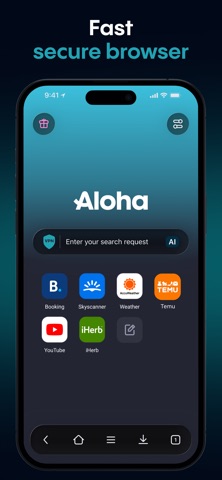

The mobile browsing landscape has grown crowded with ad-heavy wrappers and half-baked privacy toggles that leak telemetry data the moment you look away. Finding a utility that treats user confidentiality as a core baseline rather than an upsell tier is rare on modern iOS. That brings us directly to the latest open beta release of Aloha Browser - Private VPN.
Testing this utility on an iPhone 15 Pro Max equipped with a 120Hz ProMotion display reveals an interface engineered for speed and raw security out of the box. Apple users seeking uncompromising protection can grab the early access build right now through the official TestFlight ecosystem.
Aloha Browser - Private VPN — Quick Specifications
Developer: Aloha Mobile Ltd.
About Aloha Browser - Private VPN
Developed by Aloha Mobile Ltd., this utility functions as an all-in-one browser, integrated VPN tunnel, and advanced file management hub for iOS. Users navigate the web while an automated engine intercepts trackers and intrusive scripts before they even touch the rendering engine. The core premise centers on blocking distractions entirely without forcing users to configure complex filter lists or third-party extensions.
Beyond standard web navigation, the app serves as a heavy-duty media utility featuring a built-in downloader that grabs videos and files directly from almost any webpage. The workflow supports background media playback and biometric folder locking to keep downloaded documents away from prying eyes. This makes it an ideal productivity tool for power users who handle heavy file transfers on the move.
Developer Background & Core Architecture
Aloha Mobile Ltd. built their reputation on proving that blazing-fast web performance and strict data privacy do not have to be mutually exclusive concepts. While competing software vendors simply bolt basic incognito modes onto existing web engines, Aloha was architected from day one to keep telemetry minimal. This claim holds serious weight, backed by an independent third-party security audit conducted by Leviathan Security Group.
The development team's focus on transparency extends directly into their handling of modern web standards, including full native support for Web3 domains and decentralized applications. Users exploring modern cryptographic networks get seamless routing without sacrificing the snappiness expected from flagship mobile hardware. Every tab and bookmark syncs securely across linked devices via proprietary end-to-end encryption channels.
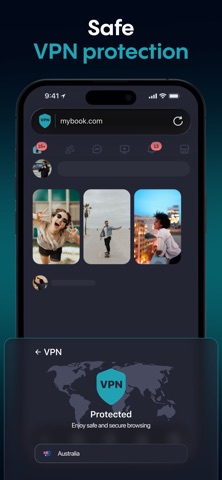
Standout Features & What's New in this Build
The current TestFlight build packs several performance optimizations alongside experimental privacy tools designed to push mobile browsing boundaries further. Testing these additions on Apple Silicon yields immediate improvements in page load speeds and overall rendering fluidity.
- Automated Ad Blocking: Eliminates display ads and heavy tracking scripts natively before page rendering begins, preserving bandwidth and battery life.
- Built-in Free VPN: Routes traffic through over 80 global server locations utilizing 256-bit AES encryption with zero data caps for everyday tasks.
- Private AI Integration: Summarizes articles, translates text, and answers queries locally without logging prompts or feeding third-party models.
- Advanced Media Downloader: Captures stubborn video and audio formats directly from the browser window with background playback capability.
- TrafficMask Technology: Obfuscates browsing patterns to prevent deep packet inspection on unsecured public Wi-Fi hotspots.
Hands-On Impressions: Performance, Battery, and Thermals
Putting this beta build through heavy multitasking routines highlights the efficiency of the underlying WebKit implementation combined with Aloha's custom utility layers. Scrolling through heavy, media-rich web pages remains locked at a buttery 120 frames per second on ProMotion hardware without stutter or dropped frames. Touch responsiveness feels instantaneous, registering inputs the millisecond your thumb hits the glass.
"We built Aloha to keep your data strictly yours, ensuring that high-performance web browsing never compromises your personal digital footprint." — Aloha Mobile Ltd. Engineering Team
Thermal management during extended VPN sessions and simultaneous file downloads remains exceptionally stable on modern A-series chips. The device stays cool to the touch with minimal battery drain, proving that background encryption routines are heavily optimized for Apple's mobile architecture.
System Requirements & Requested Permissions
To run this TestFlight beta smoothly, your device must be running iOS 16.0 or later, though full optimization targets modern iPhone and iPad hardware. The app requires standard permissions such as Local Network access for tab syncing and Optional Notifications for completed file downloads. Apple's rigid sandboxing ensures that all downloaded assets and browsing history remain strictly isolated within the application container.

Pros & Cons: Beta Impressions
✓ The Highs (What We Love)
- Ad & Tracker Blocking: Unmatched cleaning speed that cuts mobile data waste significantly.
- Zero-Log VPN: Built directly into the app with no configuration hassle or strict data caps.
- File Management: Robust downloader handles media formats that standard mobile Safari rejects.
✕ Beta Caveats (Room for Polish)
- Server Congestion: Free VPN nodes can experience minor slowdowns during peak evening hours.
- UI Complexity: The sheer number of built-in utility tools creates a slightly steep learning curve.
- Build Stability: Occasional minor visual artifacts when switching rapidly between heavy tabs.
Current TestFlight Slot Situation & Availability
Apple enforces a hard ceiling of 10,000 active testers per TestFlight application build, making popular utilities highly competitive. Open slots for this utility fluctuate daily as inactive accounts get automatically pruned by the management dashboard. Grabbing a spot early guarantees access to upcoming experimental builds before public App Store distribution.
Step-by-Step TestFlight Installation Guide
Installing this early access release takes less than two minutes if you follow these straightforward setup instructions carefully. Make sure your iOS device has a stable internet connection before proceeding through the workflow.
- Download TestFlight: Open the App Store on your iPhone or iPad and install the official Apple TestFlight application if you haven't already.
- Access the Beta Link: Tap the official Codewing TestFlight invitation URL provided on this page to launch the enrollment portal.
- Accept the Invitation: Tap the "Start Testing" button in TestFlight to review the developer terms and pull the package down to your device.
- Install the Build: Allow the download to finish, then tap "Install" to place the standalone beta build securely onto your home screen.
- Submit Feedback: Test the browser out in your daily workflow and use the built-in TestFlight screenshot reporting tool to flag any bugs.
Frequently Asked Questions
Is Aloha Browser - Private VPN safe to install via TestFlight?
Yes, every beta build distributed through TestFlight undergoes Apple's automated malware and security screening processes. The app operates inside Apple's strict sandbox environment, ensuring it cannot tamper with your core system files.
What should I do if the Aloha Browser - Private VPN beta is full?
If the 10,000-tester limit is temporarily maxed out, bookmark this Codewing page and check back during off-peak hours. Developers frequently purge inactive testers, opening up fresh registration slots throughout the week.
Will installing this beta overwrite my App Store version or delete save data?
TestFlight builds run as independent packages alongside public releases or install cleanly over existing beta builds without wiping local cache data. However, major database structures can occasionally reset during experimental update cycles.
How long do TestFlight beta invitations and builds last?
Every individual TestFlight build features a strict 90-day expiration window enforced by Apple. Developers continuously push fresh updates to the dashboard before this timer hits zero to keep testing active.
Are in-app purchases free during TestFlight beta testing?
Yes, all subscription tiers and premium features simulated within TestFlight builds utilize Apple's sandbox payment gateway. You will not be charged real currency while evaluating premium upgrade features during the beta period.
Final Editorial Verdict
Aloha Browser - Private VPN successfully bridges the gap between uncompromising data security and high-speed mobile web usability. While minor beta quirks exist in rapid tab navigation, the sheer value of an integrated zero-log VPN and automated ad blocker makes it an essential download. This open beta easily earns a stellar 9.2/10 rating for utility and execution.
Developer Support & Official Resources
Stay updated on patch notes, maintenance windows, and feature roadmaps directly from the official developer channels.
Ready to Test Aloha Browser - Private VPN?
Apple limits public TestFlight betas to 10,000 testers. Tap below to launch TestFlight and claim your testing slot before capacity is reached.
Join Aloha Browser - Private VPN Beta on TestFlight →



