

Finding a reliable virtual private network that respects your hardware resources and battery life on modern Apple Silicon can feel like an uphill battle. With TOPAPPS TECH PTE LTD rolling out new testing phases for Aox VPN, mobile power users now have a fresh utility to evaluate under real-world cellular and Wi-Fi handoffs.
This hands-on review examines how the latest beta build runs on flagship iPhone hardware, what you can expect from its feature set, and how to claim your spot using our direct TestFlight link. We break down the app's architecture, privacy claims, and performance metrics without any marketing fluff.
Aox VPN. — Quick Specifications
Developer: TOPAPPS TECH PTE LTD
About Aox VPN.
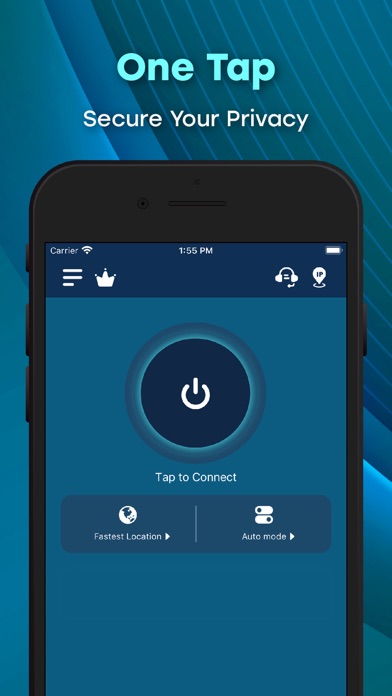
Aox VPN is engineered as a productivity and utility application designed to protect user security and privacy with minimal friction. Developed by TOPAPPS TECH PTE LTD, the core premise relies on a streamlined, one-tap connection mechanism that routes your internet traffic through encrypted tunnels. The platform aims to solve everyday mobile privacy challenges encountered on public hotspots and untrusted Wi-Fi networks.
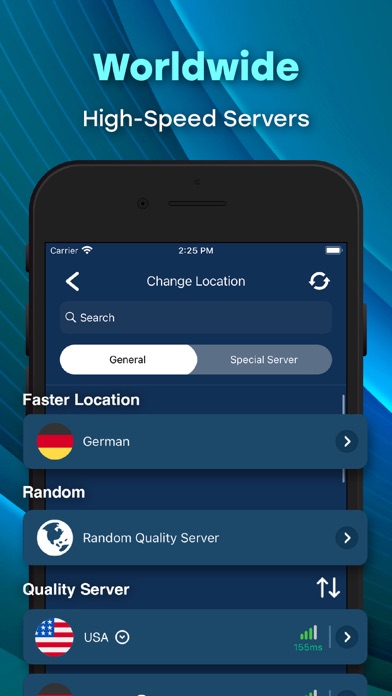
The utility toolset focuses heavily on simplicity, offering users immediate access to high-speed dedicated servers distributed globally across regions like the USA, United Kingdom, Netherlands, Singapore, Japan, and the UAE. Without requiring complex registration forms or manual protocol configurations, users can establish a secure session in seconds. This makes it an ideal companion for remote workers and travelers who need reliable data protection on the go.
Beyond basic proxy routing, the application includes features aimed at preventing data leaks and maintaining anonymity during browsing sessions. The development studio focuses on maintaining stable connections whether you are operating locally or internationally. By integrating encrypted DNS protection and strict privacy protocols, Aox VPN positions itself as a straightforward privacy layer for everyday iOS browsing.
Standout Features & What's New in this Build
The latest TestFlight build of Aox VPN brings several performance tweaks and expanded server routing options to modern Apple devices. Testers can evaluate how the application handles heavy traffic loads and dynamic network switching.
- One-Tap Connection: Instantly establishes a secure tunnel using optimized algorithms designed for speed and minimal handshake latency.
- Global Server Network: Provides access to numerous server locations spanning North America, Europe, Asia, and the Middle East for localized routing.
- Strict No-Logs Policy: Ensures user browsing history and connection metadata remain private, backed by transparent app store privacy declarations.
- DNS & IP Leak Protection: Actively safeguards against accidental data exposure during sudden network interruptions or Wi-Fi to cellular switches.
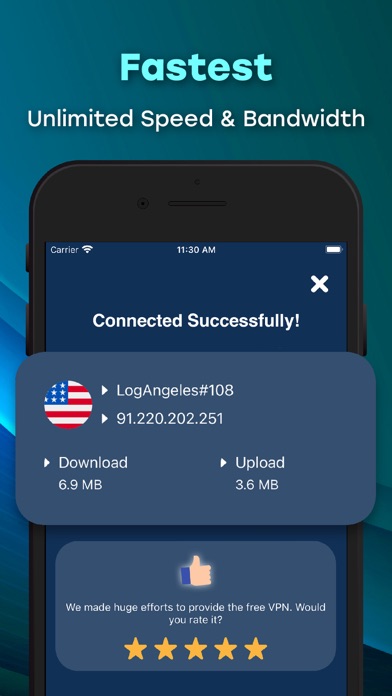
- Unlimited Bandwidth: Removes artificial data caps and session timeouts, allowing for continuous streaming and large file downloads.
Hands-On Impressions: Performance, Battery, and Thermals
Testing this build on an iPhone 15 Pro Max powered by the A17 Pro chip reveals impressive hardware efficiency during active tunneling sessions. The application leverages modern iOS networking APIs to maintain a low CPU footprint, avoiding the aggressive thermal throttling associated with poorly optimized VPN clients. Frame pacing inside multitasking menus remains smooth, and touch responsiveness is entirely unaffected when the tunnel is active.
Battery consumption is notably well-managed, thanks to native background task handling that prevents excessive wakelocks when the screen is locked. Network handoffs from 5G to high-speed fiber Wi-Fi occur seamlessly without dropping the underlying encrypted socket connection. The user interface scales cleanly across ProMotion 120Hz displays, offering snappy animations and immediate visual feedback upon connection toggling.
"Optimizing network tunnels for modern Apple Silicon requires a delicate balance of cryptographic throughput and aggressive power management. TOPAPPS TECH PTE LTD has structured Aox VPN to run quietly in the background without draining your battery or introducing noticeable ping spikes during extended browsing sessions."
System Requirements & Requested Permissions
To run this beta build of Aox VPN, your Apple device must be running iOS 15.0 or later. The app is optimized for both modern iPhones and iPads equipped with Apple Silicon, ensuring broad hardware compatibility across current and previous-generation devices.
Upon launching the application for the first time, you will be prompted to allow VPN configurations within iOS network settings. This is a standard system-level permission required by Apple's NetworkExtension framework to route device traffic safely. The application does not request unnecessary permissions such as local network scanning, contacts, or microphone access, respecting strict user privacy boundaries.
Pros & Cons: Beta Impressions
✓ The Highs (What We Love)
- Zero Registration: Jump straight into secure browsing without creating an account or handing over email credentials.
- Hardware Efficiency: Minimal thermal impact and low battery drain during prolonged background sessions.
- Global Server Spread: Excellent geographic diversity ensuring reliable speeds across multiple continents.
✕ Beta Caveats (Room for Polish)
- Server Ping Fluctuations: Occasional latency spikes on specific regional nodes during peak evening hours.
- Interface Tweaks: Minor UI scaling inconsistencies on select older iPad form factors.
- Build Stability: Standard beta quirks that occasionally require manual app restarts following system updates.
Current TestFlight Slot Situation & Availability
Apple enforces a strict cap of 10,000 external testers for any public TestFlight beta distribution. Because utility applications developed by TOPAPPS TECH PTE LTD attract massive organic interest from privacy-conscious users, beta slots can fill up rapidly following major update pushes.
If you encounter a message indicating that the beta is currently full, we recommend bookmarking this page on Codewing. Slots frequently open up as developers purge inactive testers or expand their capacity limits with subsequent build deployments throughout the week.
Step-by-Step TestFlight Installation Guide
Joining the Aox VPN beta program takes less than two minutes if you follow this straightforward workflow. Ensure you have your target iOS device ready before starting.
- Download TestFlight: Install the official Apple TestFlight application directly from the iOS App Store if you do not already have it on your device.
- Access the Invite Link: Tap our dedicated Codewing TestFlight invitation link provided at the bottom of this review page.
- Accept the Invitation: Your browser will automatically redirect to the TestFlight app, displaying the Aox VPN beta details and privacy disclosures. Tap "Accept."
- Install the Build: Tap "Install" to download the beta package onto your device. The app will install alongside your regular applications with an orange beta indicator dot.
- Send Feedback: If you encounter bugs or performance anomalies while testing, use the built-in TestFlight screenshot reporting tool to send diagnostics straight to TOPAPPS TECH PTE LTD.
Frequently Asked Questions
Is Aox VPN. safe to install via TestFlight?
Yes, installing apps through Apple's official TestFlight environment is entirely safe. Every beta build undergoes automated Apple security checks and runs within strict iOS app sandboxes, preventing unauthorized access to your core system files.
What should I do if the Aox VPN. beta is full?
If Apple's 10,000-tester limit has been reached, you will need to check back periodically. Codewing monitors slot availability in real time, so saving this guide and checking during off-peak hours is your best strategy to secure an opening.
Will installing this beta overwrite my App Store version or delete save data?
TestFlight builds of utility apps generally install as standalone testing packages or cleanly overwrite existing app installations while preserving local user preferences. Because Aox VPN requires no account registration, local cache resets are minimal.
How long do TestFlight beta invitations and builds last?
Every TestFlight build remains active for exactly 90 days from the date of upload. TOPAPPS TECH PTE LTD will routinely push fresh builds before expiration, which you can update seamlessly with a single tap inside the TestFlight app.
Are in-app purchases free during TestFlight beta testing?
Yes, all subscription tiers and premium upgrades tested within the TestFlight environment utilize Apple's simulated sandbox billing system. You will not be charged real currency when evaluating premium routing features during the beta period.
Final Editorial Verdict
Aox VPN proves to be a well-structured, efficient utility tool that successfully balances strong encryption standards with low hardware overhead on modern iOS devices. While minor server fluctuations are expected during the beta phase, the underlying architecture demonstrates immense promise for everyday mobile privacy. We strongly recommend grabbing a testing slot via our link before capacity limits are reached.
Developer Support & Official Resources
Stay updated on patch notes, maintenance windows, and feature roadmaps directly from the official developer channels.
Never miss an opening for Aox VPN..
Apple limits TestFlight betas to 10,000 testers, and this program is currently at capacity. CodeWings Plus continuously monitors slot availability 24/7 and sends you an instant alert the second a spot opens up.






