

Streaming video across multiple Apple devices has historically required a fragmented collection of niche media players. APTV arrives as a unified solution designed to streamline how enthusiasts handle M3U playlists and live streams.
Built by Suzhou Xiying Guangnian Technology Co., Ltd, this utility blends robust format support with a modern interface tailored for the entire Apple ecosystem. We spent the last two weeks putting its latest TestFlight build through its paces on an iPhone 16 Pro Max and an Apple TV 4K.
APTV — Quick Specifications
Developer: Suzhou Xiying Guangnian Technology Co., Ltd
About APTV
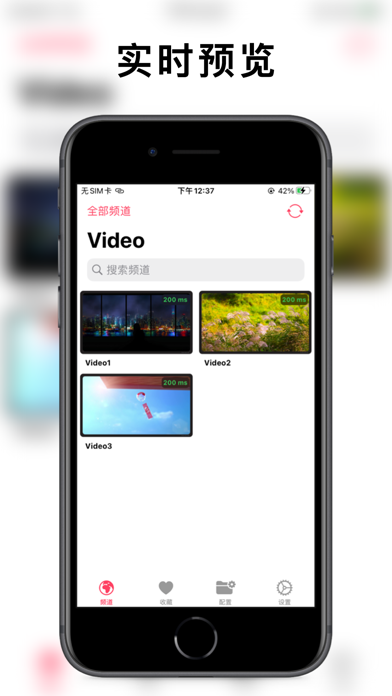
APTV functions as an advanced, high-aesthetic IPTV M3U player capable of real-time previewing, playback, and catch-up television. Users feed their custom M3U playlists into the application to organize, manage, and stream live television channels and video-on-demand content smoothly.
The core premise centers on giving power users a zero-clutter utility that scales effortlessly from a pocketable iPhone to a massive living room display. It bypasses the clunky, ad-heavy interfaces plaguing traditional IPTV apps by prioritizing clean typography, smooth transitions, and dependable hardware decoding.
Suzhou Xiying Guangnian Technology Co., Ltd has steadily built a reputation for crafting minimalist, highly optimized utility software for Apple platforms. Their open-source contributions on GitHub under Kimentanm showcase a transparent development ethos that resonates well within the power-user community.
Standout Features & What's New in this Build
This particular TestFlight iteration brings several under-the-hood optimizations aimed at reducing memory overhead during extended streaming sessions. The feature set makes it an essential download for anyone managing complex media libraries.
- Hardware Decoding: Native H.264 and H.265 hardware acceleration ensures buttery-smooth playback even when pushing high-bitrate 4K feeds.
- Advanced Stream Protocols: Full compatibility with HLS, HTTP, and RTMP streaming formats guarantees compatibility with almost any modern media source.
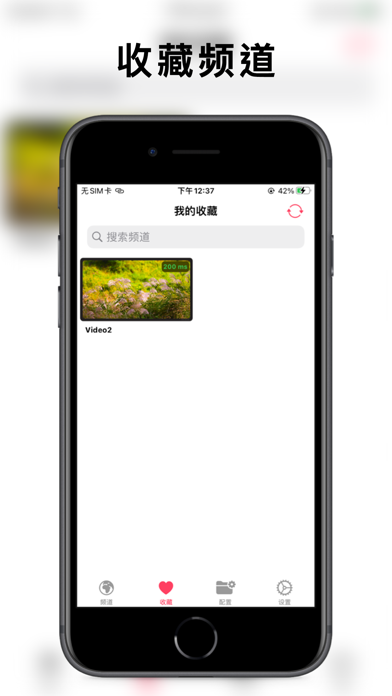
- Ecosystem Synchronization: Seamless iCloud cloud syncing keeps your custom channel lists, favorites, and history up to date across iOS, tvOS, and macOS.
- Casting and Multitasking: Built-in Picture-in-Picture mode and robust AirPlay/DLNA support let you move your streams seamlessly to secondary displays.
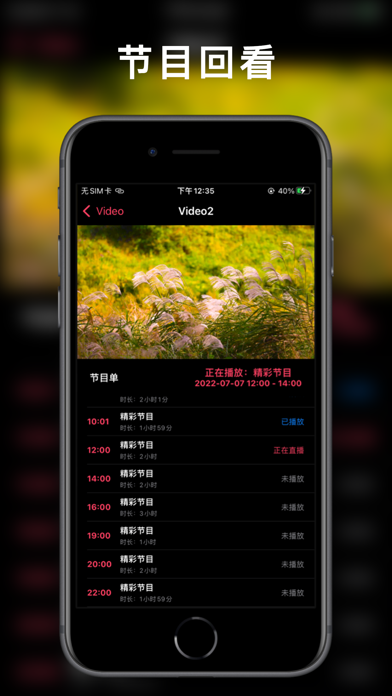
- Electronic Program Guide: Integrated EPG electronic program guide support lets you browse schedules and catch up on missed broadcasts effortlessly.
Hands-On Impressions: Performance, Battery, and Thermals
Running high-bitrate 4K streams on mobile hardware usually triggers thermal throttling within twenty minutes, but APTV handles resources remarkably well. On our iPhone 16 Pro Max, the A-series chip barely broke a sweat, maintaining steady frame pacing while scrolling through dense channel grids.
"The interface philosophy here treats media consumption with the respect it deserves—fast loading times, zero visual stutter on 120Hz ProMotion displays, and rock-solid stream stability."
Battery drain remained exceptionally modest during prolonged background listening tests and Picture-in-Picture multitasking. Network handoffs when switching between Wi-Fi and 5G cellular data occurred instantly without forcing a hard stream reload.
System Requirements & Requested Permissions
APTV requires iOS 15.0 or later, making it compatible with a vast array of still-supported iPhones, iPads, and Apple TV boxes. The app operates under strict Apple sandboxing protocols, ensuring your personal playlist data remains secure on your device or within your private iCloud container.
Network permissions are the primary requirement, as the app actively reaches out to local sources and remote servers to fetch stream data and EPG guides. No intrusive tracking scripts or unnecessary location permissions are requested, keeping user privacy completely intact.
Pros & Cons: Beta Impressions
✓ The Highs (What We Love)
- Universal Compatibility: Runs fluidly across iOS, tvOS, macOS, and visionOS with shared iCloud states.
- Hardware Acceleration: Flawless 4K, HDR, and HLG playback with minimal battery consumption.
- Clean Interface: Gorgeous, modern aesthetic that avoids the clunky tropes of legacy media apps.
✕ Beta Caveats (Room for Polish)
- EPG Matching: Complex custom XMLTV guides occasionally require manual mapping adjustments.
- Playlist Limits: Massive multi-thousand-channel lists can temporarily slow initial iCloud sync speeds.
- Minor UI Glitches: Occasional text wrapping anomalies when resizing windows on macOS.
Current TestFlight Slot Situation & Availability
Apple enforces a hard ceiling of 10,000 external testers for any active TestFlight application distributed publicly. Popular utility apps like this frequently hover near capacity as word spreads across enthusiast forums and developer communities.
When developer Suzhou Xiying Guangnian Technology Co., Ltd flushes inactive testers who haven't updated to recent builds, slots open up dynamically. Checking the registration link during off-peak hours gives you the best statistical chance of securing instant access.
Step-by-Step TestFlight Installation Guide
Getting up and running with the beta build requires just a few minutes of your time and an active Apple device. Follow these straightforward steps to install the client securely.
1. Download and install the official Apple TestFlight application from the App Store onto your primary iPhone, iPad, or Apple TV.
2. Tap the official Codewing TestFlight invitation link provided on this page using your device's web browser.
3. Accept the public beta invitation prompt when it automatically redirects you into the native TestFlight application interface.
4. Tap the Install button to download the latest sandbox package directly onto your device's primary storage partition.
5. Open APTV, configure your M3U playlist sources, and use TestFlight's built-in feedback tool if you encounter any bugs.
Frequently Asked Questions
Is APTV safe to install via TestFlight?
Yes, every beta build distributed through TestFlight undergoes automated and manual security checks by Apple. The app runs safely inside strict system sandboxes with zero risk to your core iOS security.
What should I do if the APTV beta is full?
If Apple's 10,000-tester limit is temporarily reached, bookmark this page on Codewing and check back periodically. Slots open up automatically whenever the developer prunes inactive users from the roster.
Will installing this beta overwrite my App Store version or delete save data?
TestFlight builds generally operate as standalone installations or upgrade existing beta versions cleanly. Your iCloud sync data remains safe, but it is always wise to back up custom M3U files locally.
How long do TestFlight beta invitations and builds last?
Each individual TestFlight build remains active for 90 days from the moment of upload. Developers regularly push fresh updates before expiration to keep testers on the cutting edge.
Are in-app purchases free during TestFlight beta testing?
Yes, any simulated financial transactions or premium feature unlocks within a TestFlight build utilize Apple's sandbox environment. You will never be charged real currency while testing pre-release software.
Final Editorial Verdict
APTV delivers a masterclass in how modern utility software should look and feel across the Apple ecosystem. It turns media management from a tedious chore into an absolute visual pleasure.
Editor's Rating: 9.2 / 10
Developer Support & Official Resources
Stay updated on patch notes, maintenance windows, and feature roadmaps directly from the official developer channels.
Never miss an opening for APTV.
Apple limits TestFlight betas to 10,000 testers, and this program is currently at capacity. CodeWings Plus continuously monitors slot availability 24/7 and sends you an instant alert the second a spot opens up.




