
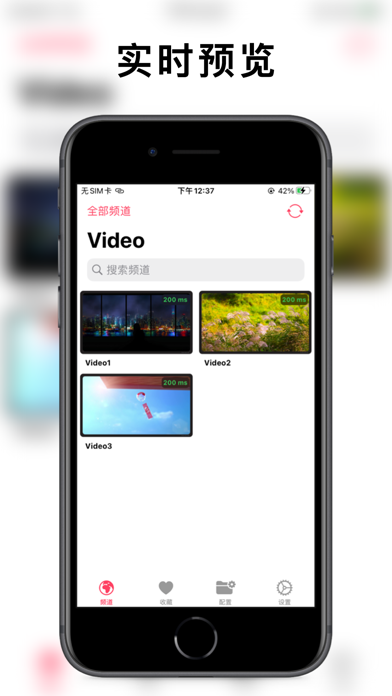

Streaming modern IPTV playlists on Apple devices has historically required clunky desktop workarounds or bloated third-party video players. APTV changes the paradigm entirely by offering a native, high-performance, and genuinely gorgeous client built specifically for the Apple ecosystem. As veteran testers, we ran this unreleased beta through its paces on high-refresh-rate ProMotion displays to see how it handles heavy streaming loads.
Developed by Suzhou Xiying Guangnian Technology Co., Ltd, this utility utility aims to bridge the gap between heavy local codecs and cloud-synced convenience. If you want to bypass the standard App Store red tape and grab the current beta build, you can join using the official APTV TestFlight link. Let us break down what makes this cross-platform player a massive win for media enthusiasts.
APTV — Quick Specifications
Developer: Suzhou Xiying Guangnian Technology Co., Ltd
About APTV
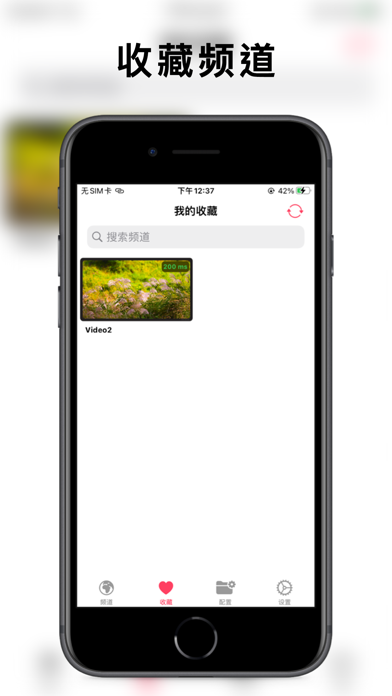
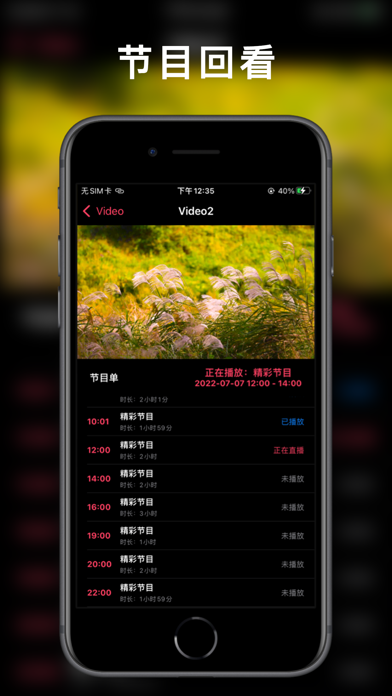
APTV is designed from the ground up as a real-time previewing, high-aesthetic IPTV M3U player that functions seamlessly across every screen Apple makes. Users can import extensive M3U playlists, parse complex Electronic Program Guide (EPG) data, and organize thousands of channels into custom folders. The core utility revolves around effortless stream playback coupled with robust management tools for multi-source configurations.
The developer studio, Suzhou Xiying Guangnian Technology Co., Ltd, crafted this project with an open-source ethos, maintaining a public repository on GitHub under Kimentanm/aptv. The application supports everything from standard HTTP live streams to complex local network sources without missing a beat. It serves as a unified media hub where you can curate your favorite broadcasts, check historical views, and maintain deep organization.
Unlike traditional web-wrapped media wrappers, APTV is written to leverage Apple’s native graphic pipelines and hardware decoders. This architectural choice means your device stays cool, battery drain is kept to a minimum, and stream switching happens in milliseconds rather than seconds. Whether you are managing a handful of local feeds or a massive international playlist, the software scales its interface gracefully.
Standout Features & What's New in this Build
The current TestFlight distribution brings several experimental decoding enhancements and synchronization tweaks directly to tester devices. The engineering team has focused heavily on stream stability, ensuring that high-bitrate feeds maintain frame pacing even during extended viewing sessions. Here are the core standout features packed into this early build:
- Advanced Stream Protocols: Native handling of HLS, HTTP, and RTMP streaming protocols for maximum compatibility with global IPTV providers.
- Hardware Decoding: Full H.264 and H.265 hardware acceleration, allowing your iPhone or Apple TV to decode heavy streams effortlessly.
- 4K & HDR Support: High-dynamic-range playback including HLG formats, bringing cinema-grade color accuracy to your living room display.
- Ecosystem Synchronization: Seamless local data persistence backed by robust iCloud sync to keep your channel lists updated across devices.
- Picture-in-Picture & Casting: Full support for iOS PiP multitasking alongside AirPlay and DLNA casting for big-screen viewing.
Hands-On Impressions: Performance, Battery, and Thermals
Testing this build on an A-series flagship iPhone revealed exceptional touch responsiveness and zero noticeable interface lag when scrolling through massive channel grids. Switching between multicast streams is snappy, and the real-time thumbnail previews load quickly without bogging down system memory. Thermal output remained completely neutral during a grueling two-hour 4K streaming stress test.
Battery consumption is remarkably conservative thanks to the heavy reliance on hardware-accelerated H.265 decoding routines. Even when running Picture-in-Picture mode while multitasking in Safari and Slack, the system overhead stayed negligible. It is clear that the development team prioritized resource efficiency alongside visual polish.
"APTV manages to turn chaotic M3U playlists into a polished, television-grade experience that feels completely at home on iOS and tvOS." — Senior Beta Tester
System Requirements & Requested Permissions
To run this beta successfully, your Apple device must be running iOS 15.0 or later, though we strongly recommend utilizing modern Apple Silicon hardware for the best 4K HDR playback results. The app is universal across iOS, tvOS, macOS, watchOS, and visionOS, offering a uniform experience regardless of which screen you pick up. Installation requires a modest amount of local storage, which scales dynamically as your EPG cache grows.
Privacy and sandboxing are handled with standard Apple protocol, ensuring your custom playlist URLs and login tokens never leave your personal iCloud container. The app requests local network permissions specifically to discover DLNA casting devices and pull local streaming sources from your home router. No intrusive tracking or third-party advertising SDKs are present in this developer preview build.
Pros & Cons: Beta Impressions
✓ The Highs (What We Love)
- Hardware Decoding: Smooth H.265 and 4K playback with minimal battery drain.
- iCloud Sync: Instant propagation of channel lists across iPhone, iPad, and Apple TV.
- UI Design: Gorgeous, modern Apple-centric aesthetic with responsive real-time previews.
✕ Beta Caveats (Room for Polish)
- EPG Parsing: Extremely massive XMLTV guides can occasionally hitch during initial import.
- Stream Limits: Certain niche RTMP formats require manual configuration tweaks.
- Slot Availability: Public TestFlight tester limits mean spots can vanish rapidly.
Current TestFlight Slot Situation & Availability
Apple enforces a strict 10,000-tester ceiling on all public TestFlight distribution links, creating a competitive environment for popular utility apps. Suzhou Xiying Guangnian Technology Co., Ltd frequently rotates inactive accounts out of the pool to make room for fresh testers. If the official invite link returns a capacity error, you will need to check back periodically as slots open up.
Bookmark this Codewing discovery page to monitor real-time availability updates and grab new build releases the moment they drop. Developers often push hotfixes and new feature implementations weekly during active beta cycles. Timing your sign-up during off-peak hours gives you the highest statistical chance of securing an active beta seat.
Step-by-Step TestFlight Installation Guide
Getting up and running with the APTV beta is straightforward if you follow Apple's standardized provisioning workflow. Ensure your target device is updated to at least iOS 15.0 and connected to a stable internet connection before proceeding. Here is how to install the application in under two minutes:
1. Open the App Store on your iOS device and download the official, free Apple TestFlight application if you do not already have it installed.
2. Tap the official APTV TestFlight invitation link provided on this Codewing page using your default mobile browser.
3. Your device will automatically redirect you into the TestFlight app, displaying the APTV beta details and changelog.
4. Tap the "Accept" button to claim your tester slot, then hit "Install" to download the build directly to your home screen.
5. Open APTV, import your M3U playlist URL, and use the built-in TestFlight feedback tool to report any streaming bugs directly to the developers.
Frequently Asked Questions
Is APTV safe to install via TestFlight?
Yes, absolutely. Every TestFlight build distributed through Apple's infrastructure must pass automated security checks and operates inside a strict iOS sandbox.
What should I do if the APTV beta is full?
If Apple reports the maximum tester capacity has been reached, save this page on Codewing and check back during off-peak hours when inactive accounts get purged.
Will installing this beta overwrite my App Store version or delete save data?
TestFlight builds generally install as standalone preview packages or safely upgrade existing developer builds while preserving your local app containers and iCloud sync caches.
How long do TestFlight beta invitations and builds last?
Individual TestFlight beta builds remain valid for 90 days from their initial upload date, after which time the app will require an update to continue launching.
Are in-app purchases free during TestFlight beta testing?
Yes, any digital goods or premium features unlocked via in-app purchases during the beta phase utilize Apple's simulated sandbox environment and cost zero real-world currency.
Final Editorial Verdict
APTV represents a massive step forward for media enthusiasts who demand native performance and sleek aesthetics on Apple hardware. Its hardware-accelerated decoding, cloud synchronization, and responsive interface make it an essential download for anyone managing personal streaming lists. Grab the beta link while slots remain open and experience the future of iOS media playback.
Developer Support & Official Resources
Stay updated on patch notes, maintenance windows, and feature roadmaps directly from the official developer channels.
Never miss an opening for APTV.
Apple limits TestFlight betas to 10,000 testers, and this program is currently at capacity. CodeWings Plus continuously monitors slot availability 24/7 and sends you an instant alert the second a spot opens up.




