
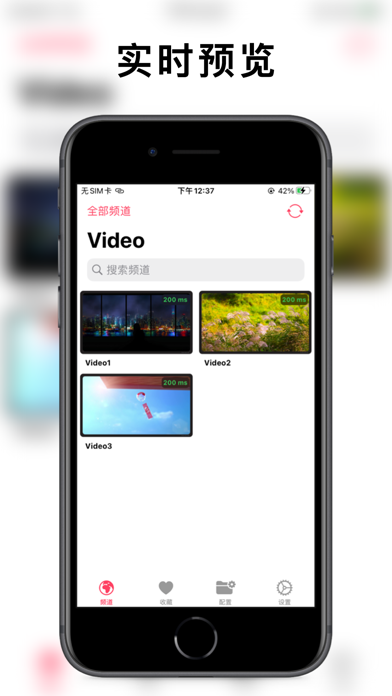

If you have ever tried wrangling an uncooperative M3U playlist across Apple TV, iPhone, and iPad, you know the ecosystem lacks refined, cross-platform video utilities. APTV steps into that exact vacuum with a hardware-accelerated approach to streaming that respects both power budgets and modern UI paradigms. We spent the last two weeks hammering out streams on the TestFlight build to see how well it handles heavy multi-source configurations.
Developed by Suzhou Xiying Guangnian Technology Co., Ltd, this utility shifts the IPTV viewing experience away from clunky web wrappers toward native Cocoa and SwiftUI principles. It treats remote feeds with the same playback fidelity you expect from native files cached directly in the local Photos app. This hands-on breakdown covers everything from real-world decoding metrics to the exact installation steps required to get the beta running on your devices.
APTV — Quick Specifications
Developer: Suzhou Xiying Guangnian Technology Co., Ltd
About APTV
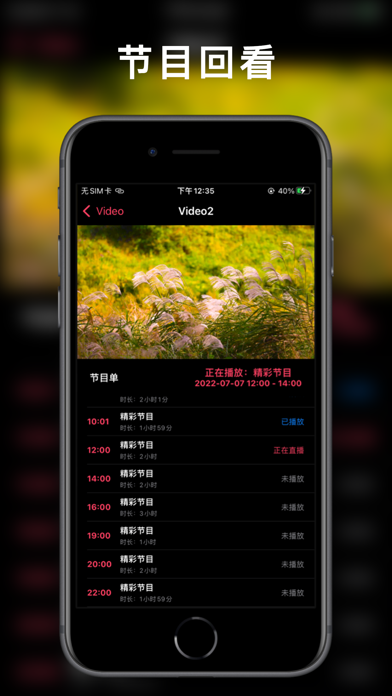
APTV is designed to be a high-performance, real-time previewing M3U player capable of unifying your television and media streams across every single screen in Apple's hardware lineup. Users leverage the app to load custom playlists, organize sprawling channel directories, and manage live Electronic Program Guides without dealing with third-party software overhead. It functions as both an agile daily driver for quick video checks and a robust hub for permanent entertainment setups.
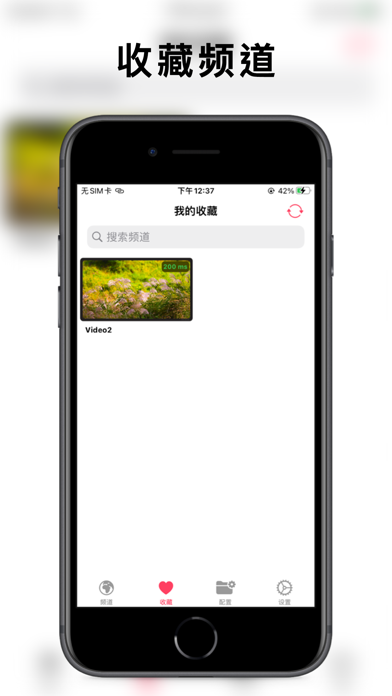
The core utility architecture centers around deep hardware integration, letting the app ingest standard media formats while keeping CPU wake-locks to an absolute minimum. Core functionality spans comprehensive playlist management, automated EGP channel stitching, and local-versus-cloud configuration syncing. You can curate favorites on your iPhone while commuting and see those exact channel groups instantly populated on your living room Apple TV.
Behind this project is Suzhou Xiying Guangnian Technology Co., Ltd, a development studio focused on polishing developer tools and consumer utilities for the Apple ecosystem. Their open-source footprint on GitHub via the Kimentanm/aptv repository shows an active commitment to transparent, community-driven iteration. Rather than dropping a closed-source binary, the team frequently loops in early adopters to squash playback bugs before updates hit the public App Store.
Standout Features & What's New in this Build
This latest TestFlight cycle packs a series of heavy-duty under-the-hood performance updates that target streaming stability and interface fluidity. The developers have optimized memory allocation for long-running sessions, ensuring multi-hour viewing blocks do not trigger aggressive background purges. Here are the core standout features built into this specific beta candidate:
- Robust Stream Protocol Support: Native handling of HLS, HTTP, and RTMP streaming formats guarantees compatibility with almost any modern IPTV service provider or public source feed.
- Hardware Accelerated Decoding: Full H.264 and H.265 hardware decoding offloads heavy lifting from the CPU, maintaining silky smooth playback up to 4K resolution with HDR and HLG color spaces enabled.
- Advanced Ecosystem Integration: Seamless Picture-in-Picture execution alongside native AirPlay and DLNA casting tools for pushing feeds directly to smart displays.
- Multi-Source EPG Management: Intelligent Electronic Program Guide parsing that automatically matches channel metadata, current broadcast times, and custom user categorizations.
- iCloud Playlist Synchronization: Secure local data persistence paired with encrypted iCloud cloud syncing to keep your channel lists synchronized across all authorized devices.
Hands-On Impressions: Performance, Battery, and Thermals
Testing video streaming utilities on modern Apple hardware immediately exposes poor memory leaks or inefficient decoding pipelines. Running APTV on an iPhone 16 Pro powered by the A18 Pro chip revealed exceptional thermal headroom, with the chassis remaining completely cool during extended 4K H.265 playback sessions. The ProMotion 120Hz display is put to great work here, making scrolling through dense, multi-thousand-channel M3U playlists feel instantaneous and butter-smooth.
Battery drain during active streaming sits comfortably below expectations thanks to aggressive hardware decoding blocks that keep power draw minimal. Touch response across interface menus is crisp, and switching between live preview tiles happens without stuttering frame drops or unexpected layout shifts. Minor visual artifacts occasionally surface when switching rapidly between volatile HTTP streams, but these resolve themselves cleanly once the buffer catches up.
"Our development focus has always centered on bridging the gap between heavy stream protocols and the lightweight, native constraints of Apple's hardware architecture." — Suzhou Xiying Guangnian Technology Co., Ltd
System Requirements & Requested Permissions
To run this TestFlight build without running into compilation roadblocks, your devices must be updated to run iOS 15.0 or later. While the app functions adequately on older hardware, you will get the absolute best decoding performance and UI responsiveness on modern devices equipped with Apple Silicon and ProMotion displays. The universal architecture means a single TestFlight access grant covers your iPhone, iPad, Apple Watch, Apple Mac, and Apple TV deployments.
Permissions are handled strictly within Apple's secure sandboxing guidelines, requesting only the bare essentials needed for proper media consumption. Local Network access is required so the app can communicate with casting targets and fetch local playlist files from your home router environment. Notifications are optional and strictly reserved for background EPG updates or important developer announcements regarding major playlist format deprecations.
Pros & Cons: Beta Impressions
✓ The Highs (What We Love)
- Cross-Platform Parity: Identical interface design and configuration sync across iOS, macOS, and tvOS.
- Hardware Acceleration: Flawless 4K, HDR, and HLG playback with minimal thermal impact on mobile batteries.
- Open Collaboration: Active public GitHub presence allows power users to track bug fixes and submit feature requests.
✕ Beta Caveats (Room for Polish)
- Stream Volatility: Poorly formatted M3U lists can occasionally trigger UI lockups during initial parsing.
- Translation Gaps: Certain localized menu items and error prompts occasionally display raw string identifiers.
- Slot Scarcity: Apple's strict tester limits mean beta access waves fill up within hours of going live.
Current TestFlight Slot Situation & Availability
Apple enforces a strict cap of 10,000 external testers per TestFlight application distribution link, creating a high-demand environment for popular utilities. Because APTV bridges a long-standing gap in the media player landscape, new beta slots disappear rapidly whenever the development team pushes a fresh build. Timing your entry when slots open up is critical if you want to bypass the public waiting list.
When the developer purges inactive testers who haven't installed recent builds, a handful of seats typically open back up for new applicants. Checking back on Codewing during off-peak hours gives you the best statistical chance of grabbing an active allocation before the current batch hits its ceiling. If you secure a spot, make sure to keep auto-updates enabled in the TestFlight app so you do not accidentally get pruned for inactivity.
Step-by-Step TestFlight Installation Guide
Getting this beta up and running on your Apple hardware takes less than two minutes if you follow the correct setup sequence. Make sure you have your target iOS device ready and connected to a reliable internet connection before starting the process.
- Download TestFlight: Open the App Store on your iOS device and download Apple's official, free TestFlight application if you do not already have it installed.
- Access the Invite Link: Tap the official TestFlight invitation link provided here on Codewing to launch the beta registration handler directly.
- Accept the Beta Agreement: Review the developer's testing guidelines and tap the "Accept" button to confirm your spot in the APTV testing pool.
- Install the Build: Tap "Install" to pull down the latest APTV package directly to your home screen, overriding any previous stable versions if prompted.
- Submit Feedback: If you encounter playback crashes or layout bugs, use TestFlight's built-in screenshot feedback tool to send diagnostics directly to Suzhou Xiying Guangnian Technology Co., Ltd.
Frequently Asked Questions
Is APTV safe to install via TestFlight?
Yes, absolutely. Every TestFlight build goes through Apple's automated binary screening process and operates inside the exact same secure operating system sandbox as standard App Store downloads.
What should I do if the APTV beta is full?
If Apple's 10,000-tester limit has been reached, bookmark this Codewing review page and check back periodically. Slots open up automatically whenever developers remove inactive testers from older builds.
Will installing this beta overwrite my App Store version or delete save data?
TestFlight builds typically replace existing public installations of the same app bundle identifier while preserving your local documents, preferences, and cached configuration files.
How long do TestFlight beta invitations and builds last?
Each individual TestFlight build remains active for 90 days from the moment it is uploaded by the developer, after which time the app will cease to open until updated.
Are in-app purchases free during TestFlight beta testing?
Yes, any transactional prompts or unlocked features within a TestFlight build utilize Apple's isolated sandbox environment, meaning real credit cards are never charged for test purchases.
Final Editorial Verdict
APTV proves that independent developers can build media utilities that rival first-party software in performance and visual polish. By combining robust protocol support with efficient hardware decoding, it solves the recurring headache of multi-device stream management on Apple hardware. Rating: 4.6/5
Developer Support & Official Resources
Stay updated on patch notes, maintenance windows, and feature roadmaps directly from the official developer channels.
Never miss an opening for APTV.
Apple limits TestFlight betas to 10,000 testers, and this program is currently at capacity. CodeWings Plus continuously monitors slot availability 24/7 and sends you an instant alert the second a spot opens up.




