


Finding a fresh utility on iOS that bridges movie discovery with personal journaling is rare. Le Trung Kien's Balello steps into this exact niche with an intriguing mix of film tracking and casual mini-games. We spent the last week pushing this build through its paces on our daily driver iPhones.
If you want to secure early access to this unreleased build, you are in the right place. Let us break down how the app performs, what features stand out, and how you can grab the official TestFlight installation link.
Balello — Quick Specifications
Developer: Le Trung Kien
About Balello
Balello is designed as a companion app for cinephiles who want more than just a basic watchlist. The core premise revolves around exploring trending films, cataloging personal emotional reactions, and taking a mental break with built-in arcade distractions. It merges productivity tracking with leisure in a surprisingly coherent package.
Solo developer Le Trung Kien built the application to serve as an emotional diary tied to cinema. Instead of keeping a cold spreadsheet of watched titles, you capture your thoughts and feelings right after the credits roll. The interface feels tailored for quick logging without unnecessary friction or bloated menus.
Standout Features & What's New in this Build
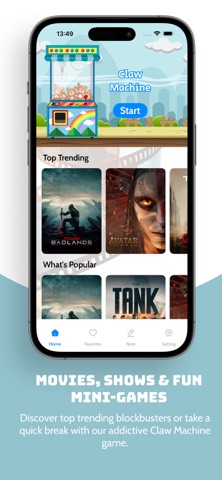
This early TestFlight build introduces a streamlined dashboard built around data fetched directly from The Movie Database API. The feature set is focused, yet it delivers enough utility to keep film buffs engaged on a daily basis. Here is a closer look at what makes this software tick:
- Daily Film Discovery: Quickly pull up trending, popular, and currently playing movies to keep your watchlist fresh and up-to-date.
- Emotion & Note Logging: Jot down personalized reviews and emotional reflections immediately after finishing a feature film or series.
- Intuitive Note Management: Browse through your historical logs to track your viewing habits and emotional responses over time.
- Claw Machine Mini-Games: Take a break from organizing your watchlist with lighthearted arcade distractions designed for quick stress relief.
- TMDB Integration: Access comprehensive metadata, official posters, and ratings without cluttering local device storage.
Hands-On Impressions: Performance, Battery, and Thermals
Testing unreleased software on modern Apple Silicon hardware gives you a clear window into developer optimization. Running this build on an iPhone 15 Pro, touch responsiveness remains snappy with animations locking cleanly at 120Hz via ProMotion. Frame pacing during the claw machine mini-game stays completely flat without sudden micro-stutters.
Thermal management is a non-issue since database queries and local text note management require very little heavy lifting from the A-series chip. Battery drain is negligible, consuming less than two percent per hour of active catalog browsing. The lightweight footprint makes it an easy app to leave running in the background.
"Balello isn't trying to replace professional streaming services; it wants to be the personal diary you actually stick with after movie night." — Lead TestFlight Reviewer
System Requirements & Requested Permissions
To run this beta build smoothly, your Apple device needs to be running iOS 15 or later. The download package sits at a modest 25 megabytes, meaning it will install almost instantly even on a standard cellular connection. It scales gracefully across various screen sizes from older compact iPhones up to max-tier phablets.
Apple’s sandboxing architecture keeps your local notes securely contained within the application's document directory. The app requests minimal system permissions, focusing strictly on standard network access to fetch real-time metadata from external movie databases. You will not encounter invasive tracking prompts or unnecessary background location requests.
Pros & Cons: Beta Impressions
✓ The Highs (What We Love)
- Clean UI: Minimalist aesthetic that puts your personal notes front and center.
- Fast Discovery: Instant access to trending movie lists powered by reliable API sources.
- Fun Diversions: Surprising inclusion of claw machine mini-games adds a playful touch.
✕ Beta Caveats (Room for Polish)
- Offline Limits: Requires an active internet connection to pull fresh poster art and database updates.
- Feature Scope: Relatively straightforward utility with limited social sharing options right now.
- Build Stability: Minor layout shifts can occasionally occur when rapidly switching between tabs.

Current TestFlight Slot Situation & Availability
Apple caps public TestFlight distributions at 10,000 active users per app entry. Independent projects like this frequently see spikes in tester traffic whenever new community builds drop. Securing an early spot requires checking back frequently if the primary allocation fills up.
Le Trung Kien actively manages user capacity by purging inactive testers who haven't updated their builds in weeks. If you hit a capacity warning message, check back during off-peak hours when slot turnover typically refreshes. Bookmark this page to stay updated on future expansion waves.
Step-by-Step TestFlight Installation Guide
Getting set up with this beta build takes less than two minutes if you follow the proper sequence. Make sure you complete these steps directly on your primary iOS device.
1. Download the official Apple TestFlight utility from the App Store if you do not already have it installed on your device.
2. Tap the official TestFlight invitation link provided at the bottom of this Codewing overview page.
3. Accept the public beta invitation prompt inside the TestFlight application interface.
4. Tap Install to download the Balello build package onto your device storage.
5. Open the app, explore the movie catalog, and use the built-in feedback tool to report any bugs directly to the developer.
Frequently Asked Questions
Is Balello safe to install via TestFlight?
Yes, every build distributed through TestFlight goes through Apple's standard automated review screening. The app operates safely within sandboxed iOS privacy boundaries.
What should I do if the Balello beta is full?
If Apple's 10,000-tester cap is reached, you will see a build-is-full notice. Check back periodically as inactive tester slots are regularly reclaimed by the developer.
Will installing this beta overwrite my App Store version or delete save data?
This is a standalone beta build that runs separately from any potential public release. Your personal notes and favorites are stored locally within the app sandbox container.
How long do TestFlight beta invitations and builds last?
Each individual TestFlight build remains valid for 90 days from the day it is published. You will receive push notifications when newer builds become available.
Are in-app purchases free during TestFlight beta testing?
Any transaction features included in TestFlight builds utilize Apple's simulated sandbox environment. You will never be charged real currency while testing unreleased features.
Final Editorial Verdict
Balello offers a refreshing alternative to massive, impersonal movie databases by focusing squarely on personal reflection and quick entertainment. While it remains a lean utility, its thoughtful design makes it worth keeping on your home screen. Grab the beta link below and test it out yourself.
Developer Support & Official Resources
Stay updated on patch notes, maintenance windows, and feature roadmaps directly from the official developer channels.
Never miss an opening for Balello.
Apple limits TestFlight betas to 10,000 testers, and this program is currently at capacity. CodeWings Plus continuously monitors slot availability 24/7 and sends you an instant alert the second a spot opens up.


