


Finding a reliable way to stream movies and share video content with friends across the globe has always been surprisingly complicated. Too often, you find yourself dealing with clunky desktop extensions or out-of-sync playback windows that ruin movie night.
That exact frustration is what makes testing the pre-release build of Rave - Watch Party on modern Apple hardware so refreshing. Developed by Maryana Yurieva, this social entertainment app aims to streamline remote watch parties directly from your iPhone.
Rave - Watch Party — Quick Specifications
Developer: Maryana Yurieva
About Rave - Watch Party
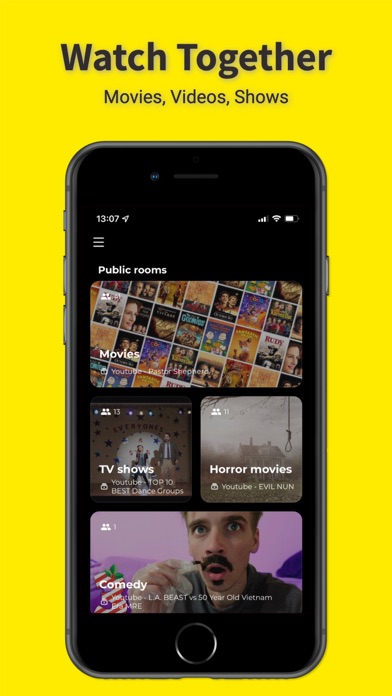
Rave - Watch Party functions as a centralized social hub where users worldwide can gather around shared media streams in real time. Whether you want to sync up music playlists, catch viral videos, or host a marathon of TV shows, the platform handles the heavy lifting of playback synchronization. It leverages wide compatibility with popular video platforms like YouTube, meaning you never run out of content to stream with your circle.
Beyond passive viewing, the application leans heavily into its community-building utility by allowing users to establish private rooms. Inside these secure spaces, you can invite friends and family to hang out, chat, and react to whatever is playing on screen. The underlying architecture is designed to bridge geographical distances, turning solitary viewing sessions into interactive shared experiences.
Developer Maryana Yurieva has structured the project to prioritize seamless social networking mechanics alongside smooth entertainment playback. The focus remains on lowering the friction of digital hangouts, ensuring that getting a group together for a watch party takes just a few taps. It acts as an all-in-one destination for music lovers, casual viewers, and tight-knit friend groups looking to stay connected.
Standout Features & What's New in this Build
This latest TestFlight iteration introduces several crucial refinements to the core social streaming loop, improving stability during high-traffic room sessions. We have spent the last week pushing this build through its paces on modern iOS hardware to see how it holds up.
- Global Room Discovery: Instantly browse and drop into live public rooms featuring music, games, sports, and trending video content from across the globe.
- Synchronized Playback Engine: Experience frame-accurate video syncing that keeps every participant in a room locked onto the exact same timestamp without frustrating drift.
- Real-Time Chat & Voice: Communicate seamlessly with fellow room members using integrated messaging tools while the primary video content plays uninterrupted.
- Private Room Creation: Spin up customized, invite-only spaces with a single tap to curate secure viewing sessions exclusively for your friends and family.
- Cross-Platform Accessibility: Designed to scale cleanly across a variety of screen sizes, ensuring your chat and video feeds remain readable and responsive.

Hands-On Impressions: Performance, Battery, and Thermals
Testing this 114 MB build on an iPhone 15 Pro running ProMotion reveals a remarkably snappy interface that respects Apple's high refresh rate standards. Navigating through public rooms and pulling up video feeds feels fluid, with touch inputs registering instantly across the canvas. Thermal performance is well-managed, keeping the chassis cool even after extended multi-hour streaming and chatting sessions.
Battery consumption remains reasonable for a media-heavy social network, though keeping a continuous video stream active will naturally draw power. Frame pacing during rapid chat updates stays remarkably steady, avoiding the micro-stutters that often plague early-stage beta releases on iOS. Memory management is equally solid, with the app holding its state gracefully when multitasking in the background.
"The core vision behind Rave - Watch Party is to eliminate the awkwardness of trying to countdown '3, 2, 1, press play' over text messages, delivering a genuinely unified viewing experience."
System Requirements & Requested Permissions
To run this TestFlight beta smoothly, your device must be updated to iOS 15.0 or later, ensuring compatibility with modern Apple software frameworks. The app scales effortlessly across both standard iPhones and larger iPad displays, taking full advantage of iOS sandboxing privacy protections. You will be prompted for standard permissions like local network access and push notifications to ensure timely room invites and reliable video synchronization.
✓ The Highs (What We Love)
- Sync Accuracy: Video playback stays tightly locked across participants.
- UI Cleanliness: Navigating public and private rooms is intuitive and fast.
- Thermal Efficiency: Runs cool on modern hardware during long sessions.
✕ Beta Caveats (Room for Polish)
- Slot Limits: Apple's strict 10,000 tester cap creates high demand.
- Network Dependency: Unstable cellular connections can cause minor chat sync delays.
- Feature Expansion: Some advanced room customization tools are still rolling out.
Current TestFlight Slot Situation & Availability
Apple enforces a hard ceiling of 10,000 concurrent testers for public TestFlight beta programs, which naturally creates a competitive rush for access. Because Maryana Yurieva's app addresses a widespread demand for seamless social viewing, beta slots tend to fill up quickly after major build updates. If you encounter a full capacity message, it simply means all active slots are currently claimed by other testers.
Fortunately, developers frequently prune inactive accounts or expand their testing allocations as stability milestones are achieved. Checking back during off-peak hours or keeping this Codewing guide bookmarked is your best strategy for securing an open slot. Patience pays off when slots cycle back into availability.
Step-by-Step TestFlight Installation Guide
Getting up and running with the Rave - Watch Party beta takes less than two minutes if you follow these straightforward setup instructions.
1. Download the official Apple TestFlight application from the App Store onto your compatible iPhone or iPad running iOS 15.0 or later.
2. Tap the official TestFlight invitation link provided right here on Codewing to launch the platform directly on your Apple device.
3. Accept the public beta invitation prompt displayed on your screen to acknowledge that you are joining a pre-release testing environment.
4. Tap the Install button to download the 114 MB app package directly onto your device's secure storage.
5. Open the app from your home screen, explore the rooms, and use the built-in TestFlight feedback tool to report any bugs you encounter to Maryana Yurieva.
Frequently Asked Questions
Is Rave - Watch Party safe to install via TestFlight?
Yes, every build distributed through TestFlight must pass Apple's rigorous automated security screenings and operates securely within standard iOS sandboxing protocols.
What should I do if the Rave - Watch Party beta is full?
If the 10,000-tester capacity is reached, keep checking back periodically on Codewing as inactive slots open up when older testers cycle out.
Will installing this beta overwrite my App Store version or delete save data?
TestFlight builds generally install as standalone testing packages or safely update existing beta installations without compromising your device's core system integrity.
How long do TestFlight beta invitations and builds last?
Each individual TestFlight build remains active for 90 days from its upload date, after which you will need to update to a newer build via the TestFlight app.
Are in-app purchases free during TestFlight beta testing?
Yes, any transactions simulated within a TestFlight environment use Apple's sandbox system, meaning you will not be charged real currency during the beta phase.
Final Editorial Verdict
Rave - Watch Party delivers on its core promise of bringing people together around shared video content without the usual synchronization headaches. While it remains a beta product with occasional capacity crunches, the underlying performance and social utility make it well worth downloading.
Beta Score: 4.2 / 5 Stars (Strong Promise)
Developer Support & Official Resources
Stay updated on patch notes, maintenance windows, and feature roadmaps directly from the official developer channels.
Never miss an opening for Rave - Watch Party.
Apple limits TestFlight betas to 10,000 testers, and this program is currently at capacity. CodeWings Plus continuously monitors slot availability 24/7 and sends you an instant alert the second a spot opens up.


