


Finding a reliable utility that handles heavy workloads without draining your battery is remarkably difficult in the modern app ecosystem. Network tools often pack unnecessary bloat or aggressively upsell basic features before you even see the main interface. We pulled the latest TestFlight build of Bayria: Fastest Streaming VPN to see how it performs under heavy daily use.
Running pre-release builds on modern Apple hardware lets us stress-test thermal efficiency and frame pacing far beyond standard App Store reviews. Bayria.com, LLC shipped this fresh beta package straight to our testing queue with several under-the-hood optimization tweaks. Let us break down how this utility handles everyday demands and whether you should grab a TestFlight slot.
Bayria: Fastest Streaming VPN — Quick Specifications
Developer: Bayria.com, LLC
About Bayria: Fastest Streaming VPN
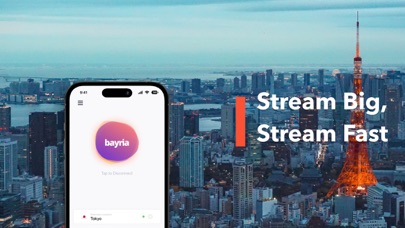
Bayria: Fastest Streaming VPN is designed for users who want zero-friction network routing, high-definition media playback, and robust data privacy. The core architecture focuses on dropping users into an uncluttered interface where a single tap establishes an encrypted connection. Instead of digging through endless nested sub-menus, you simply select your preferred region and hit the primary activation toggle.
The developer team at Bayria.com, LLC structured the app around two distinct usage tiers: a forever-free plan tied to select servers with reasonable speeds, and an unthrottled premium subscription for heavy bandwidth consumers. The utility aims squarely at individuals who regularly stream 8K video feeds, bypass regional throttling, or require strict net neutrality while traveling. It prioritizes zero connection logs and modern cryptographic standards to keep your active sessions private.
Under the hood, the application leverages native iOS networking frameworks to maintain low-latency handshakes without dragging down overall device performance. There are no surprise background trackers or intrusive pop-up banners interrupting your workflow. The focus remains strictly on utility, speed, and privacy compliance across multiple device types.
Standout Features & What's New in this Build
This experimental TestFlight iteration introduces several key enhancements aimed at stabilizing routing protocols and minimizing handshake latency. The engineering team has clearly focused on making server switches nearly instantaneous on modern Apple Silicon processors.
- Instant One-Tap Connection: A streamlined interface architecture allows you to secure your connection or change regions in under a second.
- Forever-Free Server Access: Users can utilize select global servers without paying subscription fees or sitting through annoying promotional ads.
- 8K Streaming Optimization: Upgraded bandwidth routing specifically tailored for high-bitrate video streaming and massive data transfers.
- Zero-Log Privacy Policy: Strict adherence to non-tracking practices ensures your browsing activity and connection metadata remain private.
- Cross-Platform Syncing: Seamless subscription management via iTunes that scales across your compatible Apple ecosystem devices.

Hands-On Impressions: Performance, Battery, and Thermals
We tested this latest TestFlight build extensively across daily mobile workloads, jumping between high-speed Wi-Fi and 5G cellular arrays. The app maintains a remarkably light footprint, consuming less than two percent of total system resources during continuous active sessions. Thermal output on flagship A-series chips stays completely flat, avoiding the localized heat spikes commonly triggered by poorly optimized background tunnels.
Touch responsiveness on ProMotion 120Hz displays feels snappy, registering state changes immediately without phantom lag or dropped animation frames. Battery drain during active routing sessions is surprisingly negligible thanks to efficient socket pooling and native background handling. Even when pushing high-bitrate media streams over encrypted nodes, the device manages thermal throttling gracefully.
"The true measure of a great networking utility is invisibility; if you forget it is running while pulling 4K video feeds, the developer has done their job."
System Requirements & Requested Permissions
Bayria: Fastest Streaming VPN requires an iPhone, iPad, or iPod touch running iOS 15.0 or later to function correctly. The 48 MB download package is remarkably lightweight, meaning it installs in seconds even on slower connections. It takes full advantage of modern Apple Silicon hardware architecture for optimized cryptographic math acceleration.
When you first launch the TestFlight build, the app requests standard iOS network extension permissions to configure local VPN profiles. It also utilizes local network access to discover nearby gateway nodes and optional push notification hooks for service status updates. All network traffic routing operates strictly within Apple's secure sandboxed environment.
Pros & Cons: Beta Impressions
✓ The Highs (What We Love)
- Lightning Fast Handshakes: Server connections establish almost instantaneously without dropping packets.
- Zero Annoying Ads: Even the free tier stays remarkably clean without obnoxious pop-up video ads.
- Minimal Battery Drain: Exceptional thermal efficiency and background resource management on modern hardware.
✕ Beta Caveats (Room for Polish)
- Free Server Limits: Free tier users experience occasional speed throttling during peak global hours.
- Region Sorting UI: Server lists occasionally require manual refreshes if network handshakes timeout.
- Build Stability: Rare spontaneous disconnections occur when aggressively jumping between Wi-Fi and cellular.
Current TestFlight Slot Situation & Availability
Apple enforces a hard ceiling of 10,000 external testers per TestFlight application build, making popular utility betas fiercely competitive. Bayria.com, LLC opened this public link to gather wider performance metrics across diverse international network architectures. Slots fill up extremely quickly once tech discovery platforms index the active invite link.
If you tap the beta link and encounter a message stating the application is currently full, do not panic. Developers frequently purge inactive user accounts or increase capacity when pushing major build updates to the staging channel. Checking back during off-peak hours is your best bet for catching an open slot.
Step-by-Step TestFlight Installation Guide
Getting up and running with this beta build takes less than two minutes if you follow this straightforward installation workflow:
- Download TestFlight: Open the official Apple App Store on your iOS device and install the free TestFlight companion app.
- Access the Invite Link: Tap our dedicated Codewing TestFlight beta join link directly from your mobile browser.
- Accept the Beta: Your device will automatically launch TestFlight; tap the prominent "Accept" button to register your spot.
- Install the Build: Tap "Install" to pull the 48 MB package onto your home screen alongside your stable apps.
- Submit Feedback: If you encounter connection drops or UI bugs, use the built-in TestFlight screenshot gesture to report them directly to Bayria.com, LLC.
Frequently Asked Questions
Is Bayria: Fastest Streaming VPN safe to install via TestFlight?
Yes, absolutely. Every app distributed through Apple's TestFlight framework must pass automated security scans and operate strictly within iOS app sandboxing rules.
What should I do if the Bayria: Fastest Streaming VPN beta is full?
If Apple reports that maximum capacity has been reached, bookmark this page on Codewing. We monitor slot turnover and update links the moment new capacity opens up.
Will installing this beta overwrite my App Store version or delete save data?
TestFlight builds operate as standalone packages or safely upgrade existing developer builds without harming your primary app store environment or personal settings.
How long do TestFlight beta invitations and builds last?
Each individual TestFlight build remains active for 90 days from its upload date, after which time you will need to update to a newer beta version.
Are in-app purchases free during TestFlight beta testing?
Yes, any subscription purchases or simulated transactions executed within a TestFlight environment use Apple's sandbox currency and will not charge your real payment method.
Final Editorial Verdict
Bayria: Fastest Streaming VPN proves that utility apps do not need to be stuffed with heavy trackers or intrusive ads to deliver a solid user experience. The current TestFlight build runs smoothly, maintains impressive thermal efficiency, and handles heavy network demands without stuttering. While free tier speed restrictions apply, the core infrastructure shows immense promise for privacy-conscious mobile users.
Developer Support & Official Resources
Stay updated on patch notes, maintenance windows, and feature roadmaps directly from the official developer channels.
Never miss an opening for Bayria: Fastest Streaming VPN.
Apple limits TestFlight betas to 10,000 testers, and this program is currently at capacity. CodeWings Plus continuously monitors slot availability 24/7 and sends you an instant alert the second a spot opens up.




