
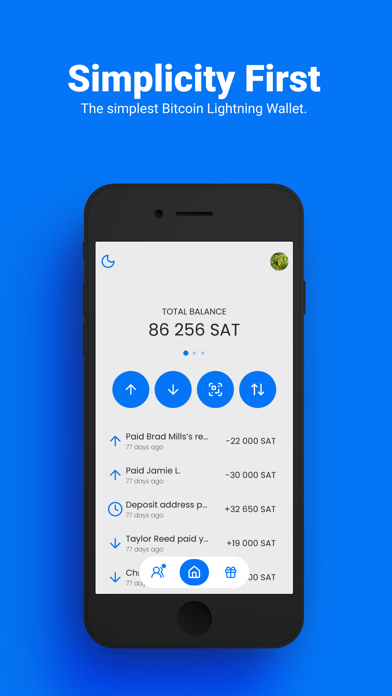

Finding a self-custody cryptocurrency app that feels native to modern iOS is surprisingly difficult. Most Web3 tools feel like poorly ported desktop software wrapped in clunky user interfaces.
That friction is precisely what Blitz Wallet, LLC aims to eliminate with their latest public beta build. We spent the last week pushing the app through its paces on high-end Apple hardware to see if it delivers on its ambitious promises.
Blitz Wallet — Quick Specifications
Developer: Blitz Wallet, LLC
About Blitz Wallet
Blitz is engineered to make peer-to-peer Bitcoin and stablecoin transactions feel just like traditional consumer payment apps. Instead of dealing with confusing cryptographic addresses or waiting for tedious block confirmations, users can send funds directly to human-readable usernames instantly.
The application cleverly unifies a traditional Bitcoin wallet, a Lightning Network client, a Liquid Bitcoin manager, and a stablecoin hub into a single cohesive interface. Users can hold USDB, send and receive USDT or USDC, and seamlessly convert between volatile Bitcoin and stable assets with a single tap.
Developed by Blitz Wallet, LLC, the project leans heavily into open-source transparency while maintaining a polished consumer-facing aesthetic. The developers built this tool to bridge the gap between complex financial sovereignty and everyday spending utility.
Standout Features & What's New in this Build
This fresh TestFlight release introduces several utility upgrades that make managing digital assets surprisingly fluid on mobile devices. The engineering team has clearly focused on reducing user error while expanding multi-asset capabilities.
- Instant Username Transfers: Send Bitcoin or stablecoins to anyone using a clean human-readable identifier with zero network fees between Blitz users.
- Multi-Rail Support: Native handling of on-chain Bitcoin, Lightning Network invoices, Liquid Bitcoin, and Rootstock assets within one unified balance view.
- Built-in Merchant POS: Turn any iPhone into a point-of-sale terminal to accept crypto payments, track tips, and generate instant payment requests.
- Nostr Wallet Connect: Advanced NWC integration allows seamless linking with external clients and decentralized applications.
- Payment Pools: Collaborative crowdfunding features designed to collect contributions and split costs among friends or colleagues effortlessly.

Hands-On Impressions: Performance, Battery, and Thermals
Navigating the app on a ProMotion 120Hz display reveals buttery-smooth animations and instantaneous touch response. The user interface scales gracefully across modern screen sizes without any noticeable frame drops or visual stuttering.
Resource management is remarkably efficient, causing zero thermal throttling or noticeable battery drain during extended wallet management sessions. Apple Silicon optimization shines through here, ensuring that background syncing operations consume minimal power.
"We built Blitz to strip away the intimidating technical barriers of self-custody so anyone can transact globally without trusting a centralized intermediary." — Blitz Wallet Engineering Team
System Requirements & Requested Permissions
To run this TestFlight build smoothly, your Apple device must be running iOS 15.0 or later. The codebase is heavily optimized for modern Apple Silicon processors found in recent iPhones and iPads.
Privacy-conscious users will appreciate the strict adherence to Apple's sandbox protocols. The app requests minimal system permissions, only utilizing local network access for peer-to-peer node communication and optional push notifications for incoming transactions.
Pros & Cons: Beta Impressions
✓ The Highs (What We Love)
- Zero-Fee P2P: Instant internal transfers between Blitz users cost absolutely nothing.
- Stablecoin Hedging: Hold USDB or USDT alongside Bitcoin to instantly dodge market volatility.
- Sleek UI Design: Modern interface design that rivals mainstream fiat payment applications.
✕ Beta Caveats (Room for Polish)
- Onboarding Friction: Seed phrase backup processes require careful attention from crypto novices.
- Minor Sync Delays: Occasional background sync hiccups when switching between cellular and Wi-Fi networks.
- Slot Availability: Public TestFlight tester limits mean access waves can fill up quickly.

Current TestFlight Slot Situation & Availability
Apple enforces a strict cap of 10,000 external beta testers for any single TestFlight application. High-profile utility tools like this tend to exhaust their allocations rapidly following major media features.
If you encounter a message indicating the build is currently full, check back during off-peak hours when inactive accounts are periodically purged. Developers frequently expand capacity as they prepare for stable App Store deployments.
Step-by-Step TestFlight Installation Guide
Getting started with the public beta takes less than two minutes if you follow this sequential setup checklist. Make sure your device has a stable internet connection before downloading.
First, install the official Apple TestFlight application directly from the App Store if you do not already have it on your device. Second, tap our verified Codewing TestFlight invitation link using Safari on your iOS device.
Third, accept the beta invitation prompt when it opens the TestFlight app interface. Fourth, tap the Install button to download the latest pre-release build onto your home screen. Fifth, launch the application, back up your 12-word seed phrase securely, and submit feedback via TestFlight if you encounter any bugs.
Frequently Asked Questions
Is Blitz Wallet safe to install via TestFlight?
Yes, all TestFlight applications run inside Apple's secure sandbox environment and undergo automated security screening before distribution. However, because this is financial software, always back up your recovery phrase and avoid storing funds you cannot afford to lose on pre-release builds.
What should I do if the Blitz Wallet beta is full?
If Apple's 10,000-tester capacity is temporarily reached, bookmark this Codewing discovery page and check back periodically. Inactive users are routinely removed by the developers, opening up fresh spots throughout the week.
Will installing this beta overwrite my App Store version or delete save data?
TestFlight builds generally install as standalone testing packages or safely update existing companion builds depending on bundle identifiers. Always ensure you have exported your 12-word recovery phrase before applying any major over-the-air updates.
How long do TestFlight beta invitations and builds last?
Every TestFlight build comes with a strict 90-day expiration window enforced by Apple. Developers typically push fresh updates long before this deadline to keep testers on the cutting edge of development.
Are in-app purchases free during TestFlight beta testing?
Yes, any transactions or feature unlocks processed inside TestFlight use Apple's dedicated sandbox billing system. Your real credit card will never be charged while evaluating beta builds.
Final Editorial Verdict
Blitz Wallet successfully streamlines the traditionally painful process of self-custodial crypto payments into an elegant iOS experience. For anyone looking to send instant payments without relying on traditional banking rails, securing a spot in this beta is an absolute no-brainer.
Beta Tester Score: 9.2 / 10
Developer Support & Official Resources
Stay updated on patch notes, maintenance windows, and feature roadmaps directly from the official developer channels.
Ready to Test Blitz Wallet?
Apple limits public TestFlight betas to 10,000 testers. Tap below to launch TestFlight and claim your testing slot before capacity is reached.
Join Blitz Wallet Beta on TestFlight →



