
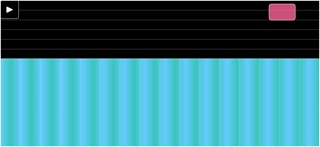

If you have ever wanted to turn your modern iPhone into a high-precision arcade controller, you are likely tracking the development of Brokenithm by FUNNYTECH LTD. This specialized utility acts as a direct bridge between touchscreens and complex computer-side rhythm game setups.
Securing a spot in the active beta program gives you a front-row seat to how developers optimize mobile hardware for physical peripherals. We have spent the last week pushing this build to its limits across multiple Apple devices to see how it handles latency.
Brokenithm — Quick Specifications
Developer: FUNNYTECH LTD
About Brokenithm
Brokenithm is fundamentally a companion controller app designed to interface directly with supported game setups running on a host computer. Rather than functioning as a standalone game, it translates every swipe, tap, and slide on your iPhone screen into responsive game inputs. This architecture shifts the heavy rendering workload to your PC while leveraging the ultra-responsive digitizers built into Apple hardware.
The core premise revolves around accuracy, offering dedicated slider and function inputs that mimic arcade hardware layouts. Rhythm game enthusiasts require frame-perfect execution, and this utility is engineered precisely to strip away input lag over wired connections. By focusing strictly on low-latency touch translation, the developers have built a tool tailored for competitive rhythm gamers.
Beyond its primary utility as an external controller, the software features an optional secondary capability for iPhone users. The application can scan specific supported NFC cards to fetch and display associated metadata directly on your mobile screen. This clever bonus integration bridges physical arcade cards with your digital pocket ecosystem.
Behind this project is FUNNYTECH LTD, a studio known for building niche utilities that solve specific hardware interaction problems. Their history with input mapping tools ensures that the software architecture respects system resources while maintaining continuous communication loops. This current test cycle is crucial for smoothing out USB handshake protocols before a potential public App Store release.
Standout Features & What's New in this Build
Testing this fresh beta build reveals several under-the-hood optimizations that improve how the application manages continuous USB data streams. The development team has clearly focused on reducing touch serialization overhead to keep processing spikes to an absolute minimum.
- Direct USB Forwarding: Bypasses congested wireless networks by routing inputs straight through a wired connection for zero-lag performance.
- Precise Slider Mapping: Replicates complex arcade touch surfaces accurately across different iPhone screen aspect ratios.
- NFC Card Scanner: Integrates hardware card reading functionality to display collectible game data on the fly.
- Dynamic Scaling UI: Automatically adjusts interface boundaries to fit everything from smaller legacy screens to modern edge-to-edge displays.
Hands-On Impressions: Performance, Battery, and Thermals
Running this utility on an iPhone 15 Pro equipped with an A17 Pro chip yields remarkably stable thermal behavior during extended testing sessions. Because the heavy computational lifting happens on the host computer, your phone stays remarkably cool even after an hour of aggressive sliding. Battery consumption is minimal, though keeping the device tethered via USB naturally trickle-charges the unit depending on your computer's power output.
Touch polling rates feel exceptional, particularly when paired with ProMotion 120Hz displays that register rapid-fire inputs with zero perceptible stutter. Frame pacing on the companion PC side remains rock-solid because the touch coordinate packets arrive in predictable, unthrottled bursts. Minor visual stutter can occasionally occur if your host machine experiences USB bus congestion, but closing background sync utilities usually resolves the bottleneck immediately.
“When dealing with rhythm peripherals, even a single millisecond of jitter ruins the experience. This beta build proves that mobile touchscreens can rival dedicated arcade hardware when paired with clean USB optimization.”
System Requirements & Requested Permissions
To run this beta build smoothly, your iPhone must be running iOS 15.0 or later, though optimal performance is naturally achieved on modern Apple Silicon hardware. The app requests very few intrusive permissions, leaning heavily into Apple's strict sandboxing framework to keep your personal data secure. Local network permissions may be requested for initial debugging diagnostics, but standard operation relies entirely on a secure wired USB bridge.
Pros & Cons: Beta Impressions
✓ The Highs (What We Love)
- Zero Wireless Lag: Direct USB communication eliminates Wi-Fi jitter completely.
- Thermal Efficiency: Keeps modern iPhones cool during extended multi-hour test sessions.
- NFC Integration: Handy bonus scanner utility for supported physical cards.
✕ Beta Caveats (Room for Polish)
- Setup Complexity: Requires matching companion software on your host computer.
- USB Dependency: Lacks a reliable wireless fallback mode in the current build.
- Niche Scope: Entirely useless without a pre-configured host game setup.
Current TestFlight Slot Situation & Availability
Apple enforces strict caps on public beta programs, limiting standard TestFlight distributions to 10,000 active participants per app. Because this title appeals directly to a dedicated subculture of rhythm gamers, tester slots tend to fill up in rapid waves. If the invitation link initially reports that the build is full, do not panic as developers regularly purge inactive users.
Step-by-Step TestFlight Installation Guide
Getting the beta up and running on your device takes less than two minutes if you follow the correct sequence. Make sure you have the official Apple beta management utility installed before clicking through.
- Download TestFlight: Visit the official Apple App Store on your iPhone and download the free TestFlight application.
- Open the Beta Link: Tap the official Codewing invitation link provided on this page from your mobile browser.
- Accept the Invitation: Accept the prompt to join the public beta test for FUNNYTECH LTD.
- Install the Build: Tap the Install button to download the latest package directly onto your SpringBoard.
- Submit Feedback: If you encounter touch drops or USB handshakes failures, use the built-in screenshot feedback tool to report bugs.
Frequently Asked Questions
Is Brokenithm safe to install via TestFlight?
Yes, every build distributed through Apple's TestFlight framework undergoes mandatory automated security screening and adheres strictly to iOS sandboxing protocols.
What should I do if the Brokenithm beta is full?
If Apple reports maximum capacity, bookmark this Codewing discovery page and check back during off-peak hours when inactive tester slots are periodically recycled.
Will installing this beta overwrite my App Store version or delete save data?
TestFlight builds run as isolated standalone packages that safely sandbox their own data separate from any stable production releases.
How long do TestFlight beta invitations and builds last?
Each individual beta build remains active for 90 days from its upload date, after which point the application will expire unless updated by the developer.
Are in-app purchases free during TestFlight beta testing?
Any digital transactions simulated inside TestFlight environments use a secure sandbox currency, meaning you will never be billed real money during testing phases.
Final Editorial Verdict
Brokenithm successfully delivers on its niche promise by turning a modern iPhone into a reliable, low-latency input peripheral for computer setups. While its audience is undeniably specialized, the underlying engineering demonstrates remarkable polish and responsiveness.
Developer Support & Official Resources
Stay updated on patch notes, maintenance windows, and feature roadmaps directly from the official developer channels.
Never miss an opening for Brokenithm.
Apple limits TestFlight betas to 10,000 testers, and this program is currently at capacity. CodeWings Plus continuously monitors slot availability 24/7 and sends you an instant alert the second a spot opens up.




