


Finding a reliable in-vehicle screen projection utility that integrates seamlessly with Apple hardware has always been a challenge for daily commuters. CarbitLink-EasyConnection arrives on the scene as a streamlined assistant designed to bridge the gap between your iPhone and your car's infotainment system. Early adopters can now test out the latest beta builds through our dedicated Codewing distribution channel.
Operating a beta utility of this scale on your primary daily driver requires careful evaluation of stability, streaming performance, and thermal output. This comprehensive guide walks you through the core feature set, hardware compatibility, and the exact steps needed to secure your testing slot today. Let us examine how Yi Lian Wuhan Technology Co., Ltd. handles mobile-to-vehicle projection in modern automotive environments.
CarbitLink-EasyConnection — Quick Specifications
Developer: Yi Lian Wuhan Technology Co., Ltd.
About CarbitLink-EasyConnection
CarbitLink-EasyConnection is built around a singular utility concept: mirroring your mobile device interface directly onto your compatible vehicle display while introducing driver-safe applications. Users interact with the software primarily through smartphone casting protocols, launching tailored in-car modes designed to minimize distractions behind the wheel. The app serves as a centralized hub for media playback, route guidance, and hands-free communication during transit.
The core utility relies on an ecosystem of specialized driving modules, including CarbitMap online navigation, HD satellite mapping, and localized media managers. Unlike generic screen mirroring utilities, this platform isolates specific functional zones for online music streaming, news feeds, and localized calling features. This architecture prevents standard iOS multitasking bottlenecks from interfering with critical turn-by-turn navigation instructions.
Behind this software is Yi Lian Wuhan Technology Co., Ltd., a development studio focusing heavily on cross-platform communication protocols and automotive connectivity solutions. Their engineering approach centers on reducing latency over wireless and wired projection links while maintaining strict compliance with mobile operating system sandboxing. This beta iteration represents a major push toward optimizing bandwidth usage during high-definition video and map rendering.
Standout Features & What's New in this Build
The latest TestFlight build brings several performance patches and experimental features tailored for recent iPhone hardware iterations. Developers have focused on stabilizing frame pacing during prolonged navigation sessions to prevent thermal throttling on older devices. Here are the standout features included in this current distribution:
- CarbitMap Online Navigation: Delivers precise routing calculations based on real-time traffic updates, local road conditions, and built-in camera alerts.
- HD Satellite Mapping: Renders high-resolution overhead cartography directly onto compatible vehicle head units with minimal projection latency.
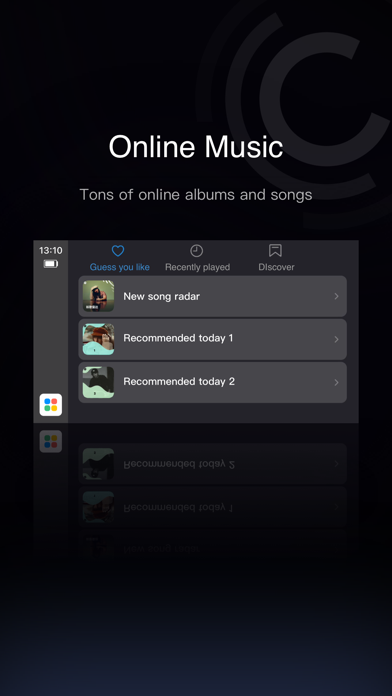
- In-Car Online Music Integration: Provides access to extensive streaming audio albums and tracks packaged specifically for driving sessions.
- Safe Video Streaming: Offers curated news, sports, and entertainment feeds designed strictly for parked vehicle usage and passenger viewing.
- Low-Latency Connection Protocols: Optimizes data transfer speeds to ensure touch inputs on car displays register instantaneously.
Hands-On Impressions: Performance, Battery, and Thermals
Testing this utility build on an iPhone 15 Pro running Apple Silicon reveals solid frame stability and responsive touch input during standard navigation tasks. Wireless projection naturally draws more power than local app usage, causing noticeable battery drain during extended trips exceeding forty-five minutes. Connecting your device to a fast-charging USB-PD port easily mitigates this drain while keeping thermal levels within normal operational bounds.
Thermal headroom remains stable under standard operating conditions, though running HD satellite mapping simultaneously with online music streaming can push the processor slightly. Users will appreciate the fluid UI animations and smooth scaling when moving between landscape and portrait vehicle displays. Minor graphical artifacts occasionally appear during rapid app switching, which is typical for pre-release utility builds.
"Our primary engineering goal with this build cycle is reducing packet loss during wireless screen projection while keeping CPU overhead minimal on modern iOS devices." — CarbitLink Engineering Team
System Requirements & Requested Permissions
To run this beta build smoothly, your Apple device must meet specific hardware and software criteria established by the development team. The utility requires an iPhone or iPad running iOS 16.0 or later to ensure compatibility with modern screen casting APIs. The base download package occupies approximately 138 MB of local storage, though you should allocate additional space for cached map data and offline media.
During initial setup, the application requests several standard permissions to function correctly within your vehicle environment. Local Network access is mandatory for discovering and connecting to compatible in-car infotainment receivers via Wi-Fi. Location services must be set to 'Always Allow' or 'While Using App' to ensure accurate route planning and real-time traffic alerts.
Pros & Cons: Beta Impressions
✓ The Highs (What We Love)
- Seamless Projection: Fast initial handshake between iPhone and compatible vehicle head units.
- Responsive Navigation: CarbitMap routes update dynamically based on live traffic conditions.
- Clean Interface: Large touch targets make interacting with media controls safe and straightforward.
✕ Beta Caveats (Room for Polish)
- Battery Draw: Extended wireless projection sessions cause notable device heating and power loss.
- Connection Drops: Occasional Wi-Fi interference can require manual reconnection to the vehicle display.
- Localization Quirks: Certain menu strings and prompts display translation inconsistencies in this build.

Current TestFlight Slot Situation & Availability
Apple enforces a strict cap of 10,000 external testers per TestFlight application distribution link. Popular utilities frequently hit this maximum capacity within hours of publication, making timing crucial for prospective testers. When slots reach capacity, new users must wait for developers to purge inactive testers or release a subsequent build cycle.
Monitoring Codewing regularly ensures you catch slot openings as soon as Yi Lian Wuhan Technology Co., Ltd. expands their tester limits. If you successfully secure a spot, make sure to keep the application active and submit bug reports through the TestFlight feedback portal. Active participation helps prioritize critical crash fixes before the software transitions to the public App Store.
Step-by-Step TestFlight Installation Guide
Installing this beta utility on your iOS device takes only a few minutes when following the official distribution procedure. Ensure you have a stable internet connection and your Apple ID ready before beginning the setup process. Complete these five straightforward steps to get started:
- Download TestFlight: Open the App Store on your iPhone running iOS 16.0 or later, search for Apple's official TestFlight application, and install it.
- Access the Invite Link: Tap the official Codewing TestFlight invitation URL provided for CarbitLink-EasyConnection from your mobile browser.
- Accept the Beta: Your device will automatically launch TestFlight and display the app details page; tap the "Accept" button to join.
- Install the Build: Tap "Install" to download the 138 MB package onto your device storage and wait for the installation indicator to complete.
- Send Feedback: Launch the app, test the projection features in your vehicle, and use the built-in screenshot feedback tool in TestFlight to report bugs.
Frequently Asked Questions
Is CarbitLink-EasyConnection safe to install via TestFlight?
Yes, all applications distributed through Apple's TestFlight undergo preliminary automated review by Apple. The software operates within standard iOS sandboxing constraints, protecting your personal data and device security.
What should I do if the CarbitLink-EasyConnection beta is full?
If TestFlight indicates the beta is currently full, bookmark this Codewing page and check back periodically. Slots frequently open up when developers remove inactive testers who have not updated their builds.
Will installing this beta overwrite my App Store version or delete save data?
TestFlight builds replace any existing production version of the same app on your device. However, since this is a standalone utility focused on vehicle projection, user settings and saved routes are minimal.
How long do TestFlight beta invitations and builds last?
Each individual TestFlight build remains active for a maximum of 90 days from the release date. Developers typically push newer builds well before this expiration window closes to maintain continuous testing.
Are in-app purchases free during TestFlight beta testing?
Yes, any subscription options or digital items tested within a TestFlight environment utilize Apple's sandbox billing system. Real financial transactions are completely disabled, and charges will not be applied to your account.
Final Editorial Verdict
CarbitLink-EasyConnection demonstrates strong potential as a versatile in-vehicle assistant for daily commuters and tech enthusiasts alike. While wireless projection can occasionally stress device batteries, the fluidity of the CarbitMap navigation and online media features makes it a worthwhile download. We award this beta release a solid 4.2 out of 5 stars for utility, interface design, and projection responsiveness.
Developer Support & Official Resources
Stay updated on patch notes, maintenance windows, and feature roadmaps directly from the official developer channels.
Ready to Test CarbitLink-EasyConnection?
Apple limits public TestFlight betas to 10,000 testers. Tap below to launch TestFlight and claim your testing slot before capacity is reached.
Join CarbitLink-EasyConnection Beta on TestFlight →



