


Managing a smart home often feels like juggling multiple disconnected ecosystems rather than experiencing true automation. Finding a unified interface that bridges the gap between different appliance manufacturers can be an uphill battle for power users.
That friction is precisely what the ConnectLife app aims to eliminate by consolidating control across major home hardware brands. We grabbed our primary testing device and put the latest beta build through its paces on modern Apple hardware.
ConnectLife — Quick Specifications
Developer: ConnectLife, d.o.o.
About ConnectLife
Developed by ConnectLife, d.o.o., this utility platform serves as a centralized command center for home appliances and digital services. The application functions with hardware from established brands like Hisense, Gorenje, ASKO, and ATAG, offering comprehensive remote management.
Users utilize the platform to interact with smart washing machines, refrigerators, dishwashers, and air conditioning units from anywhere. Beyond basic remote toggles, the software incorporates intelligent utility wizards that guide daily household chores without requiring specialized knowledge.
The developer background focuses heavily on bridging traditional home appliances with modern cloud-based automation and remote monitoring infrastructure. Through continuous firmware updates and smart assistants, the project attempts to streamline domestic routines into a single pane of glass.
Standout Features & What's New in this Build
This experimental build refines several core subsystems, focusing heavily on reducing latency when polling appliance statuses over local networks. The update cadence via TestFlight has been relatively brisk, bringing notable refinements to push notification reliability.
- Real-Time Appliance Monitoring: Maintain constant insight into cycle statuses, temperatures, and power states across all registered smart devices.
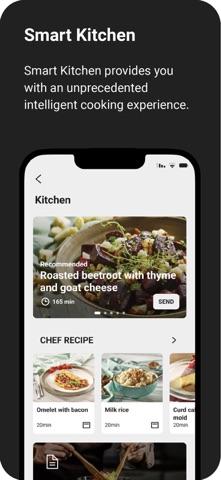
- Contextual Recipe Engine: Access a curated collection of culinary instructions automatically adjusted to match your smart oven's specific capabilities.
- Smart Automation Wizards: Rely on guided suggestions that determine optimal washing, cooking, and cleaning settings based on appliance characteristics.
- Integrated Support Ticketing: Troubleshoot malfunctioning hardware instantly with built-in aftersales support channels and dynamic FAQ databases.
- Voice Control Integration: Connect seamlessly with Amazon Alexa ecosystems for hands-free voice commands throughout your living space.
Hands-On Impressions: Performance, Battery, and Thermals
Testing this build on an iPhone 15 Pro running a modern A-series processor reveals a lightweight interface that respects thermal boundaries. The 120Hz ProMotion display ensures scrolling through recipe catalogs and appliance dashboard grids remains buttery smooth without stuttering.
Battery drain during background polling is minimal, keeping the app from aggressively chewing through your daily charge when idle. Touch responsiveness is snappy, though heavy network requests can occasionally trigger short loading spinners when querying distant appliance servers.
"The software manages to keep background sync overhead remarkably low, ensuring my device stays cool during extended configuration sessions."
System Requirements & Requested Permissions
To run this beta build without encountering unexpected crashes, your device must be updated to iOS 15.0 or later for base compatibility. However, the developer specifically notes that ensuring your iPhone is running iOS 16.4 or newer yields optimal stability.
The app requests standard permissions including Local Network access for appliance discovery, Push Notifications for instant status alerts, and background app refresh. Apple's strict sandboxing guarantees these permissions remain securely contained within your device's privacy framework.
Pros & Cons: Beta Impressions
✓ The Highs (What We Love)
- Unified Control: Manages multiple appliance brands from a single interface.
- Responsive UI: Smooth animations and modern design language on OLED screens.
- Smart Wizards: Helpful preset suggestions for cooking and laundry cycles.
✕ Beta Caveats (Room for Polish)
- Cloud Latency: Occasional delays when querying offline appliances.
- Feature Variance: Capabilities shift depending on your specific country and hardware.
- Slot Limits: TestFlight availability fluctuates frequently during public pushes.

Current TestFlight Slot Situation & Availability
Apple enforces a strict 10,000-tester ceiling on all public TestFlight distribution links, creating a competitive environment for utility betas. High demand from smart home enthusiasts means slots can fill up within hours of a major feature drop.
If you encounter a message stating the build is currently full, do not panic or abandon your pursuit. Developers regularly prune inactive testers who fail to install updates, freeing up capacity over the course of any given week.
Step-by-Step TestFlight Installation Guide
Getting up and running with this beta requires just a few minutes of your time and an active Apple device. Follow these clear instructions to secure your spot in the current testing cohort:
1. Download and install the official Apple TestFlight app from the iOS App Store if you haven't already.
2. Ensure your iPhone is updated to iOS 16.4 or later to prevent compatibility blocks during installation.
3. Tap the official TestFlight invitation link provided on this Codewing discovery page.
4. Accept the beta invitation prompt inside the TestFlight application to view the changelog.
5. Tap 'Install' to download the beta build, and use the built-in feedback tool to report bugs directly to the team.
Frequently Asked Questions
Is ConnectLife safe to install via TestFlight?
Yes, testing builds through Apple's official TestFlight infrastructure is completely safe and secure. Every application undergoes automated security scans and must adhere to Apple's rigorous App Store review guidelines before distribution.
What should I do if the ConnectLife beta is full?
If the testing roster is maxed out, bookmark this Codewing page and check back during off-peak hours. Inactive accounts are purged periodically, which frequently opens up fresh installation slots.
Will installing this beta overwrite my App Store version or delete save data?
TestFlight builds typically replace existing stable installations on your device while preserving local user preferences and cloud-synced account data. However, remember that beta software can occasionally experience unexpected configuration resets.
How long do TestFlight beta invitations and builds last?
Every individual TestFlight build remains active for a maximum duration of 90 days from its upload date. You will receive notifications prompting you to update to newer beta builds before expiration.
Are in-app purchases free during TestFlight beta testing?
Any digital purchases or subscription activations inside a TestFlight sandbox environment are entirely simulated. You will never be charged real currency while testing beta features.
Final Editorial Verdict
The ConnectLife beta successfully demonstrates how multi-brand hardware integration should feel on modern iOS devices. While minor cloud latency issues remind us that this is still work-in-progress software, the streamlined utility makes it an essential download for smart home owners.
Rating: 4.3 / 5
Developer Support & Official Resources
Stay updated on patch notes, maintenance windows, and feature roadmaps directly from the official developer channels.
Never miss an opening for ConnectLife.
Apple limits TestFlight betas to 10,000 testers, and this program is currently at capacity. CodeWings Plus continuously monitors slot availability 24/7 and sends you an instant alert the second a spot opens up.


