

Finding a reliable utility to manage in-car digital radio hardware can often feel like an exercise in frustration. Fortunately, Dension Elektronikai Kft has rolled out a fresh beta iteration designed to streamline how iOS users interface with their DAB+A and DAB+M hardware receivers.
We spent the last week pushing this pre-release build through its paces on our daily commutes. This hands-on evaluation breaks down everything you need to know about the current TestFlight architecture and how to get connected.
DAB 2.0 — Quick Specifications
Developer: Dension Elektronikai Kft
About DAB 2.0
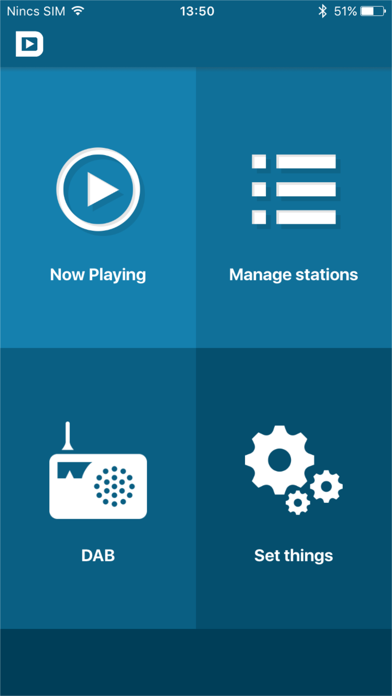
DAB 2.0 serves as a dedicated utility companion app built specifically to connect your iPhone with Dension’s proprietary DAB hardware. Users rely on this interface to orchestrate digital audio broadcasts, scan local airwaves, and fine-tune station presets directly from a touchscreen layout. The primary goal is bridging the gap between legacy in-vehicle audio hardware and modern smartphone touch interfaces.
Developed by the engineering team at Dension Elektronikai Kft, the application focuses heavily on seamless hardware handshakes over local wireless or tethered links. Rather than forcing drivers to fumble with physical dashboard dials, the utility puts granular control over frequency tuning and metadata display into an intuitive mobile UI. It acts as the central command hub for managing multiple audio sources inside the cabin.
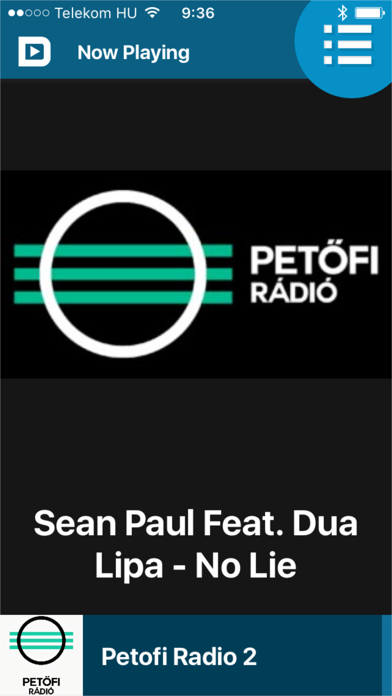
The core premise revolves around automated station discovery paired with manual personalization loops. Upon launching the app, it automatically scans for available DAB broadcasters and organizes them alphabetically for rapid access. Users can curate infinite custom favorite lists, view rich metadata on the Now Playing screen, and toggle between auxiliary, Bluetooth, and digital radio sources with minimal tap latency.
Standout Features & What's New in this Build
This latest TestFlight build introduces several backend refinements aimed at stabilizing device handshakes and speeding up initial station indexing. Dension has clearly focused on smoothing out edge cases where older firmware revisions dropped connections during long drives.
- Automated Frequency Tuning: The app features a smart auto-search tool that sniffs out clean FM frequencies on your car radio and matches the DAB transmitter effortlessly.
- Customizable Favourites: Users can build an unlimited favorites list by swiping channels and tapping a yellow heart, then reordering them via simple drag-and-drop gestures.
- Rich Now Playing Metadata: The interface pulls active broadcaster data, program information, and station logos directly onto your display in real-time.
- Multi-Source Management: Easily switch back and forth between DAB, AUX, and hands-free Bluetooth audio streams from a single dedicated menu button.
- Instant DAB Scanning: A single tap on the refresh icon initiates a background station sweep without freezing the primary interface.
Hands-On Impressions: Performance, Battery, and Thermals
Running this pre-release version on modern iPhone hardware equipped with ProMotion displays reveals a remarkably snappy interface. Touch inputs register immediately, and list scrolling maintains a locked 120Hz frame rate even while indexing hundreds of active DAB channels. Memory footprint remains lean, preventing background termination during extended navigation sessions.
Thermal management is equally impressive, drawing minimal power from the A-series silicon even when maintaining active local network communication with external Dension hardware. Battery drain is negligible, hovering right around standard background audio streaming levels. You won't notice any alarming phone warmth, even during long road trips where the app runs continuously in the foreground.
"The shift toward automated frequency matching and gesture-based favorite management turns a traditionally tedious in-car setup into a two-tap affair."
System Requirements & Requested Permissions
Compatibility remains exceptionally broad, requiring any iOS device running iOS 9.0 or later to get up and running. While older iPhones will power the application just fine, users on modern Apple Silicon hardware will benefit from instant app-launch speeds and flawless multitasking performance. iPad users can also utilize the utility for stationary setups.
To function correctly, the software requests basic local network permissions to discover and handshake with nearby Dension DAB hardware. Apple’s strict iOS sandboxing ensures your personal data stays encrypted locally on-device. No telemetry or listening habits are broadcast beyond what is strictly necessary for basic audio transmission.
Pros & Beta Impressions
✓ The Highs (What We Love)
- Auto-Scan: Instantly indexes all available local DAB channels upon first launch.
- UI Fluidity: Smooth drag-and-drop playlist curation powered by modern iOS touch responsiveness.
- Source Switching: Seamlessly jumps between DAB, AUX, and hands-free Bluetooth feeds.
✕ Beta Caveats (Room for Polish)
- Hardware Dependent: Requires specific Dension DAB+M or DAB+A physical receivers to function.
- Initial Handshake: Occasional manual reconnect needed if wireless signal drops in heavy interference zones.
- Localization Quirks: Some secondary menu prompts display minor translation inconsistencies.

Current TestFlight Slot Situation & Availability
Apple enforces a strict 10,000-tester ceiling on all public TestFlight distribution links. Because Dension Elektronikai Kft builds specialized automotive utilities, beta slots tend to open up in waves corresponding to major firmware drops. Availability fluctuates depending on how many active testers hold stale installation tokens.
If you encounter a message stating the beta is currently full, do not panic. Developers routinely purge inactive accounts and testers who fail to report telemetry on newer builds. Checking back during off-peak morning hours yields the highest probability of snagging an open slot.
Step-by-Step TestFlight Installation Guide
Getting the beta running on your iPhone takes less than two minutes if you follow these sequential instructions. Make sure your device is powered on and connected to a stable internet connection before starting.
1. Download and install the official Apple TestFlight application from the App Store if you do not already have it installed on your device.
2. Tap the official Codewing TestFlight invitation link provided at the bottom of this page using your iOS Safari browser.
3. Accept the public beta invitation prompt when it redirects you automatically into the native TestFlight app interface.
4. Tap the 'Install' button to download the DAB 2.0 beta package directly onto your iPhone storage.
5. Open the app, turn on your Dension hardware, and use TestFlight's internal feedback reporting tool if you encounter any connection bugs.
Frequently Asked Questions
Is DAB 2.0 safe to install via TestFlight?
Yes. Every beta build distributed through Apple's official TestFlight infrastructure undergoes automated security screening and runs strictly within iOS sandboxing protocols.
What should I do if the DAB 2.0 beta is full?
If slots are maxed out, bookmark this Codewing page and check back periodically. Dension periodically reclaims slots from inactive users during update cycles.
Will installing this beta overwrite my App Store version or delete save data?
TestFlight builds operate as standalone pre-release packages that typically overwrite existing beta installations while preserving your local app preferences and preset configurations.
How long do TestFlight beta invitations and builds last?
Each individual TestFlight build remains active for 90 days from its upload date, after which time testers must update to a newer build released by the developer.
Are in-app purchases free during TestFlight beta testing?
Yes. Apple routes all transactions through a simulated sandbox testing environment, meaning any digital items or features cost zero real-world currency.
Final Editorial Verdict
DAB 2.0 proves to be an indispensable companion tool for anyone running compatible Dension digital radio hardware in their vehicle. The streamlined station management and automated frequency pairing significantly elevate the in-car audio experience. Grab the TestFlight link below and modernize your dashboard today.
Developer Support & Official Resources
Stay updated on patch notes, maintenance windows, and feature roadmaps directly from the official developer channels.
Never miss an opening for DAB 2.0.
Apple limits TestFlight betas to 10,000 testers, and this program is currently at capacity. CodeWings Plus continuously monitors slot availability 24/7 and sends you an instant alert the second a spot opens up.




