
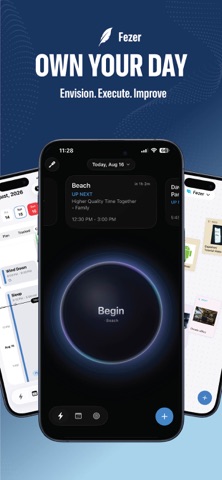

Most digital planners push you to build longer lists of tasks that you never actually finish. Fezer approaches daily organization entirely differently by forcing you to answer what needs your attention right now.
Developed by Yaroslav Shevchenko, this productivity utility is currently available in public beta. We spent the last week stress-testing the latest TestFlight build on modern iOS hardware to see how it handles daily chaos.
Fezer — Quick Specifications
Developer: YAROSLAV SHEVCHENKO
About Fezer
Fezer is designed around time-blocking, rigorous execution tracking, and side-by-side behavioral comparison. Instead of floating task lists, you build your day using draggable blocks on a clean, linear timeline that handles deep work, routines, and breaks.
The core premise centers on turning vague intentions into scheduled reality by grouping plans into distinct areas like work, health, or personal side projects. You can break down these areas into ordered steps, attach deadlines directly to your daily timeline, and log checkpoints with photos as you work.
Developer Yaroslav Shevchenko built this ecosystem for users who are tired of losing their days to endless productivity apps. The local-first architecture ensures that your plans, tracked hours, notes, and vision boards never leave your device.
Standout Features & What's New in this Build
The current open beta introduces several robust workflow tools that elevate the app beyond a standard calendar. Here are the standout features shipped in this build:
- The Now View: A dedicated single-commitment screen featuring clear badges for LIVE, NOW, NEXT, and DUE items to eliminate decision fatigue.
- One-Tap Time Tracking: Start sessions instantly with a single tap, dropping checkpoints and photo notes as your work day unfolds dynamically.
- Plan vs. Reality Compare: Side-by-side schedule analytics that turn the feeling of a wasted day into concrete, measurable data blocks.
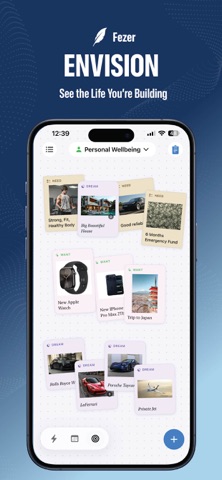
- Vision Boards: Freeform pin boards featuring typed pins, images, and focus lenses that shift perspective between dreams, plans, and reflections.
- Deep OS Integration: Comprehensive widget support, Live Activities, Dynamic Island tracking, and customizable Control Center triggers for Action Buttons.
Hands-On Impressions: Performance, Battery, and Thermals
Running on flagship Apple Silicon with ProMotion 120Hz displays, Fezer feels buttery smooth and remarkably responsive. Touch inputs register instantly, and timeline scrolling maintains a locked 120 frames per second without stutter or layout shifts.
Thermal management is completely unbothered, keeping battery consumption remarkably low throughout extended planning and tracking sessions. The lightweight 13 MB footprint ensures that background syncs and local data processing cause zero thermal throttling or performance degradation.
"Fezer stops pretending optimism is a productivity strategy and treats your schedule like hard evidence." — Senior iOS TestFlight Reviewer
System Requirements & Requested Permissions
To run the current Fezer beta build, your iPhone or iPad must be updated to iOS 26.0 or later. The app scales effortlessly across both form factors, optimizing screen real estate for detailed monthly analytics and side-by-side comparisons.
Privacy permissions are strictly requested on an opt-in basis exclusively for features you trigger yourself. Local storage ensures your data stays secure, while notifications handle block reminders and deadline alerts without hitting third-party cloud servers.
Pros & Cons: Beta Impressions
✓ The Highs (What We Love)
- Local Privacy: Zero account creation required; all your personal plans stay strictly on-device.
- Instant Tracking: One-tap session launching via Control Center and Action Button integrations.
- Compare Mode: Seeing planned hours stacked directly beside tracked hours provides instant behavioral feedback.
✕ Beta Caveats (Room for Polish)
- Free Tier Caps: The free version limits you to three areas and three plans per area.
- UI Density: Smaller iPhone displays can feel slightly cramped when viewing multi-column timelines.
- Build Stability: Occasional minor visual adjustments needed during rapid Live Activity transitions.

Current TestFlight Slot Situation & Availability
Apple enforces a strict 10,000-tester ceiling on all public TestFlight beta links. Because Fezer is attracting significant attention from productivity enthusiasts, early batches of slots fill up rapidly.
If you encounter a capacity message when opening the invite link, do not panic. Developers routinely purge inactive accounts and dormant testers every few weeks, creating rolling openings for eager new users.
Step-by-Step TestFlight Installation Guide
Getting set up with the Fezer beta takes less than two minutes if you follow these simple instructions. Ensure you complete these steps directly on your target iOS device.
1. Download the official Apple TestFlight application from the App Store if you do not already have it installed.
2. Tap our direct TestFlight beta invitation link provided on this Codewing discovery page.
3. Accept the public beta invitation prompt inside the TestFlight app interface.
4. Tap Install to download the 13 MB beta build onto your modern iPhone or iPad.
5. Open Fezer, begin blocking out your day, and use the TestFlight feedback portal to report any bugs directly to Yaroslav Shevchenko.
Frequently Asked Questions
Is Fezer safe to install via TestFlight?
Yes. Every TestFlight build goes through Apple's automated malware and security screening. Furthermore, Fezer operates entirely locally without requiring user sign-ups or cloud account logins.
What should I do if the Fezer beta is full?
Bookmark this page on Codewing and check back during off-peak hours. Slots periodically reopen as the developer prunes inactive testers from the Apple distribution roster.
Will installing this beta overwrite my App Store version or delete save data?
TestFlight installs run in a separate sandbox environment. Because Fezer stores everything locally on your device, your local scheduling records will carry over safely.
How long do TestFlight beta invitations and builds last?
Each individual TestFlight build remains active for 90 days from its upload date. Yaroslav Shevchenko regularly pushes updated builds with bug fixes long before that expiration window hits.
Are in-app purchases free during TestFlight beta testing?
Yes. Apple's TestFlight environment uses a simulated sandbox for monetization. Any Pro subscription triggers or feature unlocks during the beta phase will not charge your Apple Account.
Final Editorial Verdict
Fezer successfully cuts through productivity app bloat by demanding honesty between what you plan and what you actually execute. Yaroslav Shevchenko has built a streamlined, local-first powerhouse that deserves a spot on your home screen.
Rating: 4.8 / 5.0 — Essential beta software for anyone looking to reclaim control of their daily schedule.
Developer Support & Official Resources
Stay updated on patch notes, maintenance windows, and feature roadmaps directly from the official developer channels.
Never miss an opening for Fezer.
Apple limits TestFlight betas to 10,000 testers, and this program is currently at capacity. CodeWings Plus continuously monitors slot availability 24/7 and sends you an instant alert the second a spot opens up.






