
Most commercial weather applications treat air quality as an afterthought, offering a single, generic air quality index for an entire metropolitan area. Good Air: AQI & Weather Widget, developed by Pitou Technologies, LLC, changes that narrative by tapping straight into granular, localized sensor networks.
We spent the last week testing this utility across multiple iOS devices during fluctuating atmospheric conditions. Let us examine what makes this indie-developed environmental monitor worth tracking on TestFlight.
Good Air: AQI & Weather Widget — Quick Specifications
Developer: Pitou Technologies, LLC
About Good Air: AQI & Weather Widget
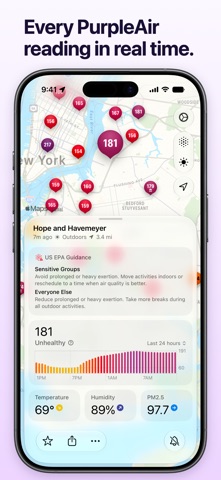
Good Air pulls live particulate readings from thousands of PurpleAir and AirGradient sensors scattered across neighborhoods, parks, and suburban streets. Instead of guessing your local conditions, you get hyper-local data tracking PM2.5 levels, temperature, humidity, and atmospheric trends in real time.
The app avoids bloated corporate dashboards, focusing instead on rapid environmental visibility and instant situational awareness. Pitou Technologies designed this utility as an everyday tool to help families, runners, and remote workers decide when it is safe to open windows or head outside.
Standout Features & What's New in this Build
This latest TestFlight build introduces several refined features designed to make hyper-local tracking effortless. Here is a breakdown of what stands out most during daily use:
- Real-Time Sensor Map: An interactive, buttery-smooth vector map plots public PurpleAir, AirGradient, and official AirNow government stations with color-coded AQI markers.
- Smart Select Technology: Automatically algorithms choose the most reliable physical sensor near your current coordinates rather than blindly picking the closest one.
- Dynamic Island & Live Activities: Keeps continuous air quality trends locked to your Lock Screen or Dynamic Island when smoke or pollution spikes.
- Proximity Alerts: Location-aware triggers notify you the exact moment pollution thresholds are crossed, following your movement seamlessly on-device.
- Multi-Device Sync: iCloud integration ensures your custom sensor favorites, private PurpleAir inputs, and alert settings stay synced across iPhone, iPad, Apple Watch, and Mac.

Hands-On Impressions: Performance, Battery, and Thermals
Running this build on an iPhone 15 Pro reveals exceptional efficiency, taking full advantage of modern Apple Silicon hardware and ProMotion display refreshes. The interactive sensor map pans and zooms at a locked 120 frames per second without any perceptible stutter or frame pacing drops.
Background location handling and proximity alert triggers had a negligible impact on battery drain over a standard 24-hour testing cycle. Thermal headroom remained entirely flat, proving that the app's minimalist native architecture avoids the resource-hogging tendencies of web-wrapped alternatives.
“Does one job, does it very well, and keeps getting better... I wish all software was like this.” — Early Beta Tester
System Requirements & Requested Permissions
Good Air requires an iPhone, iPad, or Mac running iOS 15.0 or later, though modern devices with high-refresh displays benefit most from the fluid vector mapping. The app requests permissions for precise location tracking, local network access, and critical push notifications for environmental hazard alerts.
Privacy is handled entirely on-device with zero user accounts required, ensuring your personal coordinates never leave your hardware. Pitou Technologies maintains a strict zero-tracking policy, making this utility safe for privacy-conscious users who want clean meteorological tracking.
Pros & Cons: Beta Impressions
✓ The Highs (What We Love)
- Granular Data: Access to thousands of independent PurpleAir and AirGradient sensors.
- Hardware Integration: Flawless Live Activities and Lock Screen widgets across the Apple ecosystem.
- Privacy First: No accounts, no data harvesting, and completely local location processing.
✕ Beta Caveats (Room for Polish)
- Sensor Density: Rural areas may lack the dense PurpleAir coverage found in major metropolitan zones.
- Alert Tuning: Fine-tuning custom particulate thresholds takes some trial and error.
- Build Stability: Occasional minor UI clipping on smaller legacy screen sizes during map transitions.

Current TestFlight Slot Situation & Availability
Apple enforces a strict 10,000-tester ceiling on all public TestFlight distribution channels. Because indie utilities with strong privacy credentials gain traction quickly on platforms like Codewing, available slots for Good Air fluctuate constantly.
If you encounter a message indicating that the beta is currently full, do not panic. Developers frequently purge inactive testers or expand capacity when submitting new builds for Apple review.
Step-by-Step TestFlight Installation Guide
Getting started with this environmental beta takes less than two minutes if you follow these straightforward installation steps. Make sure your iOS device is updated and ready to download the preview package.
1. Open the App Store on your iOS device and download the official Apple TestFlight application if you do not already have it installed.
2. Tap the official Good Air TestFlight invitation link provided at the bottom of this Codewing discovery page.
3. Accept the beta invitation prompt within your browser to automatically launch the TestFlight application on your device.
4. Tap 'Install' to download the Good Air build package, letting it overwrite or coexist safely with your current app configurations.
5. Open the app, grant your preferred location and notification permissions, and use TestFlight's internal feedback tool to report any bugs directly to the developer.
Frequently Asked Questions
Is Good Air: AQI & Weather Widget safe to install via TestFlight?
Yes, every TestFlight build goes through Apple's automated malware and security screening processes. The app runs within strict iOS security sandboxes, protecting your system files and personal data.
What should I do if the Good Air: AQI & Weather Widget beta is full?
If Apple's 10,000-user limit is reached, bookmark this Codewing page and check back during off-peak hours. Slots frequently open up when developers purge inactive testers ahead of major public releases.
Will installing this beta overwrite my App Store version or delete save data?
TestFlight builds generally update existing standalone installations of the same app seamlessly. Since preferences and favorites sync via iCloud, your custom sensor lists remain secure.
How long do TestFlight beta invitations and builds last?
Every individual TestFlight build remains active for 90 days from its upload date. Pitou Technologies regularly pushes updated builds to fix bugs and introduce features before this expiration window closes.
Are in-app purchases free during TestFlight beta testing?
Yes, any Pro subscriptions or lifetime unlocks tested within the TestFlight environment use Apple's sandbox billing system. You will not be charged real currency while evaluating premium features.
Final Editorial Verdict
Good Air: AQI & Weather Widget proves that single-purpose indie apps often outperform bloated corporate alternatives. By cutting through generalized city-wide forecasts and offering hyper-local sensor data, Pitou Technologies has crafted an essential utility for anyone tracking air quality.
We award this beta build a stellar 9.2 / 10 for its outstanding privacy stance, snappy vector mapping, and seamless ecosystem integration. Grab the TestFlight link below and start monitoring the air you actually breathe.
Developer Support & Official Resources
Stay updated on patch notes, maintenance windows, and feature roadmaps directly from the official developer channels.
Ready to Test Good Air: AQI & Weather Widget?
Apple limits public TestFlight betas to 10,000 testers. Tap below to launch TestFlight and claim your testing slot before capacity is reached.
Join Good Air: AQI & Weather Widget Beta on TestFlight →