
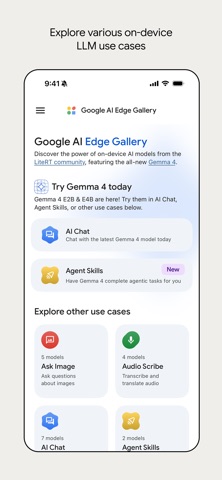

Running frontier machine learning models locally on a smartphone used to feel like a distant engineering pipe dream. Google LLC has officially upended that limitation with their latest utility release, bringing serious open-source intelligence straight to iOS hardware.
We loaded up the newest beta build on our flagship iPhone hardware to see how raw local compute handles complex reasoning tasks. If you want to bypass cloud servers and keep your personal data entirely on-device, this is the exact beta package you need to grab right now.
Google AI Edge Gallery — Quick Specifications
Developer: Google LLC
About Google AI Edge Gallery
AI Edge Gallery serves as a dedicated mobile sandbox designed for running powerful, open-source Large Language Models directly on your device hardware. Users can download, configure, and benchmark various language architectures without routing a single byte of data through external server farms.
The core premise centers around total offline privacy combined with high-performance local inference. Instead of interacting with a corporate chatbot hosted in the cloud, your phone's Neural Engine and GPU shoulder the computational load in real-time.
Developed directly by Google LLC, this open-source project bridges the gap between desktop-grade machine learning workflows and mobile utility apps. It gives developers and enthusiasts a flexible workbench to test prompt engineering, multimodal vision tools, and local agent capabilities.
Standout Features & What's New in this Build
This fresh TestFlight iteration brings several massive additions, headlined by official support for the newly released Gemma 4 family. The app transforms your device into an advanced reasoning powerhouse while maintaining strict offline privacy protocols.
- Gemma 4 Integration: Experience the cutting edge of on-device AI with advanced reasoning, logic, and creative capabilities built right into your pocket.
- Agent Skills: Transform your model into a proactive assistant by linking tools like Wikipedia, interactive maps, and modular URL scripts.
- Thinking Mode: Peek under the hood during multi-turn chats to observe the model's step-by-step reasoning process in real-time.
- Ask Image & Audio Scribe: Utilize multimodal capabilities for visual object identification alongside ultra-fast speech-to-text translation.
- Model Management & Benchmarking: Easily download modular weights or import custom models while running local benchmarks to check hardware performance.

Hands-On Impressions: Performance, Battery, and Thermals
Testing this build on modern Apple Silicon reveals staggering progress in on-device machine learning efficiency. Text generation flows smoothly across the screen, though heavy reasoning models will noticeably warm up the back glass during extended multi-turn conversations.
"By shifting heavy inference loops directly to mobile silicon, Google proves that private, offline intelligence is no longer restricted to high-end desktop rigs."
Battery drain is understandably higher than a standard messaging app when you are pushing the neural engine to its absolute limits. However, the sheer convenience of having an offline reasoning engine that requires zero internet connectivity completely outweighs the thermal overhead.
System Requirements & Requested Permissions
To run this build smoothly, you will need a modern iOS device running iOS 17.0 or later with adequate storage space for model downloads. Devices featuring Apple Silicon chips with robust Neural Engines will yield significantly faster token generation rates.
The app requests standard permissions including local network access for optional peer skill sharing and camera access for the Ask Image visual features. Because everything operates locally inside Apple's strict sandbox environment, your personal inputs never leave your device.
Pros & Cons: Beta Impressions
✓ The Highs (What We Love)
- Total Privacy: 100% offline inference means zero data sent to external cloud servers.
- Gemma 4 Power: Incredible logic and reasoning capabilities running natively on mobile hardware.
- Extensible Agents: Modular skills and GitHub integration make the assistant genuinely useful.
✕ Beta Caveats (Room for Polish)
- Thermal Load: Extended benchmarking sessions will heat up your device and drain battery fast.
- Storage Footprint: High-performance model weights require substantial free space on your iPhone.
- Early Stabilities: Expect occasional UI hiccups or model loading stalls while debugging active builds.

Current TestFlight Slot Situation & Availability
Apple enforces a hard ceiling of 10,000 active external testers for any given TestFlight public link. Popular releases from major developers like Google frequently hit this capacity threshold within hours of publication.
If you encounter an error stating that the build is currently full, do not panic. Developers routinely purge inactive accounts and stale testing tokens, freeing up fresh slots during off-peak hours.
Step-by-Step TestFlight Installation Guide
Getting set up with this beta package takes less than two minutes if you follow the proper sequence. Make sure you have the official Apple TestFlight utility downloaded from the App Store before tapping any external invitation links.
1. Open the App Store on your iOS device and search for 'TestFlight', then download and install the official Apple application.
2. Navigate to Codewing and locate the official Google AI Edge Gallery TestFlight invitation link provided on this page.
3. Tap the invitation link to automatically launch the TestFlight app and display the Google AI Edge Gallery beta overview page.
4. Tap the 'Accept' and 'Install' buttons to download the beta build directly over your current iOS system configuration.
5. Open the app, download your preferred open-source model weights, and use the built-in feedback tool to report any bugs directly to the team.
Frequently Asked Questions
Is Google AI Edge Gallery safe to install via TestFlight?
Yes, every TestFlight build goes through Apple's automated malware and security screening processes. The app runs safely inside iOS security sandboxes, restricting unauthorized access to your broader file system.
What should I do if the Google AI Edge Gallery beta is full?
If the 10,000-tester cap is currently reached, bookmark this Codewing discovery page and check back periodically. Slots open up automatically when Google removes inactive users from the roster.
Will installing this beta overwrite my App Store version or delete save data?
This is a standalone beta testing package distributed via TestFlight. It will safely update or coexist alongside standard app management protocols without wiping unrelated local device settings.
How long do TestFlight beta invitations and builds last?
Individual TestFlight beta builds expire precisely 90 days after the developer uploads them to Apple's servers. The development team will typically push updated builds well before that expiration deadline arrives.
Are in-app purchases free during TestFlight beta testing?
Since this utility is entirely free and open-source, no financial transactions are required. Any simulated sandbox purchases processed inside TestFlight environments use fake testing currency and cost zero real-world money.
Final Editorial Verdict
Google AI Edge Gallery sets a brand new benchmark for what local mobile utilities can achieve without leaning on cloud infrastructure. It is an absolute must-download for anyone interested in the future of private, on-device machine learning.
Developer Support & Official Resources
Stay updated on patch notes, maintenance windows, and feature roadmaps directly from the official developer channels.
Never miss an opening for Google AI Edge Gallery.
Apple limits TestFlight betas to 10,000 testers, and this program is currently at capacity. CodeWings Plus continuously monitors slot availability 24/7 and sends you an instant alert the second a spot opens up.






