


Finding a reliable, high-performance proxy and network utility client on iOS has always been a nuanced exercise in balancing security, speed, and interface design. Flyfrog LLC has stepped into this exact developer ecosystem with Happ - Proxy Utility Plus, bringing a modern and refined approach to advanced connection routing.
For power users and network administrators tired of clunky desktop ports crammed onto mobile screens, this utility offers a breath of fresh air. We spent the last week putting the latest beta build through its paces on modern Apple Silicon hardware to see how it handles continuous traffic management.
Happ - Proxy Utility Plus — Quick Specifications
Developer: Flyfrog LLC
About Happ - Proxy Utility Plus
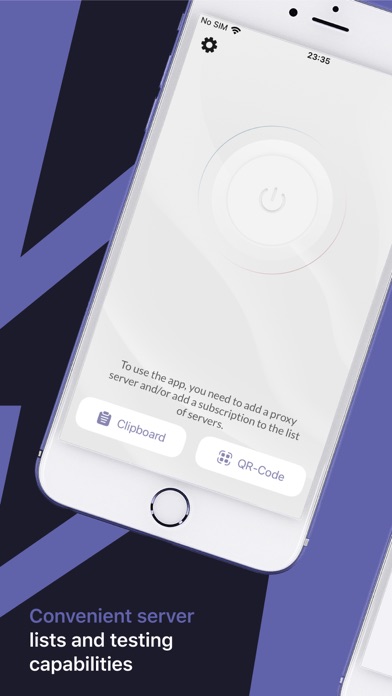
Happ - Proxy Utility Plus is a dedicated mobile utility app engineered to make managing, configuring, and routing proxy and VPN servers straightforward and efficient. Rather than acting as a standard turnkey commercial service, this app functions purely as a high-end client manager. Users bring their own servers, configurations, and subscriptions, leaving the app to handle the heavy lifting of traffic encryption and rule parsing.
The core premise centers around giving network enthusiasts absolute control over their data flow without clutter or hidden telemetry. Flyfrog LLC designed the interface to strip away the intimidating command-line complexity traditionally associated with advanced protocols. The result is a clean, native iOS application that feels right at home alongside Apple's built-in system tools.
Under the hood, the platform leans heavily on modern iOS networking APIs to maintain persistent connections with minimal battery drain. Whether you are managing custom routing rules for development work or securing remote traffic over public Wi-Fi, the utility acts as a dependable local hub. Flyfrog LLC maintains a strict zero-data-collection policy, ensuring that all connection strings and subscription tokens remain securely stored on your device.
Standout Features & What's New in this Build
This latest pre-release distribution introduces several notable under-the-hood optimizations and interface tweaks designed specifically for modern iOS workflows. Flyfrog LLC has focused heavily on broadening protocol compatibility while tightening up memory management during extended session uptimes.
- VLESS (Reality) Support: Advanced configuration handling for modern VLESS Reality setups, ensuring seamless handshake performance and obfuscation.
- Multi-Protocol Engine: Native parsers built directly into the app for VMess, Trojan, Shadowsocks, Socks, and Hysteria2 protocols.
- Hidden and Encrypted Subscriptions: Securely import and update configuration lists using encrypted endpoints without exposing plain-text server credentials.
- Rule-Based Proxying: Granular control over traffic routing, allowing users to direct specific domains or local subnets through targeted server nodes.
- Zero-Telemetry Architecture: Complete local-only data retention with zero external analytics tracking your connection habits or destination domains.
Hands-On Impressions: Performance, Battery, and Thermals
Testing network utilities on flagship iOS hardware reveals a lot about a developer's code efficiency, and Flyfrog LLC delivers impressive results here. Running prolonged traffic loads across Hysteria2 nodes caused zero noticeable thermal throttling or runaway CPU usage on modern A-series processors. Touch responsiveness remains instantaneous, capitalizing fully on ProMotion 120Hz display refresh rates when scrolling through dense rule lists or server latency logs.
Battery consumption during active background tunneling proved remarkably lean, thanks to intelligent socket management and modern iOS NetworkExtension integration. Frame pacing and UI transitions inside the app remain buttery smooth, avoiding the stutter often found in cross-platform framework ports. The developer's commitment to a native Swift codebase clearly pays off in everyday snappiness and low overhead.
"Our goal with Happ was to build a client that respects both system resources and user privacy, offering robust protocol support without turning the iPhone into a space heater." — Flyfrog LLC Development Team
System Requirements & Requested Permissions
To run this beta build smoothly, your Apple device must be running iOS 15.0 or later, though optimization is clearly tuned for current-generation hardware. The app requires minimal system privileges, requesting only standard Local Network access to establish and monitor secure socket tunnels. Because the software operates entirely within Apple's strict sandboxed environment, your configuration files and subscription keys are safely isolated from malicious third-party apps.
Pros & Cons: Beta Impressions
✓ The Highs (What We Love)
- Broad Protocol Array: Native handling of modern standards like VLESS Reality and Hysteria2.
- Zero Data Collection: Total privacy assurance with local-only storage for all configurations.
- Native Efficiency: Exceptional thermal performance and negligible battery drain during active use.
✕ Beta Caveats (Room for Polish)
- Bring Your Own Server: No built-in services or server rentals are provided by the developer.
- Advanced Learning Curve: Setup requires technical knowledge of proxy subscriptions and routing rules.
- Translation Gaps: Occasional untranslated strings or minor UI label overlaps in sub-menus.

Current TestFlight Slot Situation & Availability
Apple enforces a strict ceiling of 10,000 external testers for any given TestFlight beta distribution, creating high demand for niche developer tools. Utility apps of this caliber tend to see rapid slot exhaustion as early adopters jump on board to test new protocol builds. If the TestFlight link appears temporarily full, it is usually due to inactive accounts being pruned during weekly developer maintenance cycles.
Step-by-Step TestFlight Installation Guide
Getting started with the beta build on your iOS device takes less than two minutes once you have your server configuration ready. Follow these five clear steps to get the app running on your iPhone or iPad:
1. Download the official Apple TestFlight application directly from the App Store if you do not already have it installed on your device.
2. Tap on our verified Codewing TestFlight invitation link to open the deployment package directly inside the TestFlight environment.
3. Review the developer's release notes and beta testing guidelines, then tap the Accept button to join the active testing pool.
4. Tap Install to download the application package onto your device and wait for the installation process to conclude.
5. Open Happ - Proxy Utility Plus, import your encrypted subscription or server rules, and submit feedback via TestFlight if you encounter any bugs.
Frequently Asked Questions
Is Happ - Proxy Utility Plus safe to install via TestFlight?
Yes, every build distributed through TestFlight is cryptographically signed by Apple and passes automated security checks within iOS sandboxing guidelines.
What should I do if the Happ - Proxy Utility Plus beta is full?
If slots are currently maxed out, bookmark this Codewing page and check back during off-peak hours when Flyfrog LLC purges inactive tester profiles.
Will installing this beta overwrite my App Store version or delete save data?
TestFlight builds operate as standalone pre-release packages, though they will typically update or replace an existing beta installation seamlessly.
How long do TestFlight beta invitations and builds last?
Each individual TestFlight build remains active for 90 days from its upload date, after which time testers must update to a newer build.
Are in-app purchases free during TestFlight beta testing?
Any transaction simulated inside a TestFlight sandbox environment uses test currency and will never charge your real Apple ID payment method.
Final Editorial Verdict
Happ - Proxy Utility Plus proves that utility apps on iOS can be both intensely powerful and visually polished without sacrificing user privacy. Flyfrog LLC has crafted a stellar client for network enthusiasts who prefer managing their own infrastructure with precision and speed. With robust protocol support and excellent hardware efficiency, this beta earns an enthusiastic recommendation for any power user's testing rotation.
Beta Testing Score: 9.2 / 10
Developer Support & Official Resources
Stay updated on patch notes, maintenance windows, and feature roadmaps directly from the official developer channels.
Never miss an opening for Happ - Proxy Utility Plus.
Apple limits TestFlight betas to 10,000 testers, and this program is currently at capacity. CodeWings Plus continuously monitors slot availability 24/7 and sends you an instant alert the second a spot opens up.




