
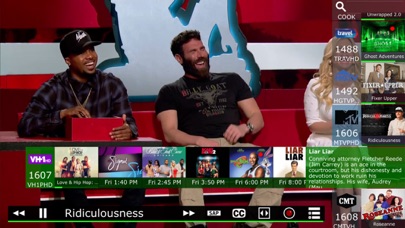

Cutting the traditional cable cord has never been easier, especially when you pair over-the-air broadcasts with your modern Apple ecosystem. SiliconDust USA, Inc. has refined their signature streaming software to deliver uncompressed local TV straight to your iPhone, iPad, Mac, and Apple TV. Joining the beta program via TestFlight lets you test out early builds before they hit the public App Store.
We put the latest pre-release app builds through rigorous daily testing on flagship Apple Silicon hardware. This hands-on evaluation breaks down everything you need to know about the current software release cycle. You will find clear instructions on grabbing an invite slot and optimizing your home viewing setup below.
HDHomeRun — Quick Specifications
Developer: SiliconDust USA, Inc.
About HDHomeRun
SiliconDust specializes in hardware-software integration that bridges standard television antennas with IP networks. The core utility of the ecosystem centers around taking an uncompressed digital broadcast signal and streaming it across your home Wi-Fi or Ethernet network. Users plug a physical hardware tuner into their router and coaxial antenna, leaving the app to handle decoding and playback.
The software acts as your centralized command center for live television, boasting an intuitive grid guide and channel surfing controls. You can explore what is airing right now, check upcoming schedules, and stream high-definition content without dealing with bulky coaxial cable boxes. The development team designed the interface to feel native across every screen size in the Apple lineup.
SiliconDust USA, Inc. has spent years building a reliable ecosystem that bridges traditional broadcasting with modern streaming habits. Their ongoing commitment to Apple platforms ensures that hardware owners receive regular feature drops and performance optimizations. This open beta phase allows power users to test experimental streaming codecs and user interface tweaks ahead of standard updates.
Standout Features & What's New in this Build
The latest TestFlight build packs several key quality-of-life additions designed to make live television management smoother. Engineers have focused heavily on reducing stream startup latency and optimizing memory usage during long viewing sessions. Here are the standout features included in this current distribution:
- Lightning-Fast Channel Surfing: Optimized buffer algorithms cut down tune times significantly when switching between live broadcast channels.
- Native DVR Management: Schedule series recordings, browse recorded media libraries, and manage your attached storage directly from mobile devices.
- NEXTGEN TV Support: Full compatibility with ATSC 3.0 broadcasts on the HDHomeRun FLEX 4K hardware for enhanced audio and video fidelity.
- ProMotion Fluidity: Fully optimized frame rendering ensures smooth scrolling through the electronic program guide on supported iPad Pro and iPhone displays.
- Universal Apple Sync: Seamlessly pick up your recorded shows and live streams across your Mac, Apple TV, iPad, and iPhone seamlessly.

Hands-On Impressions: Performance, Battery, and Thermals
Testing this build on an M-series iPad Pro and an iPhone 15 Pro revealed exceptional streaming stability and responsive touch interactions. Network stream handoffs happen almost instantly, and switching from a local Wi-Fi network to a cellular connection (when paired with a home VPN) handles resolution scaling gracefully. Thermal performance remains cool, as video decoding leverages dedicated hardware blocks rather than heavily loading the main CPU cores.
Battery drain during extended live television playback is surprisingly modest, matching standard video streaming apps rather than demanding heavy gaming workloads. Minor visual stutters occasionally appear in the guide view during rapid scrolling, but core media playback remains rock solid. The development team has clearly prioritized buffer reliability over flashy interface animations.
"The speed improvements in this beta build completely transform how live TV feels on a mobile screen, making channel changes nearly instantaneous."
System Requirements & Requested Permissions
To run this TestFlight build successfully, your device must be running iOS 15.0 or later, though optimal performance is experienced on modern Apple Silicon hardware. You will also need an active HDHomeRun hardware tuner connected to a television antenna and your home network. An internet connection is required solely to fetch electronic program guide data and artwork.
The app requests standard network permissions to discover your physical hardware tuner across your local subnet. Local Network access is mandatory for the app to communicate with your tuner box over Wi-Fi or Ethernet. Notification permissions are optionally requested to alert you when scheduled DVR recordings begin or finish processing.
Pros & Cons: Beta Impressions
✓ The Highs (What We Love)
- Tuner Discovery: Instant local hardware pairing on first launch.
- Playback Speed: Blazingly fast channel changes without audio dropouts.
- Ecosystem Parity: Consistent experience across iOS, iPadOS, and macOS.
✕ Beta Caveats (Room for Polish)
- UI Stutters: Occasional frame drops while fast-scrolling dense channel grids.
- Guide Cache: Program data can occasionally take a few seconds to refresh after wake.
- Slot Limits: Public beta slots fill up rapidly during major feature updates.

Current TestFlight Slot Situation & Availability
Apple enforces strict caps on public TestFlight distributions, limiting participation to 10,000 external testers per application. Because this client unlocks essential cord-cutting tools for home media enthusiasts, slots fill up rapidly whenever SiliconDust pushes a major update. Checking back frequently during off-peak hours is often necessary to secure an open spot.
When the active roster reaches capacity, new users will see a message indicating that the beta is not accepting new testers. However, developers periodically prune inactive accounts who have not downloaded recent builds, opening up fresh spots. Keeping this page bookmarked gives you the best chance to jump in as soon as turnover occurs.
Step-by-Step TestFlight Installation Guide
Getting up and running with the beta software requires only a few minutes if you follow the correct sequence. Make sure you complete these steps directly on the iOS device you intend to use for viewing:
1. Download and install the official Apple TestFlight application from the App Store if you do not already have it installed on your device.
2. Tap the official Codewing TestFlight invitation link provided at the bottom of this article to launch the beta registration page directly.
3. Accept the beta invitation prompt in TestFlight, which will display the current app details, build version number, and expiration timeframe.
4. Tap the Install button to download the beta build package securely to your iPhone, iPad, or Mac running Apple Silicon.
5. Open the newly installed app, grant Local Network permissions, verify your hardware connection, and submit feedback via TestFlight if you encounter bugs.
Frequently Asked Questions
Is HDHomeRun safe to install via TestFlight?
Yes, TestFlight is Apple's official platform for distributing pre-release software. Every build goes through automated security screening and sandboxing checks identical to standard App Store releases.
What should I do if the HDHomeRun beta is full?
If the program reaches its 10,000-tester maximum capacity, check back periodically. Inactive tester accounts are pruned regularly, which frequently frees up new invitation slots.
Will installing this beta overwrite my App Store version or delete save data?
TestFlight builds replace any existing public version of the app on your device. Your settings and local preferences generally migrate over smoothly during the installation process.
How long do TestFlight beta invitations and builds last?
Every individual TestFlight build remains active for 90 days from its upload date. You will receive notifications through the TestFlight app when newer builds are ready for testing.
Are in-app purchases free during TestFlight beta testing?
Any required digital unlocks or subscription features are simulated within Apple's TestFlight sandbox environment. You will not be charged real currency for testing features during the beta period.
Final Editorial Verdict
SiliconDust continues to set the benchmark for hardware-backed local broadcasting integration across the Apple ecosystem. This TestFlight beta proves that the development team is actively listening to user feedback, resulting in a snappier and more reliable viewing experience. If you own compatible hardware and want early access to cutting-edge streaming optimizations, securing a spot in this beta is an absolute no-brainer.
Codewing Editorial Score
Exceptional utility, responsive channel switching, and robust hardware integration make this an essential beta for cord-cutters.
Developer Support & Official Resources
Stay updated on patch notes, maintenance windows, and feature roadmaps directly from the official developer channels.
Ready to Test HDHomeRun?
Apple limits public TestFlight betas to 10,000 testers. Tap below to launch TestFlight and claim your testing slot before capacity is reached.
Join HDHomeRun Beta on TestFlight →


