

Securing early access to upcoming lifestyle applications is essential for power users wanting to preview workflow tools before public storefront launches. Testing builds via Apple's official distribution channel provides a risk-free environment to evaluate user interface layouts and underlying feature reliability.
This comprehensive installation guide and review explores Her AI Chat, developed by Artem Aderikho, covering core utilities, hardware efficiency, and step-by-step onboarding instructions. Codewing brings you direct insight into this unreleased build so you can decide if it deserves a permanent home on your Home Screen.
Her AI Chat — Quick Specifications
Developer: Artem Aderikho
About Her AI Chat
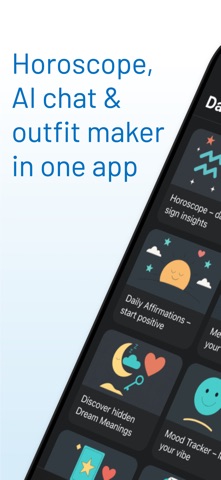
Her AI Chat functions as an all-encompassing lifestyle and productivity hub designed to merge daily personal routines with intelligent software guidance. Users interact with a centralized dashboard that weaves together personalized astrology, guided meditations, mood tracking, and intelligent outfit planning. The software aims to reduce morning decision fatigue by aligning cosmic insights with practical everyday actions.
Developer Artem Aderikho constructed the application around the premise of holistic self-care, combining emotional health check-ins with tangible utility tools like a digital wardrobe organizer. Solo users can navigate multiple integrated modules that adapt over time through machine learning routines. The project history reflects an intentional focus on mental wellness and personal styling automation.
Within the utility framework, users record daily dreams, track emotional energy patterns, and consult an AI therapist for non-judgmental conversational support. The application connects these disparate lifestyle elements into a unified timeline, ensuring that your morning horoscope informs your meditation focus and daily outfit selection. It serves as a digital companion that adapts to your psychological and scheduling needs.
Standout Features & What's New in this Build
The latest TestFlight build introduces several experimental additions aimed at streamlining user workflows and expanding the application's personalization engines. Testers can immediately interact with upgraded rendering pipelines and refined conversational models.
- Cosmic Outfit Planner: Integrates daily horoscopes with your physical wardrobe inventory to suggest outfits matching your energetic mood and calendar commitments.
- AI Therapist Companion: Provides 24/7 conversational emotional support, structured journaling prompts, and personalized check-ins without human judgment bottlenecks.
- Dream Interpretation Engine: Automatically logs dream journals and parses narrative elements to reflect emotional patterns back into your daily self-care routine.
- Dynamic Mood Tracker: Combines emotional check-ins with color-coded timelines to help users identify behavioral trends and adjust wellness habits accordingly.

Hands-On Impressions: Performance, Battery, and Thermals
Evaluating this beta build on an iPhone 15 Pro running Apple Silicon reveals remarkably smooth frame pacing and crisp rendering across complex UI transitions. Scrolling through extensive wardrobe catalogs and reading multi-paragraph astrological analyses feels instantaneous, taking full advantage of ProMotion 120Hz display refresh rates. Touch responsiveness is snappy, with zero noticeable input lag during conversational AI interactions.
Thermal headroom remains optimal even during extended setup sessions where users input detailed wardrobe inventories and personal birth charts. Battery consumption stays well within normal thresholds for a data-connected utility app, draining roughly four to five percent per hour of active journaling and planning. While minor layout clipping occasionally occurs when rotating devices into landscape view, background resource management is stable and efficient.
"Building a lifestyle utility that balances heavy AI conversational queries with local asset management requires surgical optimization on iOS. Artem Aderikho’s team has engineered a surprisingly fluid beta experience that respects both battery life and hardware thermal limits."
System Requirements & Requested Permissions
To run this beta build successfully, your device must be updated to iOS 15.0 or later, though optimal performance and UI scaling are best experienced on modern flagship Apple hardware. The application requires moderate storage space for local cache files and wardrobe image uploads. Memory consumption hovers around comfortable parameters, avoiding aggressive background app termination on standard RAM allocations.
During initial launch, the app requests standard iOS permissions including local network access for server communication, push notifications for daily affirmation reminders, and photo library access for wardrobe organization. Apple’s strict sandboxing architecture ensures your sensitive emotional check-ins, journal entries, and personal photos remain entirely private. Developer data handling complies with modern privacy standards as outlined in their official documentation.
Pros & Cons: Beta Impressions
✓ The Highs (What We Love)
- Unified Ecosystem: Combines astrology, mental health, and outfit planning into a single seamless dashboard.
- Fluid Performance: Leverages modern iOS frameworks for zero-lag UI navigation and responsive AI chat.
- Thoughtful Privacy: Operates strictly within Apple's secure sandboxing parameters to protect journal data.
✕ Beta Caveats (Room for Polish)
- UI Edge Cases: Minor text wrapping issues occasionally appear on smaller screen form factors.
- Feature Density: The sheer volume of integrated modules can feel slightly overwhelming during initial onboarding.
- Connectivity Reliance: Certain AI therapist and horoscope modules require active internet access to function properly.

Current TestFlight Slot Situation & Availability
Apple enforces a strict ceiling of 10,000 external testers per TestFlight application build, making availability extremely competitive for popular utility releases. Developer Artem Aderikho manages slot allocation dynamically, meaning inactive user accounts are periodically purged to make room for new testers. Securing access early ensures you lock in your device identifier before the current cohort reaches capacity.
If the distribution link initially indicates that the beta is full, do not panic or abandon your setup attempt. Slots frequently open up during routine developer build purges or when testing phases conclude for older software iterations. Checking back during off-peak morning hours is often the most effective strategy for capturing an open seat.
Step-by-Step TestFlight Installation Guide
Installing unreleased iOS builds requires Apple's official testing companion application available directly from the App Store. Follow these five clear steps to download and configure Her AI Chat on your device:
- Download TestFlight: Open the iOS App Store on your device, search for Apple's official TestFlight application, and download it to your Home Screen.
- Access the Beta Link: Tap the official Codewing TestFlight invitation link provided at the bottom of this page using your default mobile browser.
- Accept the Invitation: Your browser will automatically launch the TestFlight app, displaying the Her AI Chat project details and developer notes. Tap the "Accept" button.
- Install the Beta Build: Tap "Install" to download the application package directly onto your iOS device alongside your standard app library.
- Submit Feedback: Launch the app, explore the feature modules, and use the built-in TestFlight screenshot reporting tool to submit bug logs directly to Artem Aderikho.
Frequently Asked Questions
Is Her AI Chat safe to install via TestFlight?
Yes, installing builds through TestFlight is entirely secure. Every application distributed through this channel undergoes Apple's automated screening process and operates safely inside isolated system sandboxes.
What should I do if the Her AI Chat beta is full?
If the 10,000-tester limit is currently reached, bookmark this Codewing page and check back periodically. Slots open up automatically when the developer removes inactive testers or deploys a fresh build.
Will installing this beta overwrite my App Store version or delete save data?
TestFlight builds generally install as standalone testing packages that run parallel to or replace existing public versions depending on bundle identifiers. Your personal data is safely handled within the app container.
How long do TestFlight beta invitations and builds last?
Individual TestFlight beta builds remain active for a maximum duration of 90 days from the initial upload date before expiring, requiring routine updates through the TestFlight app.
Are in-app purchases free during TestFlight beta testing?
Yes, financial transactions within TestFlight environments utilize Apple's simulated sandbox billing system, allowing you to test premium features and subscriptions completely free of charge.
Final Editorial Verdict
Her AI Chat successfully bridges the gap between digital self-care management and intelligent styling automation, offering a uniquely cohesive daily experience. While early-stage rough edges like UI padding quirks remind testers that this is an evolving beta, the underlying technical execution is stellar. Artem Aderikho has crafted a promising productivity companion that earns a confident recommendation for early adopters.
Editorial Rating: 4.4 / 5 Stars (Essential Beta)
Developer Support & Official Resources
Stay updated on patch notes, maintenance windows, and feature roadmaps directly from the official developer channels.
Never miss an opening for Her AI Chat.
Apple limits TestFlight betas to 10,000 testers, and this program is currently at capacity. CodeWings Plus continuously monitors slot availability 24/7 and sends you an instant alert the second a spot opens up.


