
Managing global teams or keeping in touch with international friends usually demands mental gymnastics. Apple's native clock utilities often fall short when you need to track human schedules rather than abstract time zones. Adam Rozynski recognized this frustration and built Horzono World Clock to solve real-world scheduling headaches.
We spent the past week testing the latest open beta build across our daily driver hardware. This hands-on breakdown covers how the app handles complex time conversions and why you should secure a beta slot right now.
Horzono World Clock — Quick Specifications
Developer: Adam Rozynski
About Horzono World Clock
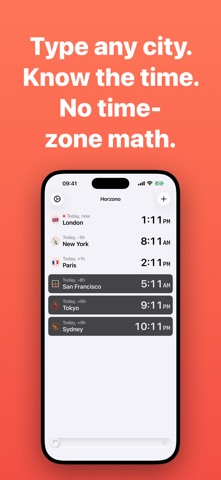
Horzono World Clock shifts the focus from rigid geographical grids to the actual people in your life. Instead of forcing you to memorize UTC offsets or country capitals, the app lets you type a city name and instantly calculates local time. You can attach specific contacts, emojis, and custom photos to individual locations so you are tracking friends and colleagues rather than faceless territories.
The utility extends far beyond basic time-checking with a robust suite of productivity features designed for remote workers. Users can deploy a time-offset slider to scrub up to twenty-four hours forward or backward across every tracked location simultaneously. This makes planning cross-continental meetings or catching a friend when they are actually awake completely frictionless.
Developer Adam Rozynski designed the application to work completely offline across more than 25,000 cities without relying on intrusive cloud servers. The minimalist software philosophy translates to zero ads, zero tracking, and a clean interface that respects user privacy. This open beta allows early adopters to test advanced features like calendar heat maps, Mac menu bar integration, and local Model Context Protocol servers.
Standout Features & What's New in this Build
The current TestFlight distribution introduces several powerful productivity tools and ecosystem expansions. The build feels remarkably stable on modern Apple Silicon hardware, benefiting heavily from recent performance optimizations.
- Instant City Search: Type any of over 25,000 cities into the search bar without needing to know national borders or complex regional time zone identifiers.
- Interactive Time-Offset Slider: Scrub through a full 24-hour cycle to visualize overlapping waking hours for team members spread across multiple continents.
- Daylight & Schedule Awareness: Instantly view sunrise, sunset, and daylight status for every person you track to avoid awkward late-night phone calls.
- Advanced Mac Integration: Utilize a global hotkey to summon the menu bar app instantly, complete with a local MCP server for AI-assisted scheduling.
- Ecosystem Widgets: Place customizable widgets on your iPhone Home Screen, iPad dashboard, Mac desktop, or Apple Vision Pro space.

Hands-On Impressions: Performance, Battery, and Thermals
Testing this build on an iPhone 15 Pro Max equipped with Apple Silicon revealed buttery-smooth animations and instant response times. The ProMotion 120Hz display makes scrubbing through the time-offset slider feel organic and physically grounded. Memory consumption remains remarkably low, keeping thermal output completely flat even during extended schedule-planning sessions.
Battery drain is virtually negligible, which is a massive relief for a utility app running background widgets all day. UI rendering across split-view iPad layouts and the Mac menu bar is crisp, showing clear attention to detail by the developer. Minor visual hiccups during rapid widget refreshes are present, but these are typical artifacts of active beta software.
"We wanted to build a world clock that focuses on human connection rather than military time and dry geographical data. Horzono lets you see your people at a glance, turning complex scheduling into a visual, zero-effort experience." — Adam Rozynski, Developer
System Requirements & Requested Permissions
Running this beta build requires an Apple device running iOS 15.0 or later for full feature compatibility. The app scales gracefully across modern iPhones, iPads, Mac devices via Mac Catalyst, and Apple Vision Pro spatial displays. iCloud sync requires a standard Apple ID to mirror your tracked people across multiple screens.
Privacy permissions are kept minimal in line with the developer's strict no-tracking pledge. The app requests local notification access for meeting reminders and local network permissions solely for inter-device iCloud communication. Because all city databases reside locally on your device, your personal contact arrangements never leak to external tracking servers.
Pros & Cons: Beta Impressions
✓ The Highs (What We Love)
- Human-Centric Design: Attaching photos and custom names makes tracking friends intuitive.
- Offline Capability: Access to over 25,000 cities without needing an active internet connection.
- Zero Ads or Bloat: Clean interface completely free of tracking scripts or forced subscriptions.
✕ Beta Caveats (Room for Polish)
- Widget Refresh Quirk: Occasional delayed sync on home screen widgets after timezone updates.
- Learning Curve: Advanced Mac MCP server setup requires technical familiarity.
- Slot Availability: Open beta participant caps can lead to temporary access bottlenecks.

Current TestFlight Slot Situation & Availability
Apple enforces a strict ceiling of 10,000 external testers for any given TestFlight beta application. Popular releases frequently hit this capacity threshold within days of receiving major tech media coverage. Adam Rozynski's open beta is currently accepting new users, but remaining spots fluctuate depending on daily download volume.
If you encounter a "Beta is Full" message when opening the invite link, do not panic. Developers routinely prune inactive testers who have not updated to recent builds over a 30-day window. Checking back during off-peak hours often yields a freshly opened registration slot.
Step-by-Step TestFlight Installation Guide
Getting up and running with the beta build on your Apple device takes less than two minutes. Follow these five clear steps to install the app safely via Apple's official testing ecosystem:
1. Download TestFlight: Open the App Store on your iPhone, iPad, or Mac, search for Apple's official TestFlight application, and download it to your device.
2. Access the Beta Invite: Tap the official Codewing TestFlight invitation link provided at the bottom of this page using your iOS device browser.
3. Accept the Invitation: Safari will automatically launch the TestFlight app, presenting you with the Horzono World Clock beta details and developer notes. Tap "Accept" to join the program.
4. Install the Build: Tap "Install" to download the beta package onto your device. The app will appear on your Home Screen with an orange beta indicator dot.
5. Provide Feedback: Test features like the time-offset slider and calendar heat map, and submit bugs directly to the developer using the screenshot feedback tool inside TestFlight.
Frequently Asked Questions
Is Horzono World Clock safe to install via TestFlight?
Yes, TestFlight is Apple's official platform for beta distribution. Every build undergoes automated security screening and adheres to strict iOS sandboxing guidelines.
What should I do if the Horzono World Clock beta is full?
If current slots are exhausted, bookmark this page on Codewing and check back periodically. Inactive tester accounts are regularly cleared to make room for new users.
Will installing this beta overwrite my App Store version or delete save data?
Horzono does not currently have a public App Store release, meaning this beta acts as your primary standalone installation with zero data conflict risks.
How long do TestFlight beta invitations and builds last?
Each individual TestFlight build remains valid for 90 days from its upload date. The developer will push regular updates through TestFlight before public release.
Are in-app purchases free during TestFlight beta testing?
Yes, all simulated transactions inside the TestFlight environment use Apple's sandbox infrastructure, allowing you to test premium features without real-world charges.
Final Editorial Verdict
Horzono World Clock successfully eliminates the friction of global scheduling through a thoughtful, human-first approach. The app punches well above standard utility tools by combining offline reliability with deep Apple ecosystem integration. Early testers looking for a streamlined way to track friends and colleagues across continents should grab a beta slot immediately.
Developer Support & Official Resources
Stay updated on patch notes, maintenance windows, and feature roadmaps directly from the official developer channels.
Ready to Test Horzono World Clock?
Apple limits public TestFlight betas to 10,000 testers. Tap below to launch TestFlight and claim your testing slot before capacity is reached.
Join Horzono World Clock Beta on TestFlight →



