
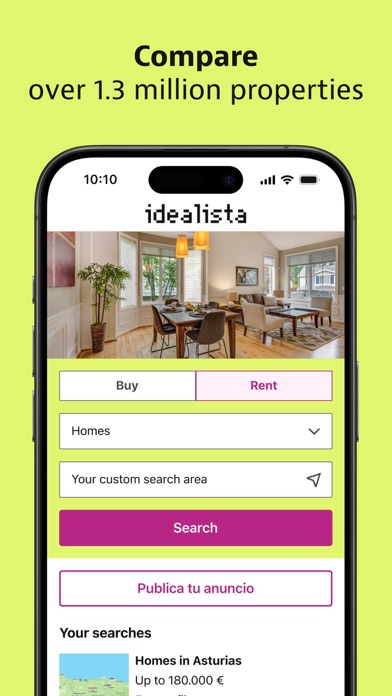

Finding a new home across Spain, Italy, and Portugal usually requires juggling multiple real estate platforms with clunky interfaces. The idealista app aims to centralize property hunting into a single, highly responsive mobile experience. We spent the last week rigorously testing the open TestFlight build to see how it handles daily property searches.
Codewing testers put this pre-release build through its paces on current flagship Apple hardware to evaluate its stability. If you want early access to upcoming features before they hit the public App Store, joining the TestFlight beta is your best option. Here is everything you need to know about performance, features, and how to get connected today.
idealista — Quick Specifications
Developer: Idealista, S.A.
About idealista
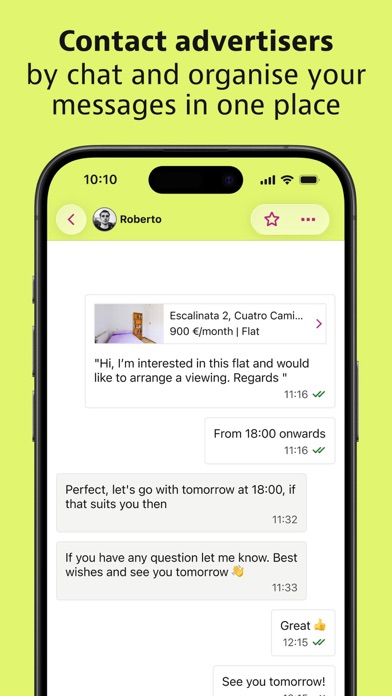
Developed by Idealista, S.A., this productivity and lifestyle application serves as a comprehensive marketplace for buying, selling, and renting properties. Users can browse over a million active listings ranging from suburban family homes to urban parking spaces and spare rooms. The core utility centers around bridging the gap between property seekers and advertisers through direct communication channels.
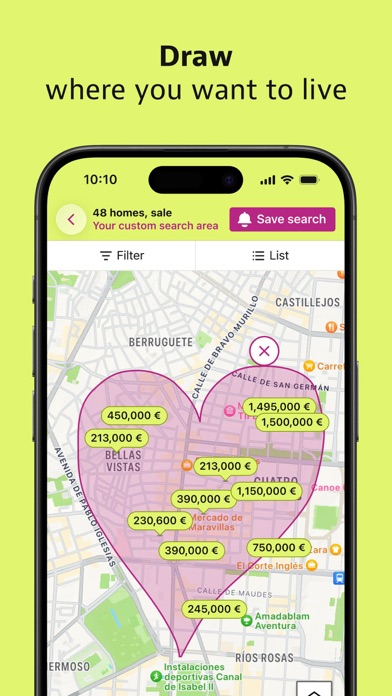
The primary workflow revolves around robust search filters and interactive mapping tools designed to streamline the discovery process. Instead of scrolling through endless static lists, users engage with dynamic geographic boundaries to filter out irrelevant listings instantly. Collaborative lists and automated push alerts ensure that prospective tenants and buyers never miss a newly published listing or sudden price drop.
Beyond basic search functionality, the platform includes specialized tools for both sides of the real estate market. Landlords and sellers gain access to listing management tools to attract buyers in record time. Meanwhile, prospective tenants can build verified tenant profiles to prioritize their inquiries and secure viewings faster.
Standout Features & What's New in this Build
This open TestFlight build introduces several refinements to the map-based search engine and user interface elements. Developers have fine-tuned how touch inputs translate to custom map boundaries, making neighborhood scouting much smoother on high-refresh-rate displays. Here are the standout features included in the current beta release:
- Custom Map Drawing: Users can outline precise search boundaries directly on the interactive map with a finger gesture to instantly filter matching local real estate options.
- Instant Search Alerts: Push notification parameters trigger immediate alerts the second a new property matches saved search criteria or drops in price.
- Collaborative Lists: Shared favorite folders allow friends and family to add notes, suggest properties, and remove outdated listings in real time.
- Verified Tenant Profiles: Dedicated profile creation tools let prospective buyers and renters showcase their credentials to stand out to advertisers.
- Direct In-App Chat: Secure messaging integration connects interested parties directly with advertisers to ask questions and coordinate viewings without leaving the app.
Hands-On Impressions: Performance, Battery, and Thermals
Testing this build on an iPhone 15 Pro running modern Apple Silicon revealed remarkably smooth UI transitions and responsive touch input. The map rendering engine takes full advantage of ProMotion 120Hz displays, keeping pan and zoom gestures fluid without stuttering. Frame pacing remains stable even when loading dense urban clusters filled with hundreds of price tags.
Thermal management is exceptionally well-handled, with zero noticeable device warming during extended browsing sessions spanning over an hour. Battery consumption is tightly optimized, drawing minimal power during background location polling and push notification syncs. Memory management is robust, preventing unexpected closures when switching rapidly between browser views and the interactive map.
“The transition from static listing feeds to fluid geographic drawing feels completely natural on modern iOS hardware, proving that real estate apps can match the responsiveness of native navigation software.”
System Requirements & Requested Permissions
To run this TestFlight build smoothly, your Apple device must be running iOS 16.0 or later. The app is fully optimized for both iPhone form factors and iPad screen layouts, leveraging adaptive UI scaling. The download package weighs in at 164 MB, requiring minimal storage overhead before installation.
Upon initial launch, the app requests standard iOS permissions including precise location access for local property discovery and push notifications for instant price drop alerts. Apple's strict sandboxing architecture ensures your personal search history and chat logs remain secure and isolated. Network access permissions are utilized exclusively for syncing live database listings with the remote servers.
Pros & Cons: Beta Impressions
✓ The Highs (What We Love)
- Fluid Mapping: Drawing custom search zones on the map is remarkably intuitive.
- Thermal Efficiency: Zero device heating or excessive battery drain during long browsing sessions.
- Collaborative Tools: Shared favorite lists make house hunting with a partner effortless.
✕ Beta Caveats (Room for Polish)
- Slot Availability: Open beta slots can fill up quickly depending on Apple's tester caps.
- Minor UI Polish: Occasional text clipping observed in dense filter menus on smaller screens.
- Sync Delays: Rare latency spikes when refreshing collaborative list comments in low-signal areas.
Current TestFlight Slot Situation & Availability
Apple enforces a strict cap of 10,000 external testers for any public TestFlight beta program. Because idealista is a major international real estate platform, demand for early builds remains consistently high. Slots open and close dynamically as inactive users get purged by the development team.
If you tap the beta link and find the program currently full, do not panic. Developers frequently expand tester caps or clear out inactive accounts during major update cycles. Checking back during off-peak hours on Codewing gives you the best chance to secure an open slot.
Step-by-Step TestFlight Installation Guide
Getting set up with the beta version on your iOS device takes less than two minutes. Follow these simple steps to download and install the current pre-release build safely:
- Download TestFlight: Open the App Store on your iPhone or iPad and install Apple's official TestFlight application if you haven't already.
- Access the Invite: Tap the official Codewing TestFlight invitation link provided on this page from your iOS device browser.
- Accept the Invitation: Safari will automatically launch the TestFlight app, prompting you to review the build details and tap "Accept."
- Install the Beta: Tap "Install" to download the 164 MB application package directly over your existing apps or as a standalone build.
- Submit Feedback: If you encounter bugs or visual glitches while browsing properties, use TestFlight's built-in screenshot feedback tool to report them directly to Idealista, S.A.
Frequently Asked Questions
Is idealista safe to install via TestFlight?
Yes, testing builds through Apple's official TestFlight platform is completely safe. Every application submitted must pass Apple's rigorous automated security checks and operates within strict iOS sandboxing guidelines.
What should I do if the idealista beta is full?
If the 10,000-tester limit has been reached, bookmark this Codewing discovery page and check back periodically. Slots open up automatically when developers remove inactive testers or push major version updates.
Will installing this beta overwrite my App Store version or delete save data?
TestFlight builds generally install alongside or replace your public App Store version depending on your configuration. User accounts and saved search data are tied to your cloud login, preventing data loss.
How long do TestFlight beta invitations and builds last?
Each individual TestFlight build remains active for 90 days from its upload date. Developers routinely push new updates before expiration to keep testers engaged with the latest code.
Are in-app purchases free during TestFlight beta testing?
Yes, any simulated transactions or premium feature activations within TestFlight environments utilize Apple's sandbox infrastructure, meaning you will not be charged real money during beta testing.
Final Editorial Verdict
The idealista TestFlight beta demonstrates impressive technical stability and refines an already essential real estate tool for modern mobile users. Its blend of responsive mapping and collaborative search features makes property hunting far less tedious on iOS hardware. We award this beta release a solid 4.5 out of 5 stars for performance, design, and utility.
Developer Support & Official Resources
Stay updated on patch notes, maintenance windows, and feature roadmaps directly from the official developer channels.
Ready to Test idealista?
Apple limits public TestFlight betas to 10,000 testers. Tap below to launch TestFlight and claim your testing slot before capacity is reached.
Join idealista Beta on TestFlight →





