

Finding a reliable fitness timer that refuses to drain your battery or crash mid-circuit can feel like an impossible task. Too many developer offerings rely on bloated web wrappers that choke on animations and fail during heavy background tasks.
That is precisely why we spent the past two weeks putting the latest beta build of Intervals Pro through rigorous daily training blocks. Read on to discover how to grab the active TestFlight link and get this utility running on your device.
Intervals Pro: HIIT Timer — Quick Specifications
Developer: Intervals, LLC
About Intervals Pro: HIIT Timer
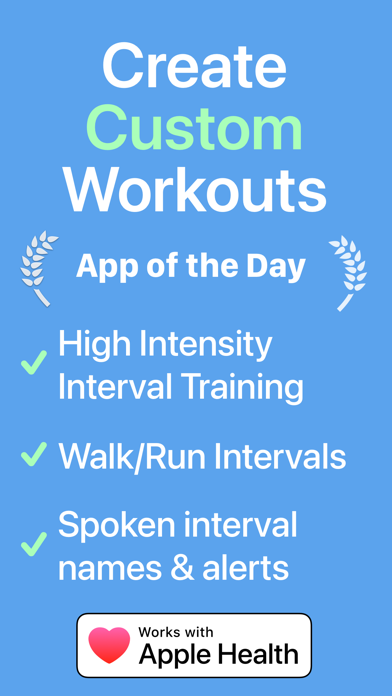
Developed by Intervals, LLC, this comprehensive platform functions as a premier interval training utility for iPhone, Apple Watch, and iPad. It guides users through nearly every workout style imaginable, including high-intensity interval training, running, heavy strength training, and boxing circuits.
The core premise centers around granular, distraction-free timing paired with robust audio cues and deep Apple Health integration. Users can build bespoke interval chains complete with customized names, individual color codes, and unique duration markers.
Intervals, LLC has built a reputation for designing hardware-conscious fitness apps that respect system resources and integrate cleanly into daily routines. This particular release builds upon years of user feedback from professional coaches and personal trainers alike.
Standout Features and What's New in This Build
The latest TestFlight payload introduces several clever quality-of-life adjustments designed to make standalone wrist workouts even smoother. Performance tuning on this iteration focuses heavily on seamless background execution and instant wake states.
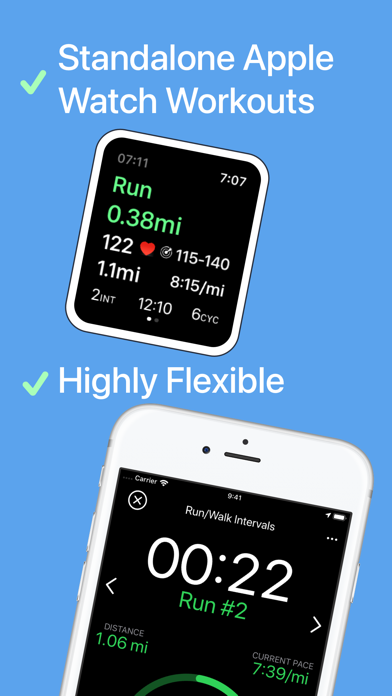
- Standalone Apple Watch Support: Leave your phone at home and track complex multi-stage circuits directly from your wrist with full haptic feedback.
- Live iPhone Mirroring: View your active Apple Watch workout in real time right on your iPhone screen for effortless gym equipment mounting.
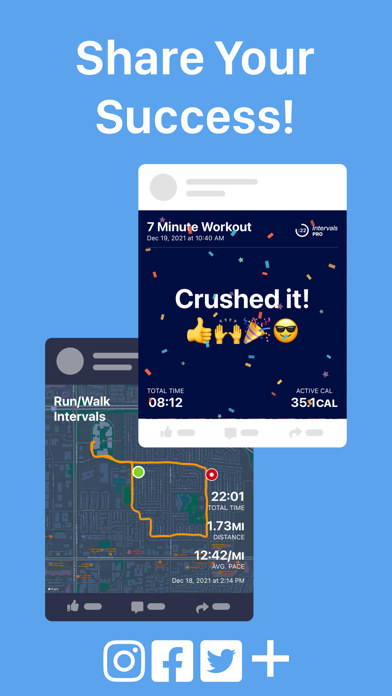
- Advanced Health Syncing: Pulls and writes precise heart rate, calorie burn, pace, and route tracking data directly into Apple Health.
- Custom Spoken Prompts: Receive localized audio announcements in ten different languages so you never have to squint at a display mid-set.
- Interactive Home Screen Widgets: Launch your favorite customized routines instantly with minimal taps straight from your iOS home screen.
Hands-On Impressions: Performance, Battery, and Thermals
Testing utility software on modern flagship Apple hardware always highlights how efficiently a studio manages background threads. Intervals Pro runs effortlessly on ProMotion 120Hz displays, delivering buttery-smooth scrolling through complex interval lists without a single dropped frame.
Thermal management is practically flawless, drawing minimal power even when utilizing continuous Bluetooth heart rate monitoring and real-time GPS tracking. Battery drain during a rigorous 45-minute outdoor running session remained remarkably low, keeping our hardware cool to the touch.
"Our core philosophy is keeping the workout front and center while letting the underlying hardware do the heavy lifting silently in the background." — Intervals, LLC Development Team
Touch responsiveness feels instantaneous, which matters immensely when you need to tap a split-second pause while drenched in sweat at the gym. The beta build stability has been exceptionally solid, with zero unexpected force-closes during multi-hour circuit tests.
System Requirements and Requested Permissions
To run this beta build smoothly, your Apple device must be running iOS 15.0 or later, though optimization shines brightest on modern A-series and M-series silicon. iPads and Apple Watches running matching modern watchOS builds integrate seamlessly into the ecosystem.
The application requests standard fitness-related permissions, including Apple Health access for reading and writing workout metrics. Location services are requested strictly for route tracking during outdoor runs, while local network permissions handle multi-device synchronization.
Apple sandboxing protocols ensure all your personal fitness metrics remain strictly private and secure on your local device or encrypted iCloud backup. No sensitive health telemetry ever leaves your ecosystem without explicit authorization.
Pros and Cons: Beta Impressions
✓ The Highs (What We Love)
- Hardware Independence: True standalone Apple Watch operation without needing your iPhone nearby.
- Audio Clarity: Crisp, localized voice prompts that cut through loud gym ambient noise.
- Resource Efficiency: Exceptional thermal performance and minimal battery consumption during long sessions.
✕ Beta Caveats (Room for Polish)
- UI Complexity: The sheer depth of customization options can feel slightly overwhelming initially.
- Widget Refresh: Occasional minor delays in home screen widget state updates following quick preset edits.
- Slot Availability: High demand means public beta spots tend to vanish rapidly after drop windows.
Current TestFlight Slot Situation and Availability
Apple places a strict ceiling of 10,000 active participants on public TestFlight beta links to manage server loads and feedback channels. Because Intervals Pro has earned widespread acclaim from fitness instructors and tech journalists alike, beta slots fill up remarkably fast.
If you tap the access link and find the beta currently full, do not panic or abandon your setup plans. Developers frequently purge inactive testers who haven't updated their builds, which opens up fresh availability during off-peak hours.
Keep this Codewing guide bookmarked and check back periodically if initial attempts fail. Timing your visit during early morning hours often yields the best results when slots cycle back into open circulation.
Step-by-Step TestFlight Installation Guide
Getting your device configured for this beta utility takes only a few moments if you follow the proper installation sequence. Make sure you complete these steps directly on your target iOS device to avoid compatibility hiccups.
- Download Apple TestFlight: Open the App Store on your iPhone or iPad and install the official Apple TestFlight application if you haven't already.
- Access the Codewing Link: Tap the official TestFlight invitation link provided on this page to launch the registration payload directly.
- Accept the Beta Invite: Review the build details, permissions, and developer notes, then tap the "Accept" button to join the active testing roster.
- Install the Build: Tap "Install" to pull the latest beta package down to your device storage alongside your existing apps.
- Provide Feedback: Use the built-in TestFlight screenshot reporting tool to submit bug logs directly to Intervals, LLC if you encounter anomalies.
Frequently Asked Questions
Is Intervals Pro: HIIT Timer safe to install via TestFlight?
Yes, absolutely. Every TestFlight build distributed through official Apple channels must pass stringent security reviews and operates inside strict iOS sandboxing protocols.
What should I do if the Intervals Pro: HIIT Timer beta is full?
Simply check back on Codewing during off-peak hours. The developer regularly reclaims slot capacity from inactive users, freeing up fresh testing spaces throughout the week.
Will installing this beta overwrite my App Store version or delete save data?
TestFlight builds typically update existing installations gracefully while preserving your local configuration files and workout history synced via Apple Health.
How long do TestFlight beta invitations and builds last?
Each individual TestFlight build remains active for 90 days from its upload date, after which time you will need to update to a newer beta version.
Are in-app purchases free during TestFlight beta testing?
Yes. Apple routes all beta purchases through a simulated sandbox environment, meaning you can test premium subscription features completely free of charge.
Final Editorial Verdict
Intervals Pro represents the absolute gold standard for custom interval training utilities across the Apple ecosystem. Its flawless hardware integration, deep Apple Health synergy, and stellar thermal efficiency make it an essential download for any fitness enthusiast.
Score: 9.6 / 10 - Essential Utility for Serious Athletes
Developer Support & Official Resources
Stay updated on patch notes, maintenance windows, and feature roadmaps directly from the official developer channels.
Ready to Test Intervals Pro: HIIT Timer?
Apple limits public TestFlight betas to 10,000 testers. Tap below to launch TestFlight and claim your testing slot before capacity is reached.
Join Intervals Pro: HIIT Timer Beta on TestFlight →



