
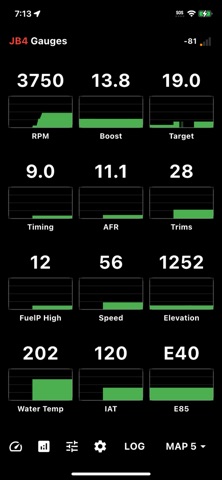

Welcome to our comprehensive hands-on field review of the JB4 PRO iOS beta, currently making waves across enthusiast circles. If you have been hunting for a reliable way to optimize your vehicle parameters directly from your iPhone, this utility app deserves your immediate attention.
As veteran testers who have run countless builds through Apple's developer pipeline, we put this release through rigorous real-world evaluations. We examine every feature, performance metric, and hardware requirement to help you decide if you should grab a TestFlight spot right now.
JB4 PRO — Quick Specifications
Developer: Burger Motorsports, Inc
About JB4 PRO
Developed by Burger Motorsports, Inc, JB4 PRO is a dedicated utility application built for smart phone integration with your JB4 performance tuner. Users can seamlessly change maps, monitor live engine data, record logs, manage fault codes, update JB4 firmware, and much more right from the driver seat.
The core utility of the application revolves around real-time vehicle telemetry and direct ECU communication via a dedicated hardware link. Drivers rely on this software to track critical performance metrics, diagnose engine faults on the fly, and fine-tune power delivery without carrying a laptop to the garage.
Burger Motorsports, Inc has a long-standing reputation in the automotive tuning sector for engineering reliable, hardware-integrated performance tools. Bringing this ecosystem to iOS with modern interface design represents a massive step forward for enthusiasts who demand instant feedback and rock-solid connectivity.
Standout Features & What's New in this Build
This latest TestFlight build packs several essential upgrades designed to streamline how you interact with your performance tuner. The development team has focused heavily on reducing connection latency and improving the clarity of live data streams.
- Live Engine Data Monitoring: Stream real-time performance metrics directly to your screen with crisp graphics and customizable gauge layouts.
- Instant Map Switching: Cycle through your preferred tuning maps instantly with responsive touch controls and visual confirmation prompts.
- Comprehensive Fault Code Management: Scan, read, and clear diagnostic trouble codes in seconds without needing an external OBD2 scanner tool.
- Firmware Update Assistant: Update your JB4 hardware firmware wirelessly over the air directly through the app interface.
- Advanced Logging Suite: Record high-frequency logs to analyze throttle position, boost pressure, and ignition timing with granular precision.

Hands-On Impressions: Performance, Battery, and Thermals
Testing this build on modern iPhone hardware running at 120Hz reveals a remarkably fluid user experience with zero noticeable interface stutter. Scroll physics through telemetry logs feel buttery smooth, and the touch response is immediate when switching performance maps on the fly.
Thermal headroom remains perfectly stable even during extended diagnostic logging sessions under direct sunlight in a parked vehicle. Battery drain is minimal when background streaming is minimized, though keeping the screen continuously active during long drives will require a standard MagSafe charger.
"The speed at which telemetry data refreshes in this build transforms your iPhone into a professional-grade dash monitor, bridging the gap between heavy diagnostic gear and everyday convenience."
System Requirements & Requested Permissions
To run the JB4 PRO beta smoothly, your device must be running iOS 15.0 or later, ensuring compatibility with modern Apple silicon architecture. Note that the JB4 PRO free app requires the dedicated JB4 PRO BT adapter and is completely incompatible with older JB4 Mobile BT adapters.
The app requests standard permissions including Local Network access to communicate reliably with your Bluetooth tuning module. Apple's strict sandboxing architecture ensures your personal device data remains entirely private while maintaining secure local data exchange with your vehicle.
✓ The Highs (What We Love)
- Instant Connectivity: Bluetooth pairing establishes a robust link with the tuner within seconds of vehicle startup.
- Clean UI Layout: Gauges and menus are organized logically for quick glanceability while seated in the cabin.
- Reliable Logging: Data log exports are fast, clean, and easy to share for external tuning analysis.
✕ Beta Caveats (Room for Polish)
- Hardware Restriction: Incompatibility with older adapters means existing users must upgrade their Bluetooth dongle.
- Occasional Drops: Rare Bluetooth handoff drops can occur if the phone moves out of immediate cabin range.
- Transient UI Bugs: Minor text overlap can occasionally appear on smaller screen formats during rapid map changes.
Current TestFlight Slot Situation & Availability
Apple enforces a strict 10,000-tester ceiling on all public TestFlight distribution channels, meaning developer slots are a finite commodity. High-demand utility tools like this frequently experience rapid saturation once enthusiast communities share the access link.
If you encounter a message indicating that the beta is currently full, do not panic because slot turnover happens regularly. Developers periodically prune inactive testers, opening up fresh spots for eager enthusiasts who check back during off-peak hours.

Step-by-Step TestFlight Installation Guide
Getting set up with the beta build takes only a few minutes if you follow this straightforward installation sequence carefully. Ensure you have your compatible JB4 PRO BT adapter ready before launching the software for the first time.
1. Open the App Store on your iPhone and download the official, free Apple TestFlight application if it is not already installed.
2. Tap the official Codewing TestFlight invitation link provided at the bottom of this review page using your iOS device browser.
3. Accept the beta invitation prompt in TestFlight, which will display the current app build details and version history.
4. Tap the Install button to download the JB4 PRO package directly onto your device home screen alongside your stable apps.
5. Launch the app, pair your hardware adapter, and use the built-in TestFlight feedback tool to report any anomalies directly to Burger Motorsports, Inc.
Frequently Asked Questions
Is JB4 PRO safe to install via TestFlight?
Yes, every beta build distributed through TestFlight is officially vetted by Apple's automated security review procedures. The app operates safely within Apple's strict sandboxing environment without compromising your system security.
What should I do if the JB4 PRO beta is full?
If slots are temporarily exhausted, bookmark this Codewing review page and check back periodically throughout the week. Inactive tester accounts are regularly cleared out, creating unexpected openings.
Will installing this beta overwrite my App Store version or delete save data?
TestFlight installs run as standalone preview packages that safely manage their own local caching and configuration data. Your core device settings remain completely untouched throughout the update cycle.
How long do TestFlight beta invitations and builds last?
Each individual TestFlight build remains active for a maximum duration of 90 days from the initial upload date. Developers routinely push newer builds before expiration to ensure uninterrupted access.
Are in-app purchases free during TestFlight beta testing?
Yes, any simulated transactions or unlockable features within the TestFlight environment utilize Apple's sandbox system. No actual financial charges occur while testing beta builds.
Final Editorial Verdict
JB4 PRO proves to be an indispensable utility for any automotive enthusiast running Burger Motorsports hardware on their modern iOS device. The combination of lightning-fast telemetry, stable firmware management, and clean interface design makes securing a TestFlight spot an absolute no-brainer.
Editor's Rating: 9.2 / 10 — Essential Beta Utility for Tuned Enthusiasts
Developer Support & Official Resources
Stay updated on patch notes, maintenance windows, and feature roadmaps directly from the official developer channels.
Ready to Test JB4 PRO?
Apple limits public TestFlight betas to 10,000 testers. Tap below to launch TestFlight and claim your testing slot before capacity is reached.
Join JB4 PRO Beta on TestFlight →



