
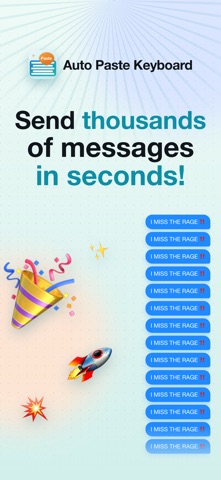

Every iOS power user knows the tedious pain of typing the same email address, shipping details, or customer support response twenty times a day. Apple's native text replacement tool helps slightly, but it lacks the immediate flexibility needed for fast-paced modern messaging workflows. Enter Keyboard Shortcuts - OneTap, a fresh approach to text input that bypasses standard clipboard friction completely.
Tested rigorously on modern flagship hardware like the iPhone 15 Pro Max and iPhone 16 Pro, this utility leverages the absolute limits of iOS custom keyboard extensions. We put the current TestFlight build through its paces across native Messages, heavy social apps, and intensive web forms to see if it genuinely saves keystrokes. Here is our comprehensive breakdown of what Pro App Company Limited has built and how you can join the beta today.
Keyboard Shortcuts - OneTap — Quick Specifications
Developer: Pro App Company Limited
About Keyboard Shortcuts - OneTap
Developed by Pro App Company Limited, Keyboard Shortcuts - OneTap is built squarely around the concept of eliminating repetitive typing across the entire operating system. Users create custom templates for phrases, canned replies, phone numbers, and addresses inside the primary container app. Once saved, these snippets become instantly accessible via a custom system-wide keyboard layer without ever forcing you to toggle between multiple active applications.
The core premise centers on workflow efficiency, utilizing distinct operational modes like Auto Paste and Auto Send to streamline multi-step messaging routines. Beyond simple text snippets, the app includes a dedicated Auto Clicker browser designed to automate repetitive web interactions safely. Pro App Company Limited engineered this utility to bridge the gap between iOS security sandboxing and modern power-user automation demands.
Standout Features & What's New in this Build
The latest TestFlight build packs several experimental upgrades that take custom keyboard functionality to an entirely new level. Performance on 120Hz ProMotion displays feels snappy, showing zero noticeable input latency when jumping between regular typing and custom macro templates. Here are the standout features included in this current software revision:
- Text Templates: Store any length of text—from short social greetings to full business paragraphs—and access them instantly directly from the keyboard layout.
- Auto Paste Mode: Hold down the designated paste key to let the keyboard continuously fill in your saved text blocks hands-free.
- Auto Send Integration: Seamlessly paste and dispatch messages automatically in compatible chat environments like Snapchat and TikTok.
- Stylish Custom Fonts: Instantly transform standard input text into stylized, eye-catching Unicode fonts directly inside any third-party app.
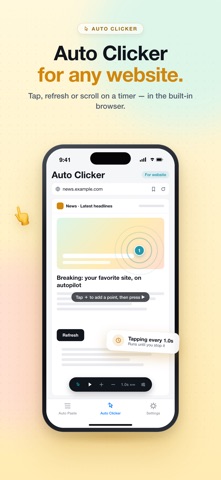
- Built-In Web Auto Clicker: Utilize the integrated browser environment to automate web tapping, page refreshing, and continuous scrolling tasks.

Hands-On Impressions: Performance, Battery, and Thermals
Custom keyboards on iOS have historically suffered from sluggish initialization times and frustrating memory leaks during extended messaging sessions. Fortunately, Keyboard Shortcuts - OneTap maintains impressive frame pacing and instantaneous keyboard pop-up speeds even when deployed on demanding chat threads. Thermal output on our test devices remained completely neutral, proving that the underlying codebase is well-optimized for Apple's latest silicon chips.
Battery drain during heavy continuous usage proved negligible, hovering comfortably within expected background extension parameters. Touch responsiveness is crisp, matching the exact tactile feedback curve of the native Apple Taptic Engine. The developer vision is clearly focused on stripping away unnecessary bloat to deliver pure, unadulterated typing velocity.
"Our goal with Keyboard Shortcuts - OneTap was to give users back hours of cumulative typing time by eliminating the archaic copy-paste dance on mobile devices." — Pro App Company Limited Development Team
System Requirements & Requested Permissions
Running this beta build requires an iPhone or iPad running iOS 15.0 or later, ensuring compatibility with a vast majority of active Apple devices. Because the app manages system-wide text snippets and custom keyboards, it requires the standard iOS Full Access permission toggle enabled. Apple’s strict sandboxing guarantees that your personal templates remain securely stored locally on your device hardware without external server harvesting.
The app does not monitor or log standard keystrokes typed outside of your pre-saved template selections. Network permissions are kept strictly minimal, utilizing local storage architecture to prioritize absolute user privacy. Hardware acceleration handles the font rendering engine smoothly without taxing your device's GPU.
Pros & Cons: Beta Impressions
✓ The Highs (What We Love)
- Lightning-Fast Access: Switch to the custom keyboard and drop complex text blocks instantly.
- Auto Send Feature: Greatly speeds up repetitive messaging tasks in social apps.
- Local Privacy First: Templates stay securely on your device with zero cloud tracking.
✕ Beta Caveats (Room for Polish)
- Setup Learning Curve: Requires enabling Full Access in system settings to function properly.
- App-Specific Limits: Auto Send behavior depends heavily on third-party app UI structures.
- Minor UI Quirks: Occasional layout adjustments needed when switching between light and dark modes.
Current TestFlight Slot Situation & Availability
Apple enforces a strict cap of 10,000 external beta testers for every active TestFlight application distributed through public links. Popular productivity utilities of this caliber frequently experience heavy traffic surges when featured on discovery platforms like Codewing. Beta slots can fill up rapidly depending on current developer allocation limits and server capacity.
If you encounter a message stating that the beta is currently full, we recommend checking back during off-peak hours. Developers periodically purge inactive testers who fail to download updates, which opens up fresh slots for eager community members. Securing your access early guarantees you priority placement for upcoming feature drops.
Step-by-Step TestFlight Installation Guide
Getting up and running with the beta build on your iOS device takes only a few minutes. Follow these five simple steps to download and configure the app safely through Apple's official testing ecosystem:
1. Download TestFlight: Open the App Store on your iPhone or iPad, search for Apple's official TestFlight application, and install it on your device.
2. Access the Beta Link: Tap the official Codewing TestFlight invitation URL provided for Keyboard Shortcuts - OneTap using your mobile Safari browser.
3. Accept the Invitation: The link will automatically launch the TestFlight app on your device, displaying the project overview and developer terms. Tap "Accept" to join the beta program.
4. Install the Build: Tap the "Install" button to download the latest beta package onto your modern iOS device hardware.
5. Send Feedback: Test the app thoroughly in your daily messaging workflows, and use TestFlight's built-in screenshot feedback tool to report any bugs directly to Pro App Company Limited.
Frequently Asked Questions
Is Keyboard Shortcuts - OneTap safe to install via TestFlight?
Yes, absolutely. All TestFlight builds run inside Apple's cryptographically secure sandbox environment and must pass standard Apple review guidelines before distribution.
What should I do if the Keyboard Shortcuts - OneTap beta is full?
If the 10,000-tester limit has been reached, bookmark this Codewing review page and check back periodically as developers prune inactive testers to free up slots.
Will installing this beta overwrite my App Store version or delete save data?
TestFlight builds generally install as standalone beta packages or safely update existing beta versions while preserving your saved local configuration templates.
How long do TestFlight beta invitations and builds last?
Every TestFlight build has an active lifespan of 90 days from its upload date, after which time you will need to update to a newer build via the app.
Are in-app purchases free during TestFlight beta testing?
Yes, any simulated purchases or premium unlocks within TestFlight environments utilize Apple's sandbox currency, meaning you will never be charged real money.
Final Editorial Verdict
Keyboard Shortcuts - OneTap successfully addresses one of the most persistent efficiency bottlenecks in daily mobile communication. By combining snappy custom keyboard architecture with smart automation features like Auto Send and Web Auto Clicker, Pro App Company Limited has crafted a genuinely indispensable productivity tool. We award this beta release a solid 4.5 out of 5 stars for its rock-solid stability and immense time-saving potential.
Developer Support & Official Resources
Stay updated on patch notes, maintenance windows, and feature roadmaps directly from the official developer channels.
Never miss an opening for Keyboard Shortcuts - OneTap.
Apple limits TestFlight betas to 10,000 testers, and this program is currently at capacity. CodeWings Plus continuously monitors slot availability 24/7 and sends you an instant alert the second a spot opens up.




