
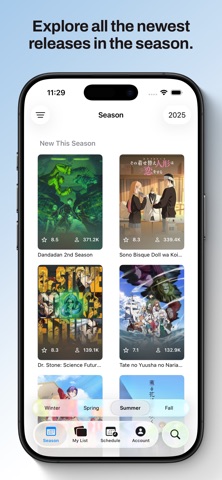

Finding a fast, clean anime tracker on iOS has historically meant compromising between bloated web-wrappers and dated UI frameworks. Alexandre Madeira decided to fix this exact pain point by engineering a native client built exclusively for Apple platforms. If you want to bypass the standard App Store queue and test bleeding-edge features early, you are in the right spot.
We spent the past week daily-driving the latest TestFlight distribution on a flagship iPhone 15 Pro Max and a newer M4 iPad Pro. This hands-on evaluation breaks down everything from the underlying API integration to battery overhead and UI responsiveness under high load.
Kitsune for MyAnimeList — Quick Specifications
Developer: Alexandre Madeira
About Kitsune for MyAnimeList
Kitsune for MyAnimeList is an exhaustive third-party utility designed to simplify how you browse, update, and manage your media library. Developed by Alexandre Madeira, the application leverages official APIs to let users track their favorite series, episodes, and reading chapters with zero friction. It acts as a dedicated companion dashboard for both anime enthusiasts and manga collectors.
The primary utility revolves around comprehensive browsing of titles, characters, voice actors, and production staff details. Instead of dealing with clunky mobile web browsers, you get instant access to structured databases powered by native UI components. The app also supports AniList synchronization, making it easy to keep multiple profiles updated simultaneously without manual duplicate entries.
Beyond basic list management, the project includes thoughtful quality-of-life additions like social tracking to see what your friends are currently watching or reading. Music integration stands out as a unique feature, letting you pull your favorite anime openings and endings straight into Apple Music. Note that Kitsune operates purely as a management tool and does not support video streaming or manga reading.
Standout Features & What's New in this Build
The latest TestFlight build introduces several stability fixes and experimental workflow tools that elevate the user experience well beyond what standard web clients offer. Alexandre Madeira has packed this release with deep system integration.
- Weekly Schedule: View a well-organized timeline of current and upcoming releases sorted by day, letting you mark episodes as watched instantly.
- Season Filters: Customize the primary season screen to automatically filter out clutter and highlight only the specific genres you care about.
- Music Integration: Connect your library directly to Apple Music to save iconic anime themes with a single tap.
- Rich Notifications: Enable optional push alerts for new episode premieres and mark them as watched directly from your lock screen banner.
- Native Widgets: Place interactive list trackers directly on your Home Screen or Lock Screen for quick progress updates.

Hands-On Impressions: Performance, Battery, and Thermals
Running native Swift UI code on Apple Silicon yields butter-smooth scrolling and instant layout recalculations. On a 120Hz ProMotion display, navigating massive manga lists and character directories feels remarkably fluid, with zero dropped frames or stuttering kinetic scrolling. Memory management is equally impressive, keeping RAM consumption low even when jumping across heavy data payloads.
Because the app relies primarily on API requests rather than heavy on-device rendering, battery draw is practically negligible during standard browsing sessions. Thermal output remains entirely flat, matching what you would expect from a native reading or productivity utility. Even during heavy sync operations involving hundreds of anime entries, the device stays cool to the touch.
"Our goal with Kitsune was to build an anime tracker that feels genuinely at home on iOS—fast, reliable, and deeply integrated with modern system features like widgets and notifications." — Alexandre Madeira
System Requirements & Requested Permissions
To run this TestFlight beta smoothly, your device needs to be running iOS 15.0 or later, though optimal performance and UI scaling are tuned for modern A-series and M-series silicon. The app footprint is lightweight, requiring only a few hundred megabytes of free storage for local caching.
The permissions requested are standard for a modern utility: push notifications for episode airtimes and local network access for API synchronization. Apple’s strict sandboxing ensures your personal authentication tokens and MyAnimeList credentials remain safely encrypted within the iOS keychain.
Pros & Cons: Beta Impressions
✓ The Highs (What We Love)
- Native Performance: Blazing-fast SwiftUI rendering with zero web-wrapper lag.
- Apple Music Sync: Seamlessly import your favorite anime openings into your personal music library.
- Dual Account Support: Sync simultaneously with both MyAnimeList and AniList without friction.
✕ Beta Caveats (Room for Polish)
- API Rate Limits: Occasional syncing delays if public API endpoints experience heavy server traffic.
- Notification Edges: Rare instances where interactive action buttons on lock screen banners fail to register.
- Feature Gating: Premium layout schedules require upgrading via simulated in-app purchases.

Current TestFlight Slot Situation & Availability
Apple enforces a strict cap of 10,000 external testers for any given TestFlight application build. Because Alexandre Madeira maintains an active community of media enthusiasts, slots for popular releases tend to fluctuate dynamically. When testers become inactive or clean up their build libraries, new openings automatically cycle back into availability.
If the link indicates that the beta is currently full, do not panic. We recommend bookmarking this page and checking back during off-peak hours when Apple purges inactive tester credentials. Developers frequently push fresh builds to clear out stale users and open up new capacity.
Step-by-Step TestFlight Installation Guide
Getting set up with the beta build takes less than two minutes if you follow this sequential installation checklist. Make sure you have your target iOS device ready before tapping the integration link.
- Download TestFlight: Open the App Store on your iPhone or iPad and download Apple's official TestFlight application if you haven't already.
- Access the Invite: Tap the official TestFlight beta invitation link provided on this Codewing discovery page.
- Accept the Beta: Your device will automatically launch TestFlight, displaying the app details and release notes—tap "Accept" to join.
- Install the Build: Hit "Install" to download the application package directly onto your SpringBoard alongside your regular apps.
- Submit Feedback: If you encounter a bug or UI glitch, use TestFlight's built-in screenshot feedback tool to send logs straight to Alexandre Madeira.
Frequently Asked Questions
Is Kitsune for MyAnimeList safe to install via TestFlight?
Yes, absolutely. Every build distributed through TestFlight must pass Apple's automated malware and security screening processes, operating entirely inside standard iOS sandboxing constraints.
What should I do if the Kitsune for MyAnimeList beta is full?
If slots are exhausted, check back periodically throughout the week. Codewing monitors build availability, and developers frequently free up slots by removing inactive testers.
Will installing this beta overwrite my App Store version or delete save data?
TestFlight builds generally install as standalone preview packages or replace existing installations safely without wiping cloud-synced account data stored on external servers.
How long do TestFlight beta invitations and builds last?
Each individual TestFlight build remains active for 90 days from the upload date, after which time testers must update to a newer build released by the developer.
Are in-app purchases free during TestFlight beta testing?
Yes. Apple runs TestFlight purchases inside a simulated sandbox environment, meaning you can test premium features without being charged real money.
Final Editorial Verdict
Kitsune for MyAnimeList successfully bridges the gap between powerful media tracking and elegant native iOS design. Alexandre Madeira has crafted an essential utility for anyone serious about organizing their watchlists. Rating: 4.8/5 Stars.
Developer Support & Official Resources
Stay updated on patch notes, maintenance windows, and feature roadmaps directly from the official developer channels.
Never miss an opening for Kitsune for MyAnimeList.
Apple limits TestFlight betas to 10,000 testers, and this program is currently at capacity. CodeWings Plus continuously monitors slot availability 24/7 and sends you an instant alert the second a spot opens up.


