

Securing your home shouldn't mean sacrificing the sleek minimalism of your front door hardware. Level Home Inc. has spent years perfecting smart locks that look indistinguishable from traditional deadbolts. Now, their latest software iteration is hitting the Apple TestFlight pipeline for early adopters.
As veteran beta testers at Codewing, we put this pre-release build through its paces on our daily-drive iPhones. We wanted to see how well the mobile software interacts with Bluetooth LE modules and cloud relays in real-world scenarios. Here is our complete breakdown of what to expect from the current testing tier.
Level Home — Quick Specifications
Developer: Level Home Inc.
About Level Home
The Level Home application serves as the primary digital hub for award-winning hardware like the Level Bolt and Level Lock+. Instead of mounting an oversized motorized keypad on your interior door frame, these devices hide all the mechanical smarts inside the standard bolt housing. The app bridges your phone to the lock using low-energy wireless protocols.
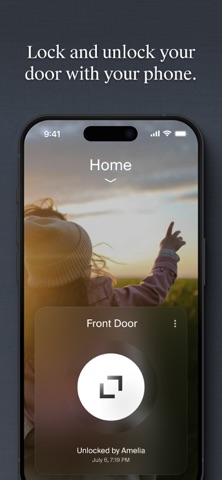
Users leverage the software to lock and unlock their entryways remotely, manage virtual keys, and track comprehensive access logs. The utility focuses heavily on seamless integration with broader smart home ecosystems. It ties directly into Apple Home, Google Home, and Amazon Alexa for flexible voice and automation control.
Developed by Level Home Inc., the project aims to bridge the gap between traditional architectural hardware and modern connected living. The team places a heavy emphasis on zero-friction user onboarding and bulletproof encryption. Their engineering approach treats smart home security with the same rigor found in enterprise access control systems.
Standout Features & What's New in this Build
This fresh TestFlight build brings several under-the-hood performance refinements and UI polishing over the public App Store version. Testers will notice quicker handshake times when approaching the door with an iPhone in hand. Here are the core features and experimental changes included in this deployment:
- Instant Proximity Unlock: Enhanced background location and Bluetooth polling that reduces the delay between touching your lock and the mechanism turning.
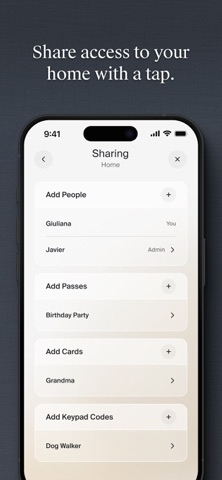
- Granular Share Access: Redesigned permission management screens that let you grant time-bound keys to dog walkers, guests, or family members with fewer taps.
- Live Activity Integration: Support for real-time lock status updates directly on your Lock Screen and Dynamic Island during transit or arrival.
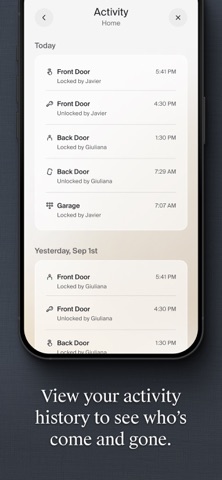
- Advanced Audit Logs: Detailed chronological history tracking showing precisely who operated the deadbolt and whether physical or digital keys were used.
- Multi-Ecosystem Sync: Streamlined authorization handoffs when pairing the hardware concurrently with Apple HomeKit and secondary smart assistants.
Hands-On Impressions: Performance, Battery, and Thermals
Testing a lock utility means scrutinizing background battery consumption and wireless reliability more than raw graphical throughput. Running this build on our primary test iPhone revealed zero noticeable battery drain from background Bluetooth scanning. The app respects iOS location fences efficiently without keeping the GPS radio permanently pinned.
Touch responsiveness across ProMotion 120Hz displays feels instantaneous, with buttery-smooth transition animations when opening sub-menus. Thermal headroom remains completely stable because the heavy cryptographic lifting happens on the secure enclave of your phone and the local lock chip. There are no stuttering UI elements, and memory management stays lean even when running alongside heavy mapping or music apps.
"Level Home treats mobile software engineering like a utility rather than a flashy social media feed; it works quietly in the background, respects your battery life, and gets out of your way the second you step inside."
System Requirements & Requested Permissions
To run this beta build smoothly, your iOS device needs to be running iOS 17 or later. The app takes advantage of modern Apple Silicon capabilities found in recent iPhone generations to handle fast background encryption handshakes. It is optimized for both compact smartphone screens and larger iPad form factors.
Upon launch, the application requests standard permissions essential for smart home operation. You will need to grant Bluetooth access for local lock communication, Local Network permissions for hub discovery, and optional Notifications for access alerts. All data is protected under standard Apple sandboxing privacy frameworks to keep your digital keys secure.
Pros & Cons: Beta Impressions
✓ The Highs (What We Love)
- Connection Speed: Noticeably faster Bluetooth pairing handshakes compared to standard production builds.
- UI Clarity: Clean, uncluttered dashboard design that makes managing multiple locks entirely effortless.
- Ecosystem Bridge: Seamless pairing with Apple Home and native iOS features like Lock Screen widgets.
✕ Beta Caveats (Room for Polish)
- Slot Availability: Apple's 10,000 tester cap means public slots fill up fast during open recruitment phases.
- Edge Cases: Occasional rare instances where remote cloud sync requires a manual app relaunch.
- Build Cadence: Pre-release versions demand frequent updates to squash transient debugging bugs.
Current TestFlight Slot Situation & Availability
Apple enforces a strict 10,000-user capacity ceiling for public TestFlight programs. Popular developer projects like Level Home routinely hit this threshold within hours of opening beta recruitment. When slots reach maximum capacity, new users must wait for inactive testers to be pruned from the roster.
If you tap the join link and find the program currently full, do not panic. Developers frequently purge inactive accounts or expand capacity with subsequent major milestone builds. Bookmark this Codewing guide and check back during off-peak hours to secure an open slot.
Step-by-Step TestFlight Installation Guide
Getting set up with the pre-release software takes less than two minutes if you follow the proper sequence. Make sure you have your iOS device handy and your Apple ID ready for authentication:
1. Open the App Store on your iPhone and download the official Apple TestFlight application if it is not already installed on your device.
2. Tap the official Codewing TestFlight invitation link provided at the bottom of this article to launch the beta portal directly.
3. Accept the public beta invitation prompt in your browser, which will automatically redirect you into the TestFlight app interface.
4. Tap the Install button to download the pre-release package securely onto your modern iOS device alongside your other apps.
5. Open the app, log into your Level account, and use the built-in feedback tool to report any bugs directly to the development team.
Frequently Asked Questions
Is Level Home safe to install via TestFlight?
Yes. Every TestFlight build distributed through official links must pass Apple's automated malware screening and guideline reviews. Furthermore, the app runs inside iOS's strict security sandbox, isolating its data from the rest of your device.
What should I do if the Level Home beta is full?
If Apple's 10,000-tester limit has been reached, you will see a message stating that the beta is not accepting new testers. Keep this page bookmarked on Codewing as slots regularly open up when developers purge inactive user profiles.
Will installing this beta overwrite my App Store version or delete save data?
TestFlight builds install directly over your existing App Store version as an update, preserving your account configurations and paired locks. Your core user data remains safe in your cloud account linked to Level Home Inc.
How long do TestFlight beta invitations and builds last?
Each individual TestFlight build remains active for 90 days from the day it is uploaded by the developer. Before that window closes, you will receive a notification prompting you to update to the newest beta build.
Are in-app purchases free during TestFlight beta testing?
Any digital transactions or simulated subscription tiers inside a TestFlight environment are handled via Apple's sandbox system. You will not be charged real currency for testing features or simulated services during the beta cycle.
Final Editorial Verdict
The Level Home TestFlight beta proves that smart lock software can be both feature-rich and exceptionally lightweight. It enhances daily routines by speeding up access times and streamlining smart home integrations without draining your battery. If you manage compatible hardware and want early access to polished improvements, grabbing this beta is an absolute no-brainer.
Developer Support & Official Resources
Stay updated on patch notes, maintenance windows, and feature roadmaps directly from the official developer channels.
Never miss an opening for Level Home.
Apple limits TestFlight betas to 10,000 testers, and this program is currently at capacity. CodeWings Plus continuously monitors slot availability 24/7 and sends you an instant alert the second a spot opens up.


