


Running advanced language models locally on mobile hardware used to be an impossible engineering dream. Asghar Ghorbani changed that narrative by building an iOS client capable of executing GGUF weights directly on your iPhone processor. We loaded up the newest beta build on our daily drivers to test its offline conversational boundaries.
If you want to bypass cloud subscription fees and chat entirely offline, this application merits immediate attention. Let us examine what makes this local AI runner stand out in the crowded utility ecosystem.
LLM Farm — Quick Specifications
Developer: Asghar Ghorbani
About LLM Farm
LLM Farm functions as a dedicated local wrapper designed to ingest and execute large language models natively on iOS hardware. Users download quantized model weights in GGUF format and query them locally without pinging external servers. This architecture keeps every prompt, response, and personal journal entry locked securely inside your device storage.
The core premise centers on total digital sovereignty and absolute privacy for mobile users. Instead of routing creative writing prompts or coding queries through third-party APIs, the app leverages Apple Silicon hardware acceleration. You control the exact models you run, swapping between different parameter sizes depending on your storage limits and processing needs.
Developer Asghar Ghorbani built this project specifically for power users who want raw AI utility without subscription paywalls or data harvesting concerns. The tool bridges desktop-class machine learning workflows with mobile convenience. It empowers everyday users to experiment with open-source weights directly from their pockets.
Standout Features and What's New in This Build
This fresh TestFlight distribution refines how iOS devices handle massive token generation workloads. Asghar Ghorbani focused heavily on memory efficiency and search convenience in this iteration.
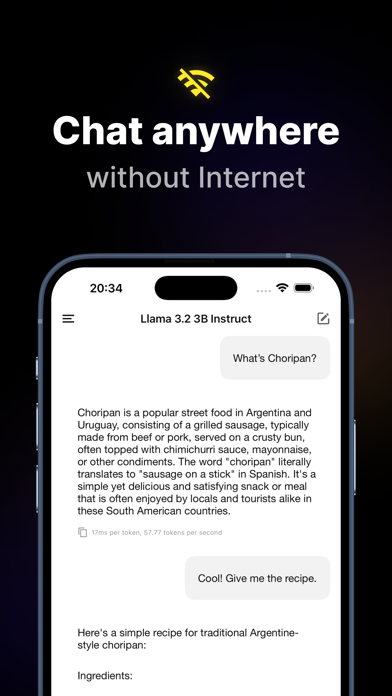
- Offline Chatting: Execute complex transformer models directly on your device without requiring an active Wi-Fi or cellular connection.
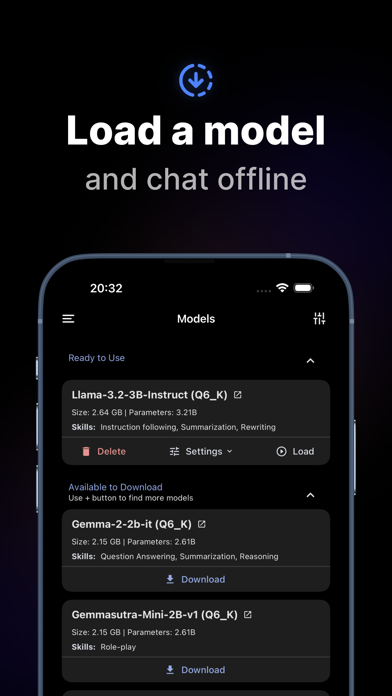
- Hugging Face Integration: Search for GGUF weights directly inside the app interface, then bookmark or download your favorite parameters seamlessly.
- Secure and Private Sandboxing: Ensure your data never leaves your hardware because all conversational inference happens entirely offline.
- Quantization Support: Load various GGUF compression formats to balance token generation speed against output response quality.
- Optimized Memory Management: Prevent sudden out-of-memory crashes during extended multi-turn prompt sessions on supported devices.
Hands-On Impressions: Performance, Battery, and Thermals
Executing billion-parameter models on a smartphone places heavy demands on thermal design and silicon throughput. On a modern A-series Pro processor paired with a 120Hz ProMotion display, smaller 1B to 3B models generate tokens at a surprisingly fast clip. Touch responsiveness remains snappy even while the inference engine churns through complex conversational reasoning loops in the background.
Extended chat sessions will predictably warm up the back glass as the Neural Engine and GPU cores work overtime. Battery drain is noticeable if you run unquantized or oversized models continuously without plugging into a power source. However, managing model size keeps thermal throttling manageable during everyday mobile usage.
"Running open-source weights locally transforms your phone into a private, self-contained intelligence hub that respects your personal boundaries."
System Requirements and Requested Permissions
To run this beta build smoothly, you need an iOS device running iOS 15.1 or later. Devices featuring modern Apple Silicon and generous RAM pools will yield the fastest token generation speeds and lowest latency. Older hardware will still function, but you should expect slower response times when processing larger GGUF files.
The app requests standard sandboxed storage permissions to download and store large GGUF weight files locally. Local network access permissions are minimal since the primary design philosophy emphasizes offline, disconnected execution. Apple's strict sandboxing ensures your downloaded model weights and chat databases remain isolated from other installed apps.
Pros and Cons: Beta Impressions
✓ The Highs (What We Love)
- Total Privacy: Zero cloud servers mean your conversations stay strictly offline.
- Hugging Face Search: Direct weight downloading simplifies model discovery within the UI.
- No Subscriptions: Free utility without monthly fees or token purchase restrictions.
✕ Beta Caveats (Room for Polish)
- Thermal Load: Extended sessions can warm up older mobile hardware noticeably.
- Storage Hungry: GGUF weight files require significant free space on your device.
RAM Limits: Large models may trigger memory warnings on base device configurations.
Current TestFlight Slot Situation and Availability
Apple enforces a strict 10,000-tester ceiling on all public TestFlight distribution links. High-profile developer utilities frequently hit this capacity threshold within hours of sharing. Checking availability early is essential if you want secure, direct access before slots vanish completely.
If the official distribution link appears full, do not panic. Developers frequently purge inactive testers or release expanded build slots alongside major updates. Bookmark this Codewing guide and check back during off-peak hours to catch newly opened seats.
Step-by-Step TestFlight Installation Guide
Installing this beta build on your iOS device takes only a few minutes. Follow these simple instructions to get set up:
- Download and install the official Apple TestFlight app from the iOS App Store.
- Tap the active developer invitation link provided on this Codewing page using your iPhone browser.
- Accept the beta invitation prompt to open the LLM Farm testing package inside TestFlight.
- Tap the Install button to download the beta build onto your local device storage.
- Open the app, download your preferred GGUF weights, and submit bug reports via TestFlight if you encounter issues.
Frequently Asked Questions
Is LLM Farm safe to install via TestFlight?
Yes, installation is completely safe. Every beta package goes through Apple's automated screening process and operates safely within standard iOS sandboxing guidelines.
What should I do if the LLM Farm beta is full?
If maximum capacity is reached, check back periodically. Developers regularly prune inactive accounts, and new testing slots open up frequently.
Will installing this beta overwrite my App Store version or delete save data?
TestFlight builds usually run as standalone preview packages or upgrade existing beta data cleanly, but you should always back up important files beforehand.
How long do TestFlight beta invitations and builds last?
Each individual TestFlight build remains active for 90 days from its upload date before expiring, requiring routine updates through the app.
Are in-app purchases free during TestFlight beta testing?
Yes. Any transactions simulated inside a TestFlight beta environment use Apple's sandbox infrastructure and will never charge your real payment method.
Final Editorial Verdict
LLM Farm delivers an impressive proof-of-concept for running decentralized, private artificial intelligence on consumer mobile hardware. Asghar Ghorbani has crafted an essential tool for privacy enthusiasts and AI tinkerers alike. Grab the TestFlight beta link while slots remain open and experience local language models firsthand.
Developer Support & Official Resources
Stay updated on patch notes, maintenance windows, and feature roadmaps directly from the official developer channels.
Never miss an opening for LLM Farm.
Apple limits TestFlight betas to 10,000 testers, and this program is currently at capacity. CodeWings Plus continuously monitors slot availability 24/7 and sends you an instant alert the second a spot opens up.






