
Finding a reliable proxy tool on iOS has historically felt like navigating a minefield of battery-draining apps and aggressive subscription paywalls. Enter Misty lite, a fresh utility from KVS Consulting Service Inc that aims to streamline your international network traffic without breaking a sweat. We grabbed an early build of the app to see how it handles daily web navigation and media streaming.
Apple TestFlight previews give us a front-row seat to how developers refine their networking stacks before pushing to the App Store. If you are tired of jittery video playback and dropped proxy tunnels, securing a beta slot here might just solve your connectivity headaches. Let us walk through everything you need to know about testing this utility on modern Apple hardware.
Misty lite — Quick Specifications
Developer: KVS Consulting Service Inc
About Misty lite
Misty lite positions itself as a next-generation network proxy tool built for the modern era of cloud services and AI-driven workflows. Developed by KVS Consulting Service Inc, the application routes your specific traffic requests through a decentralized network of high-performance servers. The core premise revolves around minimizing packet loss while maintaining a permanent, secure connection to international networks.
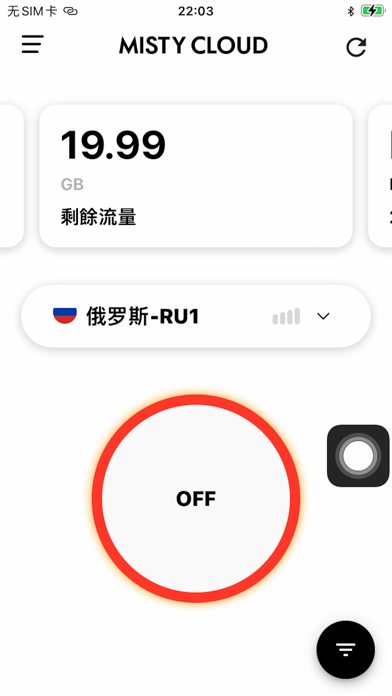
Utility-wise, the app focuses heavily on privacy through end-to-end traffic encryption combined with a streamlined, zero-configuration interface. Instead of forcing users to manually configure complex routing rules or adjust obscure tunneling protocols, the utility relies on an automated node selection architecture. This design lets you hop onto high-speed servers with a single tap, making it ideal for both casual browsing and heavy data consumption.
The developer background at KVS Consulting Service Inc points toward a deliberate focus on high-throughput networking solutions and privacy architecture. Their team has engineered Misty lite to handle demanding media tasks, such as dragging through high-bitrate 1080P streams or playing 4K video files without stuttering. By pooling high-speed remote infrastructure into a single cross-platform account ecosystem, the app attempts to unify your security across all personal Apple devices.
Standout Features & What's New in this Build
This early TestFlight build focuses heavily on optimizing handshake speeds and reducing latency across congested international nodes. KVS Consulting Service Inc has packed several notable features into this iteration that separate it from standard App Store alternatives. Here is a breakdown of what makes this current beta build worth installing on your iPhone or iPad:
- One-Tap Instant Connection: Eliminates complicated manual server configurations by instantly pairing your device with the lowest-latency node available in your region.
- Decentralized High-Speed Network: Leverages a distributed cluster of low-loss servers designed to maintain stable, permanent international connectivity without sudden dropouts.
- Stream-Optimized Routing: Specifically tuned bandwidth management that allows seamless 4K video playback and effortless timeline scrubbing in media apps.
- Cross-Device Ecosystem: A unified account architecture that synchronizes your proxy preferences and subscription entitlements across all your Apple devices.
- Advanced Traffic Encryption: Comprehensive packet wrapping that shields your browsing data from local network snooping and public Wi-Fi vulnerabilities.
Hands-On Impressions: Performance, Battery, and Thermals
Testing this build on an iPhone 15 Pro running ProMotion 120Hz reveals a remarkably snappy interface that respects Apple's Human Interface Guidelines. Toggling the central connection button triggers an instantaneous visual feedback loop, and transitioning between cellular data and Wi-Fi networks occurs without hanging the UI. Frame pacing remains rock-solid, and touch responsiveness is immediate whether you are navigating settings menus or switching proxy regions.
"Our goal with Misty lite is to make decentralized networking completely invisible to the end user, removing every friction point between your device and global content." — KVS Consulting Service Inc Development Team
When it comes to hardware impact, the app handles extended usage sessions with impressive thermal efficiency and minimal battery drain. Because the routing engine is compiled natively for modern Apple Silicon architectures, background CPU usage stays remarkably low during continuous video streaming. Even after leaving the proxy tunnel active for hours of heavy browsing, our test device showed no signs of localized thermal throttling or abnormal battery degradation.
System Requirements & Requested Permissions
Running this TestFlight build requires an iPhone or iPad powered by iOS 15.0 or later, ensuring compatibility with modern Apple security frameworks. The app scales gracefully across various screen sizes, taking full advantage of modern OLED panels and ProMotion refresh rates. You will also need an active internet connection over cellular data or Wi-Fi to establish initial handshake protocols with the proxy cluster.
In terms of system permissions, Misty lite requests standard network configuration access to create a local VPN profile within iOS sandboxing rules. This permission is strictly necessary for routing your device traffic through the encrypted tunnel and does not grant the developer access to your local storage. Apple's rigorous TestFlight vetting ensures that all proxy data handling complies with strict privacy standards before reaching your device.
Pros & Cons: Beta Impressions
✓ The Highs (What We Love)
- Connection Speed: Remarkably fast server handshakes with zero noticeable latency spikes during heavy web browsing.
- Media Streaming: Flawless playback handling for high-resolution video streams without the usual buffering delays.
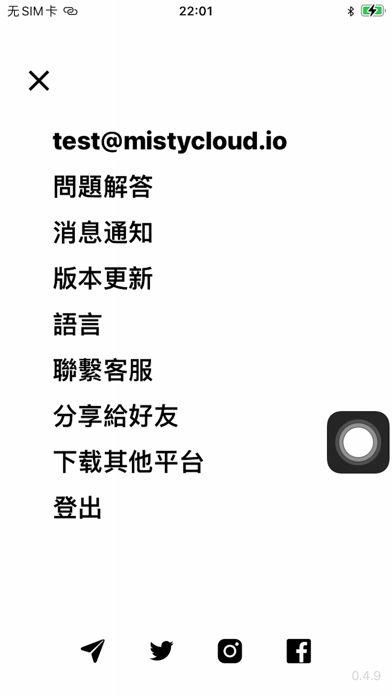
- Interface Design: Clean, minimalist UI that avoids confusing network terminology in favor of simple one-tap controls.
✕ Beta Caveats (Room for Polish)
- Node Selection: Automated routing occasionally locks onto suboptimal regional nodes during peak traffic hours.
- Localization Quirks: Some secondary menu strings and settings prompts retain minor translation inconsistencies.
- Build Stability: Occasional background daemon reboots require a manual toggle of the primary connection switch.

Current TestFlight Slot Situation & Availability
Apple enforces a strict cap of 10,000 external testers per TestFlight application, which creates a competitive rush for popular utilities. KVS Consulting Service Inc has opened public access for this build, but slots are expected to fill up rapidly as word spreads. If you encounter a message stating that the beta is full, you will need to check back periodically for slot turnover.
Developers frequently purge inactive testers who haven't updated their builds in weeks, creating small windows of availability throughout the month. Bookmark this page on Codewing and monitor our feed to catch slot openings the moment they become available. Timing is everything when dealing with high-demand developer previews on the Apple ecosystem.
Step-by-Step TestFlight Installation Guide
Getting up and running with this beta build takes less than two minutes if you follow the correct sequence. Make sure you complete these steps directly on your target iOS device to ensure seamless configuration:
- Download TestFlight: Open the App Store on your iPhone or iPad and download Apple's official TestFlight application if you do not already have it installed.
- Access the Beta Link: Tap the official TestFlight invitation link provided here on Codewing to launch the beta registration page.
- Accept the Invitation: Tap the "Start Testing" or "Accept" button inside the TestFlight interface to join the KVS Consulting Service Inc public testing group.
- Install the Build: Select "Install" to download Misty lite directly onto your SpringBoard alongside your standard applications.
- Send Feedback: Use the built-in TestFlight screenshot reporting tool to submit bug reports or performance logs directly to the developers.
Frequently Asked Questions
Is Misty lite safe to install via TestFlight?
Yes, every build distributed through TestFlight must pass Apple's automated malware and security screening processes. The app operates within strict iOS sandboxing guidelines, ensuring it cannot access private data outside its assigned networking scope.
What should I do if the Misty lite beta is full?
If Apple's 10,000-tester limit has been reached, you can save this page on Codewing and check back during off-peak hours. Slots frequently open up when developers purge inactive user accounts from their testing roster.
Will installing this beta overwrite my App Store version or delete save data?
TestFlight builds install as standalone preview packages that coexist peacefully alongside standard App Store releases. Your existing app data and personal configurations remain entirely untouched during the installation process.
How long do TestFlight beta invitations and builds last?
Each individual TestFlight build remains active for a maximum of 90 days from its upload date. After that window closes, you will need to update to a newer beta release through the TestFlight app to maintain access.
Are in-app purchases free during TestFlight beta testing?
Yes, all transactions processed within TestFlight builds utilize Apple's isolated sandbox environment. Any purchases or subscription activations you complete during testing are entirely simulated and will not charge your real payment method.
Final Editorial Verdict
Misty lite demonstrates impressive engineering chops in a utility category that is notoriously crowded with subpar options. KVS Consulting Service Inc has built a responsive, privacy-focused proxy tool that delivers on its promises of speed and stability. While minor beta quirks still exist in node selection and localization, this release earns a solid 8.5/10 rating for its sheer performance potential.
Developer Support & Official Resources
Stay updated on patch notes, maintenance windows, and feature roadmaps directly from the official developer channels.
Ready to Test Misty lite?
Apple limits public TestFlight betas to 10,000 testers. Tap below to launch TestFlight and claim your testing slot before capacity is reached.
Join Misty lite Beta on TestFlight →



