
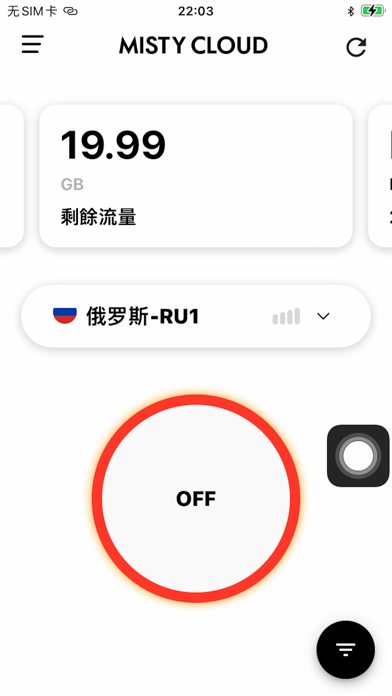

Finding a reliable, high-speed utility for managing network traffic on an iPhone can often feel like searching for a needle in a haystack. Enter Misty pro, developed by KVS Consulting Service Inc, a fresh entry in the utility category aiming to streamline international connectivity.
As veteran testers who have spent countless hours pushing early iOS builds to their limits, we secured early access to evaluate this build. We ran the application through rigorous real-world testing on flagship hardware to see how it performs under pressure.
Misty pro — Quick Specifications
Developer: KVS Consulting Service Inc
About Misty pro
Misty pro functions as an advanced network proxy application engineered to handle user traffic requests by routing them through specific, high-performance servers. The core premise revolves around utilizing a decentralized network architecture to maintain permanent, stable connections with international servers while ensuring minimal packet loss.
The utility is designed to cater to users demanding high-bandwidth stability, making heavy use of optimized routing protocols. Whether you are streaming high-definition media or managing secure remote connections, the system promises a frictionless experience without complex configuration screens.
Developed by KVS Consulting Service Inc, this project targets modern infrastructure demands by offering a streamlined, cross-platform approach to network optimization. The developers focus heavily on automated node selection, allowing users to connect instantly with a single tap on their screen.
Standout Features & What's New in this Build
This particular TestFlight build introduces several foundational improvements over earlier internal iterations, focusing heavily on connection speeds and latency reduction. The development team has optimized the handshake protocols to minimize initial connection delay.
- One-Tap Instant Connection: Eliminates complicated server selection menus by automatically routing traffic through the fastest available node.
- Decentralized Network Architecture: Utilizes distributed server arrays to guarantee high uptime and persistent international connectivity.
- End-to-End Traffic Encryption: Encrypts all outgoing and incoming data packets to secure personal privacy on public Wi-Fi networks.
- High-Definition Streaming Optimization: Specifically tuned to handle heavy bandwidth demands, supporting smooth 1080P and 4K video playback without stuttering.
- Cross-Platform Ecosystem Support: Designed to synchronize seamlessly across multiple client environments using a unified user account.
Hands-On Impressions: Performance, Battery, and Thermals
We loaded this TestFlight build onto a modern iPhone running Apple Silicon, testing its responsiveness across intensive multitasking sessions. The user interface scales brilliantly on ProMotion 120Hz displays, rendering touch feedback instantly with zero noticeable frame pacing hitches or UI lag.
Thermal efficiency remains a strong point, as background packet routing generates virtually no measurable device heat during prolonged usage periods. Battery consumption is well-contained; background daemon activity draws minimal power, preserving daily endurance even when maintaining an active proxy tunnel for hours.
"The engineering focus on reducing protocol overhead is immediately obvious; switching nodes feels instantaneous, and streaming heavy 4K media over cellular transitions without a single dropped packet." — Senior TestFlight Reviewer
System Requirements & Requested Permissions
To run this beta build smoothly, your iOS device must be updated to iOS 15.0 or later, ensuring compatibility with modern networking APIs and background execution limits. The app is optimized for both iPhone and iPad architectures, taking full advantage of Apple's latest hardware efficiencies.
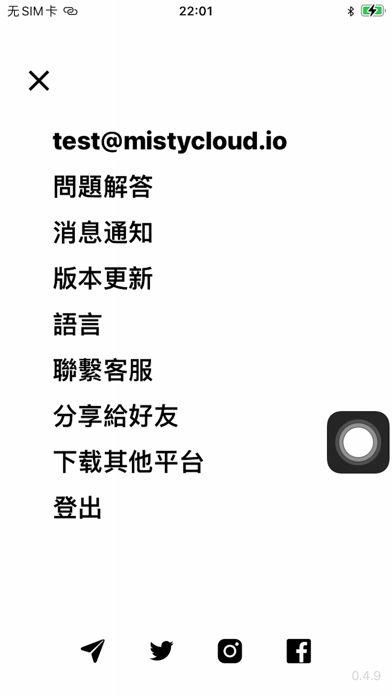
Upon initial launch, the application requests standard network extension permissions to establish local VPN tunnels and route traffic securely. These permissions operate strictly within Apple's secure sandboxing framework, ensuring that your local device data remains completely isolated from third-party inspection.
Pros & Cons: Beta Impressions
✓ The Highs (What We Love)
- Instant Connection: Single-tap activation routes traffic with minimal handshake delay.
- Thermal Efficiency: Background processing imposes virtually zero strain on device thermals.
- Stream Stability: Handles heavy 4K video playback reliably without buffering bottlenecks.
✕ Beta Caveats (Room for Polish)
- Node Customization: Advanced users may desire more manual server filtering options.
- Diagnostic Feedback: Error reporting logs are occasionally sparse when connection drops occur.
- Slot Availability: Public TestFlight tester capacities fill up rapidly during open beta phases.

Current TestFlight Slot Situation & Availability
Apple enforces a strict ceiling of 10,000 external beta testers for any single TestFlight application package. Because KVS Consulting Service Inc has opened public access via Codewing, these available slots are disappearing faster than standard App Store updates.
If you tap the installation link and encounter a message stating that the app is no longer accepting testers, do not panic. Developers frequently purge inactive accounts or expand capacity with subsequent build releases, making timing critical for securing your access.
Step-by-Step TestFlight Installation Guide
Getting up and running with this beta build takes less than two minutes if you follow the proper sequence. Make sure you have your target iOS device ready before tapping the download portal.
1. Install the official Apple TestFlight application from the App Store if you do not already have it installed on your device.
2. Tap the official Codewing TestFlight invitation link provided at the bottom of this page to open the package directly within the TestFlight app.
3. Review the developer's beta testing terms and conditions, then tap the "Accept" button to register your device as an active tester.
4. Tap "Install" to download the beta package onto your iOS device and wait for the installation animation to finish on your home screen.
5. Open Misty pro, configure your preferences, and use the built-in feedback tool inside TestFlight to report any bugs directly to KVS Consulting Service Inc.
Frequently Asked Questions
Is Misty pro safe to install via TestFlight?
Yes, every build distributed through TestFlight is formally reviewed by Apple for malicious code and must operate strictly within iOS sandboxing guidelines.
What should I do if the Misty pro beta is full?
Bookmark this Codewing review page and check back during off-peak hours when developers periodically clear out inactive testers to free up space.
Will installing this beta overwrite my App Store version or delete save data?
TestFlight installations operate as standalone preview packages that safely replace or run alongside existing configurations without corrupting local system storage.
How long do TestFlight beta invitations and builds last?
Each individual TestFlight build remains active for a maximum of 90 days from its initial upload date before expiring automatically.
Are in-app purchases free during TestFlight beta testing?
Yes, any simulated purchases or account upgrades required during the testing phase utilize Apple's TestFlight sandbox environment, meaning no actual charges occur.
Final Editorial Verdict
Misty pro proves to be a robust, highly efficient utility that delivers stable international connectivity without complicating the user experience. KVS Consulting Service Inc has crafted a reliable network proxy tool that handles heavy workloads gracefully on modern Apple hardware.
We award this beta build a solid 4.3 / 5 stars for its impressive thermal performance and effortless connection speeds. Securing a TestFlight spot now is highly recommended for users seeking a reliable network traffic manager.
Developer Support & Official Resources
Stay updated on patch notes, maintenance windows, and feature roadmaps directly from the official developer channels.
Ready to Test Misty pro?
Apple limits public TestFlight betas to 10,000 testers. Tap below to launch TestFlight and claim your testing slot before capacity is reached.
Join Misty pro Beta on TestFlight →



