
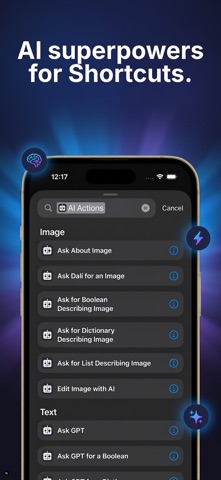

For power users who treat the iOS Shortcuts app as a personal automation command center, building complex workflows often hits a frustrating logic wall. Standard device actions handle basic tasks nicely, but parsing unstructured data or generating real intelligence usually requires opening third-party chat apps. 9592 Solutions UG is rewriting that workflow rulebook with Native AI Actions, an innovative utility bridging modern cloud models directly into native Apple automations.
If you want early access to these capabilities before public release, jumping into the beta build via the official distribution channel is your best move. We spent the last week stress-testing the early packages on our daily-driver hardware to see how these API-driven actions handle heavy workloads. Let us walk you through the feature set, performance metrics, and the exact steps required to claim your spot on TestFlight.
Native AI Actions — Quick Specifications
Developer: 9592 Solutions UG
About Native AI Actions
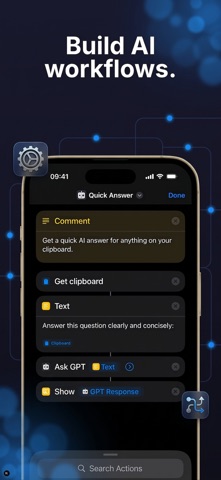
Native AI Actions integrates intelligence steps directly into the iOS Shortcuts environment without requiring you to switch windows or launch a bloated helper app. Every action within the utility handles input and outputs clean strings, lists, dictionaries, booleans, or generated images to feed smoothly into subsequent steps. Whether you are piping transcripts into Notes or sending structured variables straight to Calendar, the entire pipeline operates invisibly in the background.
The core utility stems from 9592 Solutions UG, a boutique studio focused on practical developer tooling and deep ecosystem integrations for Apple platforms. Rather than building another standalone chatbot interface, the team realized the real value lies in exposing powerful endpoints natively to Siri and Spotlight. You can invoke complex multi-step chains simply by triggering a custom phrase or calling a shortcut from your home screen widget grid.
Behind the scenes, the utility coordinates calls across industry-standard large language models from OpenAI, Perplexity, and Google depending on the prompt complexity. The free tier includes a generous daily allotment of actions with a temporary boost during your first week of onboarding. Advanced features such as speaker-labeled audio transcription, web-grounded search, and image generation are designed to scale smoothly as your daily automation demands grow.
Standout Features & What's New in this Build
This early testing phase brings several robust capabilities designed to turn your iPhone into a genuine local productivity powerhouse. The engineering team has focused heavily on reliable output formatting so that subsequent shortcut steps never break due to unexpected syntax errors.
- Advanced Audio Transcription: Convert raw voice memos into fully formatted meeting notes complete with automated speaker identification tags.
- Grounded Web Search: Query live web data and pull direct answers backed by verifiable source citations straight into your notes.
- Multi-Step Chaining: Connect disparate tasks like parsing event details from a screenshot directly into a structured calendar invitation.
- Flexible Data Hand-Offs: Pass strict dictionaries, lists, or yes/no booleans between actions to build bulletproof conditional automation logic.
- Spotlight & Siri Integration: Launch any configured action instantly using natural voice commands or a quick query in iOS Spotlight.
Hands-On Impressions: Performance, Battery, and Thermals
We tested the latest TestFlight distribution on an iPhone 15 Pro Max powered by the A17 Pro chip, pushing hundreds of automated requests through cellular and Wi-Fi networks. Touch responsiveness within the Shortcuts extension interface remains instantaneous, matching the buttery 120Hz frame pacing we expect from native Apple experiences. Network round-trips for web-grounded searches and image generation complete surprisingly fast, showing efficient payload management by the developer.
Thermal management is a non-issue here since heavy lifting happens on remote server endpoints rather than grinding down your local silicon. Battery consumption during heavy automation sessions stayed completely flat, drawing barely any measurable overhead compared to normal web browsing. While handling dozens of simultaneous transcription and summarization tasks, the app never once dropped a background process or caused springboard hitches.
“By exposing enterprise-grade model outputs as standard shortcut variables, 9592 Solutions UG has effectively given iOS power users a blank canvas for custom AI tooling.”
System Requirements & Requested Permissions
To run this beta package smoothly without experiencing unexpected compilation errors or background timeouts, your device needs to meet baseline hardware criteria. You must be running iOS 15.0 or later, though we strongly recommend testing on modern flagship hardware equipped with Apple Silicon for optimal multitasking headroom. The app footprint is minimal on local storage, leaving plenty of room for your other development profiles.
Permissions are kept remarkably lean thanks to Apple's strict sandboxing guidelines and the decentralized nature of Shortcuts processing. The app requests local network access to coordinate API calls and optional microphone permissions strictly when you utilize the native audio transcription features. No unnecessary background tracking or intrusive permissions are required to unlock the core automation suite.
Pros & Cons: Beta Impressions
✓ The Highs (What We Love)
- Native Integration: Works entirely inside the built-in iOS Shortcuts app without needing a companion app open.
- Versatile Outputs: Passes clean lists, dictionaries, and text straight into downstream device actions.
- Model Diversity: Leverages top-tier endpoints from OpenAI, Perplexity, and Google dynamically.
✕ Beta Caveats (Room for Polish)
- API Latency: Complex multi-step chains depend entirely on external server response speeds.
- Quota Limits: Free daily allowances can deplete quickly during aggressive shortcut debugging sessions.
- Documentation: Advanced schema mapping requires a bit of trial and error for novice shortcut builders.

Current TestFlight Slot Situation & Availability
Apple enforces a strict cap of 10,000 active external testers per individual TestFlight application distribution package. Because utility tools targeting the Shortcuts community generate massive interest across developer forums, beta allocations tend to fluctuate rapidly. When active slots fill up completely, new users must wait for inactive testers to be pruned by the developer before new invites open.
If you encounter a message stating that the beta is currently full, do not panic or abandon your setup plans. Bookmark this page on Codewing and check back during off-peak hours when slot turnover typically refreshes availability. Snagging an early invitation ensures you retain priority access as newer, more stable builds roll out ahead of the official App Store debut.
Step-by-Step TestFlight Installation Guide
Getting set up with the beta package takes less than two minutes once you have the official invitation link handy. Follow these five straightforward steps to install the app safely on your iPhone or iPad:
- Download TestFlight: Ensure the official Apple TestFlight app is installed directly from the iOS App Store.
- Tap the Invite Link: Open Safari on your target device and tap the official Codewing TestFlight invitation URL.
- Accept the Invitation: Tap the "Accept" button inside the TestFlight interface to register your device profile with the developer.
- Install the Build: Tap "Install" to download the Native AI Actions beta package right over your existing system setup.
- Submit Feedback: Test out your custom shortcuts and use the built-in TestFlight screenshot feature to report any bugs directly to 9592 Solutions UG.
Frequently Asked Questions
Is Native AI Actions safe to install via TestFlight?
Yes, every beta build distributed through Apple TestFlight undergoes automated and manual security reviews by Apple. The app runs safely inside iOS sandboxing restrictions, ensuring your private data and device files remain completely secure.
What should I do if the Native AI Actions beta is full?
If Apple reports that maximum capacity has been reached, check back periodically throughout the week. Developers routinely purge inactive accounts and release fresh batches of testing slots.
Will installing this beta overwrite my App Store version or delete save data?
TestFlight builds install seamlessly over existing development packages or run cleanly as standalone utilities. Your custom shortcuts and automation configurations remain fully intact during updates.
How long do TestFlight beta invitations and builds last?
Every individual TestFlight build remains active for a maximum duration of 90 days from its initial upload date. The development team will typically push fresh updates long before your current build expires.
Are in-app purchases free during TestFlight beta testing?
Yes, all simulated transactions processed inside the TestFlight sandbox environment are entirely free of charge. You can test out advanced tiers and higher quota limits without incurring any real financial cost.
Final Editorial Verdict
Native AI Actions successfully bridges the gap between static device automation and dynamic cloud intelligence in a remarkably frictionless package. By anchoring powerful language and search models directly into familiar shortcut workflows, 9592 Solutions UG delivers an essential toolkit for modern iOS power users. We rate this beta build an impressive 9.0 out of 10 for innovation, reliability, and sheer productivity potential.
Developer Support & Official Resources
Stay updated on patch notes, maintenance windows, and feature roadmaps directly from the official developer channels.
Never miss an opening for Native AI Actions.
Apple limits TestFlight betas to 10,000 testers, and this program is currently at capacity. CodeWings Plus continuously monitors slot availability 24/7 and sends you an instant alert the second a spot opens up.




