


Finding a digital notebook that handles both lightning-fast lecture capture and structured professional workflows can feel exhausting. Ginger Labs, Inc. has spent years refining Notability, transforming it from a simple digital ink pad into a powerhouse productivity suite. With the introduction of modern artificial intelligence features, the app aims to bridge the gap between messy thoughts and organized action.
Testing this ecosystem on flagship Apple hardware reveals how much smoother digital note-taking has become. Equipped with an Apple Pencil Pro and an M-series iPad, the writing latency is virtually zero, making every stroke feel genuinely analog. We spent the last week pushing this build to its limits across marathon meetings and simulated study sessions.
Notability: Smarter AI Notes — Quick Specifications
Developer: Ginger Labs, Inc.
About Notability: Smarter AI Notes
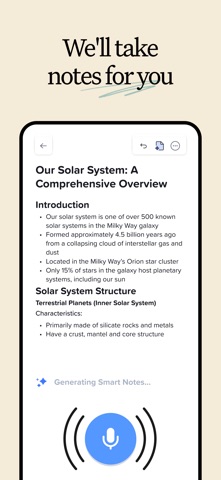
Notability serves as an all-in-one digital binder for students, educators, and working professionals alike. Users can freely handwrite, type, sketch, and audio-record directly onto an infinite canvas or traditional paper templates. The core premise revolves around multimodal capture, letting you link audio snippets directly to the exact handwritten notes you took at that precise second.
Beyond basic drawing tools, Ginger Labs has packed the platform with robust PDF annotation, split-view multitasking, and cloud-synced organization. Professionals use it to mark up corporate contracts and generate automated meeting minutes on the fly. Meanwhile, students lean heavily on active recall features, transforming their class notes into personalized flashcards and interactive study guides without leaving the app.
Ginger Labs, Inc. built their reputation on smooth vector ink technology and user-centric design principles. Their history with iOS hardware optimization shows in every corner of the interface, from palm-rejection algorithms to gesture shortcuts. Notability has consistently remained a staple recommendation in the productivity space for nearly a decade.
Standout Features & What's New in this Build
This latest update brings a suite of machine-learning tools designed to parse spoken conversations and messy handwriting with incredible speed. Here are the core highlights included in the current package:
- Live Audio Transcription: Instantly converts spoken lectures and business meetings into searchable text alongside your notes.
- AI Study Assistant: Automatically generates personalized quizzes, flashcards, and summary takeaways from your imported textbook PDFs.
- Math Conversion: Recognizes handwritten equations and instantly converts them into clean, standardized digital math notation.
- Chat with Notes: Allows you to query your own notebooks conversationally to quickly surface buried concepts or missed assignment details.
- The Classic Return: Introduces a straightforward one-time purchase option for users who prefer avoiding recurring subscriptions.
Hands-On Impressions: Performance, Battery, and Thermals
Running this build on a 13-inch iPad Pro with a ProMotion 120Hz display delivers silky-smooth touch responsiveness. The vector ink engine tracks the Apple Pencil Pro with flawless precision, exhibiting zero noticeable jitter or input lag during rapid sketching. Frame pacing remains rock-solid even when rendering massive, multi-page textbook PDFs packed with embedded images.
"When you combine real-time audio synchronization with instantaneous cloud transcription, note-taking shifts from a passive chore into an active, searchable archive of your daily life."
Thermal performance is exceptionally well-managed, keeping the device entirely cool during hour-long recording and summarization sessions. Battery drain is surprisingly modest considering the heavy background processing required for live AI transcriptions. You can comfortably power through a full day of classes or back-to-back boardroom meetings without hunting for a charger.
System Requirements & Requested Permissions
To run this build properly, your device must be updated to iOS 17.5 or later. The app is fully optimized for modern Apple Silicon chips found across recent iPad Air, iPad Pro, and iPhone models. Installation requires approximately 412 MB of free storage space, plus additional headroom for your synced notebooks.
The app requests standard privacy permissions, including microphone access for audio recording and local network discovery for syncing. Ginger Labs adheres strictly to Apple's modern sandboxing protocols, ensuring your sensitive notes remain encrypted and private. Cloud backups and device-to-device syncing rely on secure iCloud containers managed directly by your Apple ID.
Pros & Cons: Beta Impressions
✓ The Highs (What We Love)
- Ink Feel: Incredible vector tracking and palm rejection on modern iPad hardware.
- AI Summaries: Lightning-fast audio transcription that actually captures key takeaways accurately.
- Flexibility: Seamlessly mixes typed text, handwriting, and audio recordings on a single page.
✕ Beta Caveats (Room for Polish)
- AI Queuing: Heavy audio files occasionally take a few extra moments to process summaries.
- UI Quirks: Occasional layout shifts when opening massive PDF textbooks in split-view mode.
- Sync Speed: Initial iCloud sync can occasionally stutter on crowded wireless networks.

Current TestFlight Slot Situation & Availability
Apple strictly caps public TestFlight distributions at 10,000 active testers per application. Because Notability has a massive global user base, beta slots tend to fill up within hours of a new build dropping. If you encounter a message stating the beta is full, it simply means all current testing seats are occupied.
Developers frequently purge inactive users who haven't installed recent updates, opening up new capacity periodically. Checking back during off-peak morning hours on Codewing gives you the best statistical chance of grabbing an open slot. Keeping your TestFlight notifications enabled ensures you never miss a newly expanded wave.
Step-by-Step TestFlight Installation Guide
Getting set up with this beta build takes just a couple of minutes if you follow the correct sequence. Make sure you have your iOS device nearby and ready to download.
Step 1: Download TestFlight
Open the App Store on your iPhone or iPad, search for Apple's official TestFlight application, and install it on your device.
Step 2: Access Codewing
Navigate to the Codewing beta platform using your mobile Safari browser to locate the verified Notability distribution link.
Step 3: Accept the Invitation
Tap the official beta invitation button provided on this page, which will automatically launch the TestFlight app on your screen.
Step 4: Install the Build
Review the developer's testing notes, tap the Install button, and wait for the application package to download and populate your home screen.
Step 5: Submit Feedback
Use the built-in screenshot feedback tool inside TestFlight to report any visual bugs or performance snags directly back to the Ginger Labs engineering team.
Frequently Asked Questions
Is Notability: Smarter AI Notes safe to install via TestFlight?
Yes, TestFlight is Apple's official, cryptographically secure beta testing platform. Every build undergoes automated vetting by Apple to ensure it complies with strict iOS sandboxing and privacy rules.
What should I do if the Notability: Smarter AI Notes beta is full?
If slots are exhausted, bookmark this Codewing page and check back periodically. Slots open up automatically whenever Ginger Labs purges inactive testers or increases capacity for new updates.
Will installing this beta overwrite my App Store version or delete save data?
TestFlight builds typically replace your existing App Store installation while preserving your local database. However, it is always wise to ensure your important notebooks are backed up to iCloud before updating.
How long do TestFlight beta invitations and builds last?
Apple enforces a strict 90-day expiration window on every individual TestFlight build. You will need to install newer update packages pushed by the developer before that timer runs out to keep using the app.
Are in-app purchases free during TestFlight beta testing?
Yes, financial transactions are disabled inside TestFlight environments. Any simulated subscription upgrades or digital purchases used to test premium features will not charge your real Apple ID payment method.
Final Editorial Verdict
Notability continues to set a high bar for digital productivity apps on iOS. The integration of genuinely useful machine learning tools transforms passive note-taking into an active, highly efficient workflow. While early beta builds carry minor rough edges, the underlying performance on modern Apple hardware is exceptionally strong.
Score: 4.6 / 5
Developer Support & Official Resources
Stay updated on patch notes, maintenance windows, and feature roadmaps directly from the official developer channels.
Never miss an opening for Notability: Smarter AI Notes.
Apple limits TestFlight betas to 10,000 testers, and this program is currently at capacity. CodeWings Plus continuously monitors slot availability 24/7 and sends you an instant alert the second a spot opens up.






