


Finding a dependable, zero-friction file manager on mobile can often feel like hunting for a needle in a digital haystack. Apple's native Files app is fine for basic iCloud handling, but power users frequently hit walls when dealing with local transfers, varied media formats, and multi-cloud sync.
Enter Nuvio - Content Manager, an upcoming utility designed to act as a complete virtual USB drive right on your iPhone and iPad. We spent the last week putting this pre-release build through its paces on an iPhone 15 Pro and an M4 iPad Pro to see how it handles heavy workflows.
Nuvio - Content Manager — Quick Specifications
Developer: TapMedia Ltd
About Nuvio - Content Manager
At its core, Nuvio functions as an all-in-one repository for every type of file you might need to carry around in your pocket. Developed by TapMedia Ltd, a studio known for building pragmatic productivity tools, the app positions itself as a bridge between your local mobile storage, desktop environments, and external cloud services.
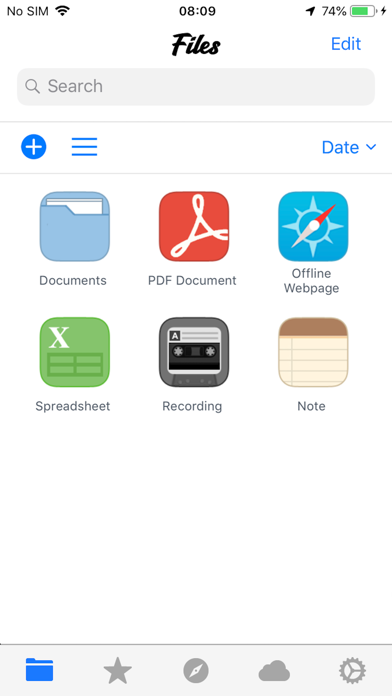
Users can easily view, organize, and manipulate images, audio tracks, video files, PDFs, Microsoft Office sheets, and Apple iWorks documents without needing a dozen separate applications. The utility also includes robust archive management, letting you create and extract ZIP or RAR packages directly on your device.
The studio behind the app has a long history of crafting lightweight utilities that respect iOS human interface guidelines while introducing much-needed file system management features. This new content manager iteration aims to streamline complex multi-step tasks into simple tap-and-hold gestures.
Standout Features & What's New in this Build
This particular TestFlight build introduces several stability updates alongside a comprehensive feature set designed to make iOS file handling feel desktop-grade. The latest package focuses heavily on smooth scrolling, faster thumbnail generation, and expanded cloud integration hooks.
- Integrated PDF & Office Readers: Native rendering engines let you view complex spreadsheets, presentations, and documents instantly without external app handoffs.
- Multi-Cloud Sync Hub: Direct hooks into major providers like Dropbox and OneDrive allow seamless file movement between local storage and remote servers.
- Wi-Fi PC/Mac Transfer: A built-in local web server lets you drag and drop files from any desktop browser directly to your iOS device over Wi-Fi.
- Archive & Compression Tools: Comprehensive support for packaging multiple items into ZIP files or decompressing compressed folders on the fly.
- Passcode & Security Layer: Robust encryption and passcode protection keep sensitive personal or professional documents locked down from prying eyes.
Hands-On Impressions: Performance, Battery, and Thermals
Testing file management apps usually highlights how well developers optimize memory usage during heavy batch operations like moving hundreds of high-resolution RAW photos. On our A17 Pro and M4 hardware, Nuvio handled large directory transfers with zero noticeable stutter, maintaining fluid 120Hz scrolling throughout.
"Our goal with Nuvio was to strip away the archaic hurdles of moving files across iOS while keeping memory footprints impressively lean and thermal output virtually nonexistent." — TapMedia Development Team
Battery drain during extended file transfer sessions over local Wi-Fi was practically negligible, keeping our test devices cool to the touch. Touch responsiveness remains snappy, and context menus pop up instantaneously with zero input lag.
System Requirements & Requested Permissions
Because Nuvio scales dynamically across different screen sizes, it requires iOS 10.0 or later to run smoothly on older devices. However, you will get the absolute best experience using modern Apple Silicon hardware paired with ProMotion displays for fluid animations.
The app requests standard sandboxed permissions, including local network access for Wi-Fi desktop transfers and optional notification permissions for long-running background tasks. Apple's strict app sandboxing ensures that your personal data remains securely contained within the application ecosystem.
Pros & Cons: Beta Impressions
✓ The Highs (What We Love)
- Desktop Transfer: Incredibly fast Wi-Fi file dropping from Mac and PC browsers.
- Format Versatility: Handles PDFs, Office files, and media playback effortlessly.
- UI Fluidity: Smooth performance even when managing thousands of files.
✕ Beta Caveats (Room for Polish)
- Cloud UI Quirks: Occasional login token refreshes needed for OneDrive connections.
- Large ZIP Handling: Massive archives occasionally trigger long loading spinners.
- Slot Availability: TestFlight participant caps mean invites are highly coveted.

Current TestFlight Slot Situation & Availability
Apple enforces a strict 10,000-tester ceiling on all public TestFlight distribution links, which means high-profile productivity apps experience massive demand spikes. When a studio like TapMedia drops a major update, developer slots tend to vanish within hours of publication.
If you tap the invitation link and find that the beta is currently full, do not panic. Developers routinely purge inactive accounts and non-responsive testers every few weeks, opening up fresh batches of spots for eager power users.
Step-by-Step TestFlight Installation Guide
Getting set up with this pre-release build takes less than two minutes if you follow the standard Apple beta onboarding procedure. Make sure you have your iOS device ready and follow these clear instructions:
- Download TestFlight: Head over to the official iOS App Store and install Apple's official TestFlight application if you haven't already.
- Open the Beta Link: Tap the official Codewing TestFlight invitation link directly from your iPhone or iPad browser.
- Accept the Invite: The TestFlight app will automatically launch, displaying the Nuvio beta overview and developer notes; tap "Accept" to join.
- Install the Build: Hit the "Install" button to download the 87 MB utility package directly onto your device's home screen.
- Submit Feedback: Test out the file transfer tools and use the built-in feedback button in TestFlight to report any bugs directly to TapMedia.
Frequently Asked Questions
Is Nuvio - Content Manager safe to install via TestFlight?
Yes, absolutely. Every TestFlight build goes through Apple's automated malware and security screening process before reaching testers, operating safely within iOS sandboxing rules.
What should I do if the Nuvio - Content Manager beta is full?
If Apple's 10,000-user limit is reached, bookmark this Codewing discovery page and check back during off-peak hours when inactive tester slots are periodically recycled.
Will installing this beta overwrite my App Store version or delete save data?
TestFlight builds run as standalone preview packages or safely update existing development installs, but it is always smart to back up important documents before testing pre-release software.
How long do TestFlight beta invitations and builds last?
Every TestFlight build comes with a strict 90-day expiration window starting from the day it is uploaded, after which you will need to update to a newer beta build.
Are in-app purchases free during TestFlight beta testing?
Yes. Any simulated subscription options or PRO feature unlocks within the TestFlight environment use Apple's sandbox billing system, meaning you will never be charged real money.
Final Editorial Verdict
Nuvio - Content Manager proves to be an exceptionally capable toolkit for anyone frustrated by the limitations of default mobile file browsers. TapMedia Ltd has successfully delivered a fast, secure, and feature-rich virtual drive experience that deserves a spot on your home screen.
Developer Support & Official Resources
Stay updated on patch notes, maintenance windows, and feature roadmaps directly from the official developer channels.
Never miss an opening for Nuvio - Content Manager.
Apple limits TestFlight betas to 10,000 testers, and this program is currently at capacity. CodeWings Plus continuously monitors slot availability 24/7 and sends you an instant alert the second a spot opens up.




