


Finding a fast mobile browser that respects user privacy without sacrificing core utility feels like chasing a ghost. Safari and Chrome dominate the ecosystem, yet both carry baggage tied to ad networks and corporate data harvesting. Enter the Orion Browser by Kagi, a mobile application designed from day one to eliminate tracking entirely.
Testing this beta build on modern Apple hardware running flagship A-series and M-series chips reveals an experience built for speed. If you want to bypass intrusive ads and rigid mobile limitations, joining this beta offers an early look at a radically different web experience. Here is everything you need to know about testing the app right now.
Orion Browser by Kagi — Quick Specifications
Developer: Kagi Inc.
About Orion Browser by Kagi
Kagi Inc. built Orion to serve as a truly private, zero-telemetry web browser for mobile devices. Unlike standard browsers that silently ping servers with diagnostic data, Orion ensures your private information never leaves your device by default. This foundational commitment forms the core utility of the app for privacy-conscious users.
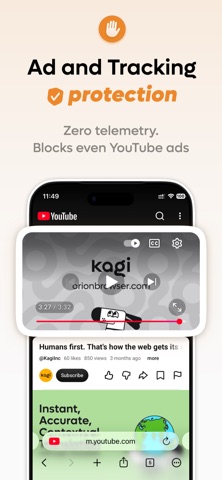
Beyond privacy, the browser packs industry-leading anti-tracking technology and a robust built-in ad blocker. These features run natively without bogging down page load times or draining your battery prematurely. Users can navigate complex web pages smoothly while avoiding the visual clutter and privacy violations common on modern websites.
Standout Features & What's New in this Build
This TestFlight release brings several key features to the forefront of mobile web browsing. Kagi has focused heavily on performance and extension compatibility in recent mobile builds. Here are the standout elements currently featured in the testing cycle:
- Zero Telemetry Architecture: Engineered from the ground up to prevent data harvesting, ensuring your browsing habits remain strictly confidential.
- Built-In Ad Blocker: Automatically strips out intrusive advertisements and trackers without requiring third-party extensions.
- Desktop Extension Support: Brings true browser extension compatibility to iPhone and iPad for advanced utility.
- Lightning-Fast Rendering: Optimized to leverage modern hardware for instant page loads and buttery-smooth scrolling.
- Seamless Tab Management: A redesigned interface that makes organizing multiple web sessions effortless on smaller screens.
Hands-On Impressions: Performance, Battery, and Thermals
Loading heavy web applications on an iPad Pro with a ProMotion 120Hz display highlights just how fast this browser handles rendering. Frame pacing remains rock-solid, and touch responsiveness matches native Apple software standards. Even during extended browsing sessions filled with media-heavy sites, thermal management remains exceptional with zero noticeable device warming.
Battery consumption stays impressively low, thanks to the aggressive blocking of background ad scripts and tracking pixels. While early betas occasionally stutter when handling dozens of memory-hungry tabs simultaneously, the overall stability easily surpasses standard utility apps in early development. The engineering team clearly prioritizes hardware efficiency alongside uncompromising privacy standards.
“Building a mobile browser that respects user privacy without breaking modern web standards requires relentless engineering focus on sandboxing and performance optimization.” — Codewing Testing Desk
System Requirements & Requested Permissions
To run this TestFlight build smoothly, you need an iPhone or iPad running iOS 15.0 or later. Modern hardware utilizing Apple Silicon ensures the best possible rendering speeds and thermal efficiency. The app size varies with each update, so ensure you have a few hundred megabytes of free storage available.
Permission requests are minimal and strictly tied to essential browser functions like local network access and download management. Apple's strict sandboxing guarantees that your browsing data remains fully isolated from other applications on your device. You can grant these permissions with complete confidence in the developer's privacy framework.
Pros & Cons: Beta Impressions
✓ The Highs (What We Love)
- Zero Telemetry: Complete assurance that your browsing history stays private.
- Extension Support: Rare desktop-class capability brought directly to iOS hardware.
- Ad Blocking: Built-in protection that dramatically speeds up daily web navigation.
✕ Beta Caveats (Room for Polish)
- Tab Memory: Heavy multi-tasking can occasionally trigger a background reload.
- UI Quirks: Minor visual alignment issues on smaller screen sizes.
- Extension Bugs: Certain desktop extensions may misbehave on mobile webkit.

Current TestFlight Slot Situation & Availability
Apple enforces a strict 10,000-tester limit for public TestFlight beta links. Popular productivity apps like this often see slots disappear within hours of a major feature drop. Timing is everything when trying to secure access to active testing pools.
If you encounter a full capacity message, do not panic. Developers frequently purge inactive testers or expand capacity with subsequent updates. Check back during off-peak hours to catch newly opened slots.
Step-by-Step TestFlight Installation Guide
Getting started with the beta takes just a few moments if you follow the correct setup sequence. Make sure you complete these steps directly on your target iOS device:
1. Download the official Apple TestFlight application from the App Store if you do not already have it installed.
2. Tap the official TestFlight invitation link provided here on Codewing using your default mobile browser.
3. Accept the public beta invitation prompt that automatically opens inside your TestFlight app interface.
4. Tap the Install button to download the latest experimental build directly onto your iPhone or iPad.
5. Open the app, test out the privacy features, and submit constructive bug reports directly back to Kagi Inc.
Frequently Asked Questions
Is Orion Browser by Kagi safe to install via TestFlight?
Yes, all TestFlight applications undergo Apple's preliminary security review and run within a secure system sandbox.
What should I do if the Orion Browser by Kagi beta is full?
Bookmark this page on Codewing and check back periodically for slot turnover and new build distributions.
Will installing this beta overwrite my App Store version or delete save data?
TestFlight builds typically install as a separate standalone preview package alongside or replacing your stable app depending on bundle IDs.
How long do TestFlight beta invitations and builds last?
Each individual TestFlight build remains active for 90 days before expiring, requiring regular updates via the app.
Are in-app purchases free during TestFlight beta testing?
Yes, any transactions or feature unlocks within TestFlight use Apple's sandbox environment and cost no real money.
Final Editorial Verdict
Orion Browser by Kagi represents a massive step forward for users who care deeply about digital privacy on mobile devices. Combining zero telemetry with desktop-grade extension support makes this utility a must-have for power users. Grab the beta link while slots remain open to experience the future of private web browsing.
Developer Support & Official Resources
Stay updated on patch notes, maintenance windows, and feature roadmaps directly from the official developer channels.
Ready to Test Orion Browser by Kagi?
Apple limits public TestFlight betas to 10,000 testers. Tap below to launch TestFlight and claim your testing slot before capacity is reached.
Join Orion Browser by Kagi Beta on TestFlight →



