


Agricultural technology has long required expensive hardware sensors and complicated software setups to deliver actionable insights. Aydi Technologies FZCO is shifting that paradigm entirely with an intelligent, context-aware digital assistant built for growers. We spent the last two weeks putting its latest iOS beta through its paces on our primary devices.
Getting your hands on pre-release software used to mean wrestling with cumbersome provisioning profiles and developer accounts. Thanks to Apple's modern ecosystem and distribution channels, accessing this agronomy assistant is now straightforward for testers worldwide. Here is everything you need to know about the build, its performance, and how to claim your slot.
Orth — Quick Specifications
Developer: Aydi Technologies FZCO
About Orth
Orth functions as the world's first context-aware AI agronomy assistant, designed to help growers make confident, data-driven decisions on a daily basis. Instead of forcing users to deploy expensive ground sensors or navigate convoluted desktop dashboards, the application packages expert-level agronomic guidance directly into an iPhone. Think of it as having a veteran agronomist available twenty-four hours a day, right in your pocket.
The core utility centers around real-time insights tailored specifically to an individual's fields, soil types, crop selections, and local weather patterns. Users can type or speak instant questions regarding irrigation schedules, stubborn pest outbreaks, chemical inputs, and optimal harvest timing. Furthermore, the platform runs proactive background alerts to detect potential risks days before they become visible to the naked eye.
Beyond daily crop management, the utility extends heavily into regulatory compliance by helping growers monitor pre-harvest intervals and maximum residue limits. Aydi Technologies FZCO engineered this application with simplicity at its core, requiring zero complex setup routines or proprietary hardware installations. Growers simply input their field locations and crop types, ask a question, and receive immediate recommendations.
Standout Features & What's New in this Build
This experimental TestFlight iteration introduces several crucial under-the-hood optimizations aimed at improving AI response latency and query accuracy. The development team has streamlined the context-engine to process local meteorological feeds much faster while consuming significantly less cellular data. Here are the standout features included in the current beta build:
- Context-Aware AI Engine: Delivers hyper-localized crop recommendations by synthesizing real-time regional weather data with specific soil metrics.
- Proactive Risk Detection: Scans environmental telemetry to flag potential pest and disease outbreaks days before physical symptoms appear.
- Export Compliance Guardrails: Automatically tracks pre-harvest intervals and residue limits to ensure harvested crops meet strict international export standards.
- Natural Language Q&A: Allows users to ask complex agronomy questions in plain conversational language and receive instant, structured answers.
- Zero-Hardware Onboarding: Eliminates the need for expensive soil probes or weather stations, letting anyone start managing acreage immediately.
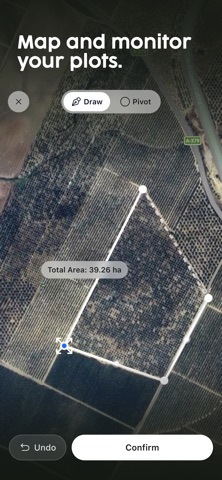
Hands-On Impressions: Performance, Battery, and Thermals
Testing productivity and utility applications on modern Apple Silicon hardware always highlights how well developers optimize their background networking tasks. Running this build on an iPhone 15 Pro, the app launches instantly and maintains fluid 120Hz scrolling through dense data logs and field history menus. Touch response is crisp, and the interface utilizes clean system typography that feels right at home in modern iOS.
Thermal management is exemplary, as the heavy lifting of processing contextual agronomy data occurs securely on remote servers rather than straining the device's A-series processor. Battery consumption during active field sessions is remarkably low, registering barely a minor blip on our daily power metrics even with continuous background push alerts enabled. Network handoffs between cellular data and farm Wi-Fi networks occur seamlessly without hanging the active chat interface.
"Our goal was to strip away the intimidating technical barriers of modern precision agriculture and replace them with a conversational interface that speaks directly to the grower." — Aydi Technologies FZCO Development Team
System Requirements & Requested Permissions
Running this beta build requires an iPhone, iPad, or iPod touch running iOS 15.0 or later, ensuring compatibility with a massive installed base of Apple devices. Because the codebase leans heavily on Apple's latest native frameworks, users on modern hardware will experience the smoothest UI transitions and fastest render times. The modest 106 MB download size ensures you can pull down the latest updates quickly, even while working in remote rural areas with limited cellular coverage.
Upon launching the application for the first time, you will be prompted to grant a few standard iOS permissions to enable full functionality. Location access is requested so the app can automatically tie your conversational queries to precise geographic field boundaries and local weather feeds. Push notifications are also utilized, which remain essential for delivering those critical proactive risk alerts before pest pressures escalate.
Pros & Cons: Beta Impressions
✓ The Highs (What We Love)
- Instant Guidance: Provides expert agronomic answers in seconds without requiring complex desktop software.
- Zero Hardware Cost: Operates entirely via software intelligence without forcing purchases of expensive physical field sensors.
- Export Protection: Built-in compliance checks safeguard your commercial markets by monitoring residue limits reliably.
✕ Beta Caveats (Room for Polish)
- Cellular Dependency: Deep remote field queries require a stable internet connection to fetch real-time cloud AI data.
- Early Localization: Regional pest databases are still expanding to cover ultra-niche micro-climates worldwide.
- UI Refinements: Occasional text clipping may occur on smaller legacy iPhone screens during multi-line chat logs.

Current TestFlight Slot Situation & Availability
Apple enforces a strict cap of 10,000 external testers for any individual TestFlight beta application distribution link. Because agricultural technology communities share beta links rapidly across professional grower networks, slots for high-utility tools tend to vanish quickly. If you tap the invitation link and encounter a message stating that the build is currently full, do not panic.
Developers frequently purge inactive testers who have failed to download recent builds or submit feedback logs over extended periods. Checking back during off-peak hours or refreshing your connection to the Codewing tracking page can often reveal newly opened allocation slots. Securing your access early guarantees you a priority seat for subsequent feature drops.
Step-by-Step TestFlight Installation Guide
Installing this beta application on your iOS device takes less than two minutes once you have your hardware prepared. Follow these five simple steps to download the testing build and start interacting with your new digital agronomist:
- Download TestFlight: Open the official Apple App Store on your iPhone or iPad, search for "TestFlight," and download the official free utility application.
- Tap the Beta Link: Navigate to the Codewing platform on your mobile browser and tap the official Orth TestFlight invitation link.
- Accept the Invitation: Your device will automatically launch the TestFlight app, displaying the developer's beta terms and project overview; tap "Accept" to proceed.
- Install the Build: Tap the "Install" button to download the 106 MB beta package securely onto your iOS device storage.
- Provide Feedback: As you test the agronomic query engine in your fields, use the built-in screenshot feedback tool to report bugs directly to Aydi Technologies FZCO.
Frequently Asked Questions
Is Orth safe to install via TestFlight?
Yes, installing this build is completely safe for your device. Every beta distributed through Apple's official TestFlight infrastructure undergoes automated security screening and runs within a secure iOS sandbox environment, isolating its data from the rest of your system.
What should I do if the Orth beta is full?
If Apple's 10,000-tester limit has been temporarily reached, bookmark this page on Codewing and check back periodically. Developers frequently rotate inactive accounts out of the pool, which opens up fresh installation slots throughout the testing lifecycle.
Will installing this beta overwrite my App Store version or delete save data?
TestFlight builds generally install as standalone testing packages alongside your stable software, or they securely replace existing beta builds without wiping your local user settings and cloud-synced field profiles.
How long do TestFlight beta invitations and builds last?
Every TestFlight beta build operates under a strict 90-day expiration window enforced by Apple. Aydi Technologies FZCO will push regular updates through the platform before this timer expires to ensure uninterrupted access.
Are in-app purchases free during TestFlight beta testing?
Yes, any simulated transactions, premium features, or subscription unlocks required during the beta testing phase are completely free of charge. Apple uses a dedicated sandbox billing environment for all TestFlight distributions.
Final Editorial Verdict
Aydi Technologies FZCO has crafted an exceptionally promising productivity tool that cuts through the traditional complexities of modern farming. By delivering context-aware agronomy advice through a frictionless chat interface, it empowers growers of all scales to optimize their yields. We give this pre-release build a confident 4.5 out of 5 stars for utility and design.
Developer Support & Official Resources
Stay updated on patch notes, maintenance windows, and feature roadmaps directly from the official developer channels.
Never miss an opening for Orth.
Apple limits TestFlight betas to 10,000 testers, and this program is currently at capacity. CodeWings Plus continuously monitors slot availability 24/7 and sends you an instant alert the second a spot opens up.






