


Finding a virtual pet that genuinely feels alive on mobile is harder than ever. Frisson Labs, CO. aims to change that dynamic with their latest interactive ecosystem.
We spent the last week pushing this pre-release build through its paces on high-end Apple hardware. Here is everything you need to know about joining the beta.
Oto - AI Voice Companion — Quick Specifications
Developer: Frisson Labs, CO.
About Oto - AI Voice Companion
Oto - AI Voice Companion introduces players to a personalized chibi companion equipped with its own virtual home and evolving personality. Users engage directly with their Otomate by feeding, nurturing, and reacting to world events together.
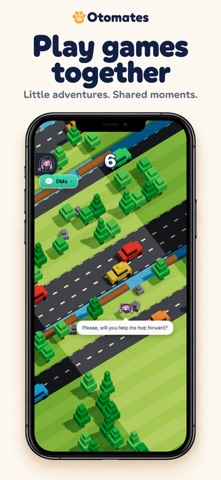
The core gameplay revolves around companion maintenance combined with minigames and casual quests. Players complete objectives to earn currency, which can then be spent on home decor and food items.
Your companion actively responds to the physical items you place within their living space. This interactive loop creates an ongoing sense of shared virtual habitation.
Frisson Labs, CO. designed the software to bridge casual pet simulation with real-time conversational AI. Communication happens seamlessly via text messages or direct live voice calls.
The application leverages your device's microphone exclusively when you activate the voice feature. This ensures that privacy remains a top priority during extended chat sessions.
Players can also revisit past milestones through an integrated memory timeline feature. This ledger tracks shared moments to build a continuous digital narrative over weeks of play.
Standout Features & What's New in this Build
This early TestFlight build highlights several core systems currently undergoing stress tests. Here are the standout features shipped in the latest package:
- Dynamic Chibi AI: Advanced response models power the companion's real-time conversational personality.
- Interactive Environment: Fully customizable room decor where your companion physically interacts with placed furniture.
- Voice & Text Messaging: Seamless switching between typed chat prompts and live spoken audio calls.
- Minigame Economy: Dedicated arcade quests that yield rewards to fund your companion's lifestyle.
- Memory Timeline: Persistent storage of major interaction milestones to track relationship progression.
Hands-On Impressions: Performance, Battery, and Thermals
Running the application on an iPhone 15 Pro reveals remarkably fluid frame pacing. The 120Hz ProMotion display ensures animations render smoothly during room navigation and mini-games.
Thermal performance remains stable during standard text sessions, though active voice calls cause a slight temperature increase near the upper chassis. Battery drain is noticeable during extended voice conversations due to continuous audio streaming.
"Our goal was to build a companion that doesn't just sit on a static screen, but actively participates in your daily digital routine." — Frisson Labs, CO. Development Team
Touch responsiveness feels instantaneous, with zero perceivable input lag when interacting with inventory menus. Minor asset-loading stutter can occasionally occur when transitioning rapidly between the main room and minigame hubs.
System Requirements & Requested Permissions
Oto - AI Voice Companion requires an iPhone or iPad running iOS 18.6 or later to ensure compatibility with modern AI frameworks. The installation package sits at a modest 182 MB, leaving plenty of room on your local storage.
The app requests permission to access your microphone strictly for the voice call feature. Local network access may occasionally be utilized for syncing companion state data across active sandbox sessions.
Apple’s strict application sandboxing ensures that all conversation logs and personal metrics remain private. Your audio data is never retained beyond the immediate processing window required for conversational continuity.
Pros & Cons: Beta Impressions
✓ The Highs (What We Love)
- Voice Integration: Extremely natural conversational voice calling mechanics.
- Visual Fidelity: Charming chibi art style that scales perfectly on OLED screens.
- Customization Depth: Rich furniture placement physics and interactive home decor.
✕ Beta Caveats (Room for Polish)
- Battery Draw: Live voice features accelerate battery consumption visibly.
- Loading Hiccups: Occasional asset pop-in when opening dense inventory screens.
- Slot Limits: High demand means TestFlight slots fill up rapidly.

Current TestFlight Slot Situation & Availability
Apple enforces a strict cap of 10,000 active testers per public TestFlight link. High-profile entertainment builds like this frequently trigger rapid seat exhaustion within hours of public disclosure.
If you encounter a message stating that the developer isn't accepting new testers, do not panic. Frisson Labs, CO. periodically purges inactive accounts to redistribute seats.
Checking back during off-peak morning hours is often the best strategy to secure an open slot. Keeping this page bookmarked ensures you catch inventory restocks immediately.
Step-by-Step TestFlight Installation Guide
Installing unreleased software via Apple's official testing platform takes less than two minutes. Follow these five simple steps to get started:
1. Download TestFlight: Install the official Apple TestFlight application directly from the iOS App Store if it isn't already present on your device.
2. Open the Beta Link: Tap our dedicated Codewing TestFlight invitation URL directly from your mobile browser.
3. Accept the Invitation: Your device will automatically launch TestFlight and display the application overview page. Tap the "Accept" button to join the testing program.
4. Install the Build: Tap "Install" to download the 182 MB package onto your modern iOS device running iOS 18.6 or later.
5. Send Feedback: Use the built-in TestFlight screenshot reporting tool to submit bug reports directly to Frisson Labs, CO. if you encounter anomalies.
Frequently Asked Questions
Is Oto - AI Voice Companion safe to install via TestFlight?
Yes, all TestFlight applications must pass automated Apple security checks. The code runs inside a standard iOS sandbox, protecting your personal data and device integrity.
What should I do if the Oto - AI Voice Companion beta is full?
If slots are maxed out, check back periodically. Developers frequently remove inactive testers to make room for new users throughout the beta cycle.
Will installing this beta overwrite my App Store version or delete save data?
TestFlight builds operate as standalone packages or safe upgrades. Beta data is managed independently, though major architectural changes between test builds can occasionally reset local saves.
How long do TestFlight beta invitations and builds last?
Every TestFlight build has an active lifespan of 90 days from the initial upload date. Frisson Labs, CO. will push updated builds before expiration to maintain uninterrupted access.
Are in-app purchases free during TestFlight beta testing?
Yes, any simulated transactions within a TestFlight sandbox environment are entirely free of charge. Real currency is never billed for testing items or currency packs.
Final Editorial Verdict
Oto - AI Voice Companion delivers a surprisingly deep virtual pet experience backed by fluid conversational tech. Frisson Labs, CO. has crafted an engaging sandbox that feels right at home on modern Apple hardware.
Beta Testing Score: 8.5 / 10 — Highly recommended for enthusiasts looking to test next-generation AI interaction models.
Developer Support & Official Resources
Stay updated on patch notes, maintenance windows, and feature roadmaps directly from the official developer channels.
Never miss an opening for Oto - AI Voice Companion.
Apple limits TestFlight betas to 10,000 testers, and this program is currently at capacity. CodeWings Plus continuously monitors slot availability 24/7 and sends you an instant alert the second a spot opens up.


