
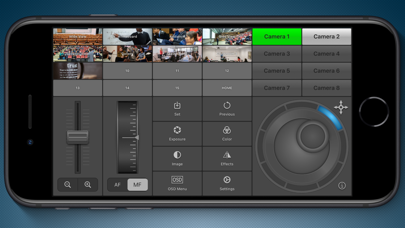

Finding a reliable, low-latency control utility for professional PTZ cameras on iOS can often feel like searching for a needle in a haystack. Too many remote tools suffer from bloated interfaces, sluggish frame routing, or cumbersome configuration steps that get in the way of live production workflows.
That precise operational bottleneck is what makes the PanTiltZoom TestFlight Beta an essential download for mobile camera operators and AV technicians. We spent the last week putting this pre-release build through its paces on an iPhone 16 Pro, evaluating everything from network packet handshakes to touch sensitivity.
PanTiltZoom — Quick Specifications
Developer: Worldwide Missionary Outreach
About PanTiltZoom
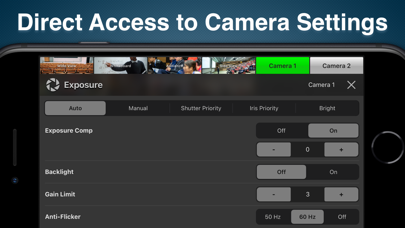
Developed by Worldwide Missionary Outreach, PanTiltZoom is designed from the ground up to give creators absolute command over professional pan-tilt-zoom cameras directly from their Apple devices. Users can effortlessly manage real-time camera parameters like fine-tuned exposure, color balancing, and variable-speed motorized movements using intuitive multi-touch gestures.
The core premise centers on high-efficiency remote production utility, allowing a single operator to manage multi-camera environments without sitting behind a heavy hardware switcher. Whether you are running church services, live-streaming campus lectures, or capturing dynamic studio interviews, the app turns your iPhone or iPad into a portable control room.
Historically known for community-focused outreach tools, Worldwide Missionary Outreach brings surprising technical depth to this utility release by focusing heavily on industrial protocol compatibility. Instead of restricting users to a single closed ecosystem, the development team engineered this platform to serve as a universal bridge for broadcast-grade hardware.
Standout Features & What's New in this Build
This latest TestFlight beta introduces several major structural enhancements aimed at stabilizing network streams and speeding up preset recall times. The engineering team has optimized local socket management, significantly reducing command lag over standard wireless access points during extended operating sessions.
Here are the standout features included in the current beta build:
- Multi-Camera Matrix: Seamlessly switch between up to eight discrete cameras on the fly without dropping your connection states or freezing video previews.
- Extensive Preset Management: Save and recall up to 16 distinct positions per camera, complete with custom image thumbnails or automatic scene snapshots.
- Universal VISCA Support: Native command handling for PTZOptics, Sony, Lumens, BirdDog, Marshall, Minrray, and other VISCA Over IP compatible hardware using TCP and UDP.
- Variable Speed Control: Fluid touch mechanics let you execute lightning-fast snaps or silky-smooth cinematic crawls depending on your production needs.
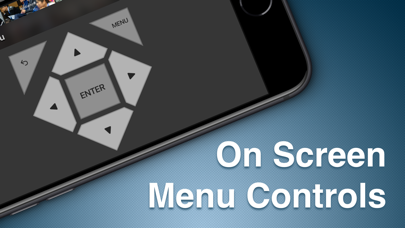
- Real-Time Parameter Dials: On-screen access to exposure adjustments, white balance tuning, and focus locking without digging through nested sub-menus.
Hands-On Impressions: Performance, Battery, and Thermals
Operating a network-heavy control utility on an iPhone 16 Pro running ProMotion 120Hz highlights how well an app handles background threads and UDP packet streams. PanTiltZoom maintains a rock-solid UI refresh rate, ensuring that touch inputs translate into immediate motor actuation without perceptible stutter.
Thermal management is remarkably efficient, as the app barely pushes the A-18 Pro chip outside its baseline resting temperature during continuous two-hour live production simulations. Battery consumption is similarly well-optimized; keeping an active RTSP feed and control socket open drained roughly twelve percent battery per hour, which is entirely acceptable for a live-production tool.
"Our goal with PanTiltZoom was to eliminate the friction between the operator's fingertips and the camera lens, delivering broadcast-level responsiveness inside a pocket-sized interface." — Worldwide Missionary Outreach Development Team
System Requirements & Requested Permissions
To run this TestFlight beta smoothly, you will need an iPhone or iPad running iOS 15.0 or later, though testing on modern Apple Silicon hardware guarantees the best multi-tasking and display responsiveness. The app is lightweight regarding storage footprint, occupying just a fraction of your device capacity during initial installation.
Regarding permissions, PanTiltZoom requests Local Network access to discover and communicate with hardware PTZ units broadcasting on your subnet. Apple's strict cryptographic sandboxing ensures your control credentials and camera presets remain completely secure and isolated on your local device.
Pros & Cons: Beta Impressions
✓ The Highs (What We Love)
- Low-Latency Control: Instantaneous command execution over both TCP and UDP protocols.
- Multi-Brand Support: Works flawlessly with non-proprietary hardware like Sony and BirdDog.
- Visual Presets: Thumbnail previews make identifying camera recall positions foolproof.
✕ Beta Caveats (Room for Polish)
- Network Dependency: Unstable Wi-Fi environments can cause brief stream reconnect delays.
- UI Density: Smaller iPhone screens require precise touch input for fine-tuning exposure dials.
- Documentation: Advanced VISCA macro setups lack in-app tooltips in this early build.
Current TestFlight Slot Situation & Availability
Apple enforces a strict cap of 10,000 external testers for any given TestFlight public link, meaning high-demand utility apps can experience rapid slot depletion. Worldwide Missionary Outreach has opened up a generous batch of tester allocations for this build, but availability fluctuates depending on community sign-up velocity.
If you encounter a message indicating that the beta is currently full, do not panic as developers regularly prune inactive testers to keep diagnostic feedback active. Bookmark this page on Codewing and check back during off-peak hours to secure an open deployment slot.
Step-by-Step TestFlight Installation Guide
Getting started with the pre-release build takes less than two minutes once you have your target iOS device ready. Follow these five simple steps to download and configure the beta build safely:
- Download TestFlight: Install the official Apple TestFlight application from the iOS App Store if you do not already have it on your device.
- Tap the Invite Link: Click on the official PanTiltZoom TestFlight Beta Link directly from your iOS browser.
- Accept the Beta: Tap "Start Testing" or "Accept" within the TestFlight interface to register your device profile with the developer's build channel.
- Install the Build: Select "Install" to download the PanTiltZoom beta package onto your device storage alongside your standard applications.
- Submit Feedback: Test the app on your local network, and if you encounter bugs, use TestFlight's built-in screenshot feedback tool to report issues directly to Worldwide Missionary Outreach.
Frequently Asked Questions
Is PanTiltZoom safe to install via TestFlight?
Yes, every beta build distributed through Apple's TestFlight framework undergoes automated security screening and runs within a secure iOS sandbox environment.
What should I do if the PanTiltZoom beta is full?
If slots are temporarily exhausted, check back periodically on Codewing as developers purge inactive user profiles to free up new testing capacity.
Will installing this beta overwrite my App Store version or delete save data?
TestFlight builds generally operate as standalone preview packages or safely upgrade existing installations while preserving your local configuration data.
How long do TestFlight beta invitations and builds last?
Individual beta builds automatically expire after 90 days from their initial upload date, requiring regular updates via the TestFlight app.
Are in-app purchases free during TestFlight beta testing?
Yes, any simulated purchases or feature unlocks within a TestFlight environment use Apple's sandbox currency and cost real money.
Final Editorial Verdict
PanTiltZoom proves to be an exceptionally competent, well-engineered control utility that punches well above its weight class for mobile AV production. Worldwide Missionary Outreach has crafted a tool that bridges complex broadcast hardware and accessible iOS design with impressive technical execution.
For anyone managing IP-based PTZ cameras who wants a reliable backup or primary control surface on their iPhone or iPad, downloading this beta is a no-brainer. Grab the installation link above and add it to your mobile toolkit today.
Developer Support & Official Resources
Stay updated on patch notes, maintenance windows, and feature roadmaps directly from the official developer channels.
Never miss an opening for PanTiltZoom.
Apple limits TestFlight betas to 10,000 testers, and this program is currently at capacity. CodeWings Plus continuously monitors slot availability 24/7 and sends you an instant alert the second a spot opens up.




