

Finding a reliable PDF utility on iOS has traditionally meant juggling multiple single-purpose apps for scanning, signing, and converting documents. Wondershare Technology Group aims to solve this fragmentation with their latest productivity suite, currently making waves in public beta testing. Let us walk you through how to secure your spot in the pre-release sandbox and see what makes this build worth downloading.
If you have been hunting for a seamless way to handle heavy documentation work on mobile, this early software cycle provides a compelling preview. We put the package through its paces on modern Apple silicon hardware to see how it handles resource-heavy rendering and AI processing. Here is everything you need to know before grabbing the installation link.
PDF Owl — Quick Specifications
Developer: Wondershare Technology Group Co.,LTD
About PDF Owl
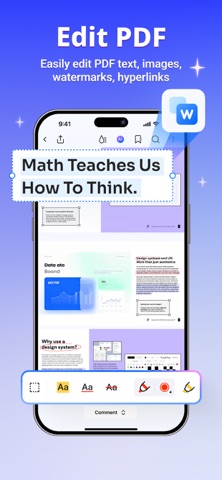
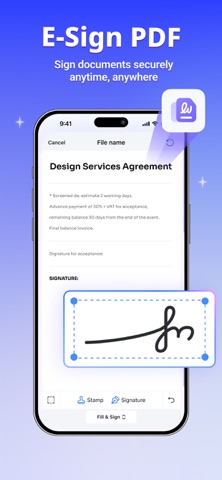
Wondershare Technology Group brings its extensive document management expertise directly to the Apple ecosystem with this optimized productivity utility. Designed natively around modern mobile workflows, the platform consolidates reading, scanning, converting, signing, and editing into a single cohesive interface. Users can seamlessly move from marking up architectural blueprints to converting scanned paper invoices into fully editable Word documents.
The core utility centers around a remarkably flexible workspace that lets you rearrange your toolbar to match your specific daily habits. Whether you are a student organizing lecture notes or a corporate professional signing multi-page contracts on the go, the platform eliminates app-switching friction. Wondershare has built its reputation on reliable file processing, and this application leverages that foundational engineering to run smoothly on handheld devices.
Standout Features & What's New in this Build
This active TestFlight distribution introduces several cutting-edge capabilities specifically optimized for current-generation iOS hardware acceleration. Testers get early access to tools that normally require hefty desktop software suites, all scaled down for intuitive touch and Apple Pencil input. Here are the standout features included in the current build:
- AI PDF Assistant: Chat directly with your documents, generate concise summaries of lengthy reports, and instantly translate text across more than 60 languages.
- Mind Map Generation: Automatically transform dense, text-heavy PDF content into clear, interactive visual mind maps for streamlined studying and outlining.
- Liquid Mode Reading: Reflows and optimizes complex PDF layouts dynamically to ensure comfortable reading on any screen size without pinch-zooming.
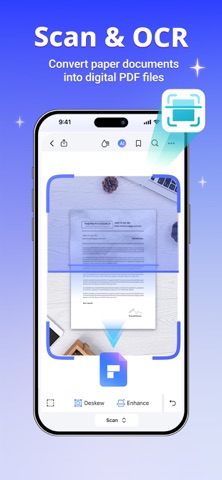
- Advanced OCR Scanner: Instantly scan multi-page physical documents, receipts, or IDs, and extract high-accuracy editable text using on-device optical character recognition.
- Customizable Toolbars: Reorder, show, or hide specific utilities to tailor your workspace entirely to your personal reading and editing workflow.
Hands-On Impressions: Performance, Battery, and Thermals
Testing this build on modern iPhone and iPad hardware reveals an impressive commitment to buttery-smooth scrolling and responsive touch handling. Thanks to ProMotion 120Hz display optimization, panning across dense architectural schematics and highlighting text feels instant and completely frictionless. Memory management is equally robust, as the app handles massive 500-page academic textbooks without running into aggressive RAM purging or abrupt closures.
Thermal performance remains completely stable during extended reading and markup sessions, though running heavy AI document summaries will predictably draw a bit more power. Battery consumption during typical reading tasks is negligible, but batch-converting large image-based PDFs will utilize the Neural Engine and cause modest battery drain. Overall system stability in this beta stream is remarkably high, showing very few visual glitches outside of occasional transition stutters when rotating screens rapidly.
"Wondershare has managed to pack desktop-grade document parsing into a mobile framework that respects both system resources and user attention spans."
System Requirements & Requested Permissions
To run this beta build smoothly, your Apple device must be running iOS 15.0 or later, though optimal performance is achieved on current-generation A-series and M-series hardware. The application requires very few system privileges, asking only for standard local storage access to manage your files and camera permissions for the document scanner. Apple's strict sandboxing ensures that all your sensitive corporate contracts and personal notes remain entirely secure on your local device or your chosen cloud vault.
Network permissions are utilized selectively to facilitate cloud synchronization across your personal devices and to power the optional online AI translation features. Notifications are handled conservatively, pinging you only when large background batch conversions finish processing or shared document links receive updates. The development team has clearly prioritized user privacy, keeping telemetry minimal and restricting data collection strictly to crash diagnostics.
Pros & Cons: Beta Impressions
✓ The Highs (What We Love)
- AI Integration: Summarizing and chatting with heavy documents saves countless hours of manual review.
- Fluid Interface: Responsive touch tracking and ProMotion support make navigating large files effortless.
- All-In-One Utility: Combines reading, OCR scanning, signing, and format conversion in one cohesive package.
✕ Beta Caveats (Room for Polish)
- AI Load Times: Extremely large multi-hundred-page documents can cause brief pauses during mind map generation.
- Slot Availability: Public TestFlight capacities fill up rapidly, requiring quick action to secure a download.
- Build Expiration: Beta packages expire every 90 days, requiring routine updates through the TestFlight app.
Current TestFlight Slot Situation & Availability
Apple enforces a hard ceiling of 10,000 external testers for any active public TestFlight distribution, creating fierce competition for popular productivity utilities. Wondershare opened this beta to gather mass telemetry and user feedback ahead of a major public release cycle. Slots tend to fill up within hours of major patch notes dropping, especially when tech communities share direct access links.
If you encounter a prompt stating that the beta is currently full, do not panic or abandon your search entirely. Developers routinely prune inactive testers who haven't updated their builds in weeks, freeing up batches of fresh availability. Checking back during off-peak morning hours is often the easiest strategy to catch a newly opened spot in the sandbox.
Step-by-Step TestFlight Installation Guide
Getting set up with this pre-release version takes less than two minutes if you follow the standard Apple beta onboarding protocol. Make sure you have your iOS device handy and your TestFlight application ready to receive the secure distribution package. Here is the exact sequence to get you up and running:
1. Download TestFlight: Open the official App Store on your iPhone or iPad and download Apple's free TestFlight application if you haven't already installed it.
2. Access the Invite: Tap our dedicated Codewing TestFlight invitation link directly from your mobile browser to launch the onboarding portal.
3. Accept the Build: The link will open TestFlight automatically, displaying the official app details and developer guidelines. Tap the "Accept" button to join the public beta.
4. Install the Package: Tap "Install" to download the application package directly onto your Springboard alongside your standard apps.
5. Provide Feedback: As you test out the document editing and AI tools, use the built-in screenshot feedback feature in TestFlight to report any bugs directly to Wondershare.
Frequently Asked Questions
Is PDF Owl safe to install via TestFlight?
Yes, absolutely. Every TestFlight build distributed through our platform goes through Apple's official automated security review and operates strictly within iOS application sandboxing guidelines.
What should I do if the PDF Owl beta is full?
If the 10,000-tester cap is reached, bookmark this Codewing page and check back periodically. Inactive accounts are purged regularly, freeing up registration slots.
Will installing this beta overwrite my App Store version or delete save data?
TestFlight packages generally install as standalone beta builds or update your existing standalone environment. Your local documents and cloud sync vaults remain fully intact during the transition.
How long do TestFlight beta invitations and builds last?
Every individual TestFlight build remains fully active for 90 days from its upload date, after which time you will need to install a refreshed build through the app.
Are in-app purchases free during TestFlight beta testing?
Yes. Apple's TestFlight environment uses a simulated sandbox billing system, allowing testers to explore premium membership features and tools without incurring actual financial charges.
Final Editorial Verdict
Wondershare continues to prove its mastery over document utilities by delivering a mobile experience that rivals many desktop setups. The inclusion of responsive AI tools, smooth typography reflow, and robust OCR scanning makes this a must-have download for heavy readers and professionals alike. If you manage documents on iOS daily, securing a slot in this public beta is an absolute no-brainer.
Developer Support & Official Resources
Stay updated on patch notes, maintenance windows, and feature roadmaps directly from the official developer channels.
Ready to Test PDF Owl?
Apple limits public TestFlight betas to 10,000 testers. Tap below to launch TestFlight and claim your testing slot before capacity is reached.
Join PDF Owl Beta on TestFlight →



