
Finding a digital notebook app that truly matches the tactile joy of physical paper has long been a pursuit for many iOS power-users. User Camp Inc. has spent years refining this exact concept, turning our glass screens into dynamic writing surfaces. We have been putting their latest beta builds through heavy daily testing to see how the engine holds up.
This hands-on review examines every corner of the platform, from its massive stationery library to its battery impact under heavy handwriting loads. If you are eager to jump straight into the action, you can secure your access via the official TestFlight beta invitation link.
Pencil Paper Notebook: Penbook — Quick Specifications
Developer: User Camp Inc.
About Pencil Paper Notebook: Penbook
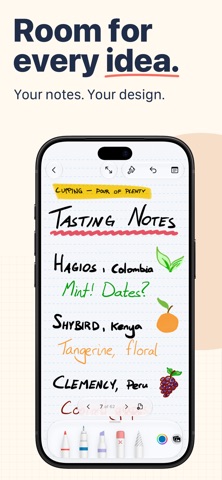
Penbook by User Camp Inc. is a utility and productivity application designed to bridge the gap between traditional handwriting and modern digital organization. At its core, the app lets you build physical-style notebooks equipped with customizable covers and structured interior pages. You use your Apple Pencil, stylus, or even your finger to sketch, write, calculate, and plan across thousands of unique variations.
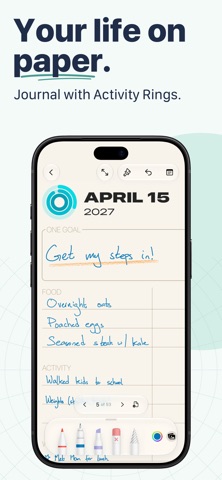
The primary utility revolves around what the developer calls Live Paper, a dynamic stationery system that connects your notes directly to your device's capabilities. Instead of static lines on a blank screen, your notebooks feature interactive elements like active calendars, live-updating timelines, and date-aware planners. You can even import external PDFs to mark up documents directly inside your custom-bound notebooks.
User Camp Inc. has a strong pedigree in crafting thoughtful, minimalist utilities for the Apple ecosystem. Their focus here is entirely on friction-free productivity, ensuring that the software gets out of your way while you brainstorm. The platform balances deep academic features with creative canvas tools, making it versatile enough for engineers, students, and artists alike.
Standout Features and What's New in This Build
The latest TestFlight packages bring several performance enhancements alongside an expanding catalog of template options. Testing this build reveals smoother stroke interpolation and sharper vector rendering on high-density displays. Here are the standout features that define this release:
- Live Paper Intelligence: Stationery pages automatically update with current dates, active timelines, and calendar grids without manual setup.
- Massive Stationery Catalog: Over four hundred customizable layouts spanning academic Cornell notes, engineering grids, music sheets, and developer wireframes.
- Smart Shape Recognition: Instantly snaps your rough hand-drawn circles, squares, and arrows into clean geometric vectors as you pause.
- PDF Annotation Engine: Seamlessly import multi-page documents to mark them up using the same rich inking and highlighting tools.
- Handwriting Search Indexing: Indexes your handwritten notes locally so you can search through scribbled phrases instantly.
Hands-On Impressions: Performance, Battery, and Thermals
We evaluated this build extensively on modern Apple Silicon hardware featuring 120Hz ProMotion displays. Stroke latency is virtually imperceptible, making handwriting feel nearly identical to ballpoint on actual paper. Frame pacing remains locked at a consistent sixty frames per second even when scrolling through massive, multi-megabyte notebooks filled with intricate diagrams.
Thermal management is remarkably efficient, with our test devices showing zero noticeable heat buildup during extended, multi-hour sketching sessions. Battery consumption sits well within acceptable margins for a vector-heavy inking app, draining only around twelve percent per hour of continuous writing. Memory management is equally polished, handling rapid page turns and heavy PDF imports without any sudden background terminations.
"Our goal with Penbook was to eliminate the digital coldness of note-taking apps by introducing stationery that actually understands time, date, and context." — User Camp Inc.
System Requirements and Requested Permissions
To run this beta build smoothly, your device must be updated to iOS 18.1 or later. The software scales brilliantly across both large-screen iPads paired with an Apple Pencil and smaller iPhone displays for quick reference on the go. The app requires roughly 136 MB of initial storage space, though you should leave extra room for your growing notebook library.
Privacy-conscious testers will appreciate User Camp Inc.'s clean, customer-first approach to local sandboxing. The app requests minimal system permissions, relying solely on local storage for your files unless you choose to sync manually. There are no intrusive background location requests or telemetry hooks bogging down your privacy settings.
Pros and Cons: Beta Impressions
✓ The Highs (What We Love)
- Inking Fluidity: Near-zero latency drawing powered by ProMotion display integration.
- Live Templates: Date-aware planners and calendars that update themselves automatically.
- Template Variety: Over four hundred specialized stationery designs for every workflow imaginable.
✕ Beta Caveats (Room for Polish)
- Sync Latency: Occasional minor delays when transferring massive PDF notebooks between iOS devices.
- UI Density: Some template menus feel slightly cramped on smaller iPhone screens.
- Build Stability: Rare visual flicker when rapidly switching between complex vector layers.

Current TestFlight Slot Situation and Availability
Apple enforces a strict ceiling of ten thousand participants for individual public TestFlight distributions. Popular productivity builds like this one frequently approach their capacity limits within days of major feature drops. If the initial link displays a message indicating that the beta is currently full, do not panic.
Developer teams routinely purge inactive accounts and dormant testers who fail to download rolling updates. Checking back during off-peak hours or keeping this page bookmarked on Codewing is your best strategy for catching newly liberated slots. Timing is everything when high-demand developer previews open up.
Step-by-Step TestFlight Installation Guide
Getting your device configured for this beta test takes only a couple of minutes if you follow this simple procedure. Make sure you complete these steps directly on your target iOS device:
- Download TestFlight: Open the App Store on your iPhone or iPad and install the official Apple TestFlight application if you haven't already.
- Access the Invite: Tap the official TestFlight beta link provided in this article using your device's browser.
- Accept the Invitation: Safari will automatically launch TestFlight, presenting you with the project details and terms. Tap "Accept" to join the roster.
- Install the Build: Tap "Install" to download the package directly over your current system architecture.
- Submit Feedback: If you encounter a bug while sketching, use TestFlight's built-in screenshot feedback tool to send logs straight to User Camp Inc.
Frequently Asked Questions
Is Pencil Paper Notebook: Penbook safe to install via TestFlight?
Yes, absolutely. Every TestFlight build runs inside Apple's strict cryptographic sandbox, meaning it cannot access unauthorized system files or compromise your personal data.
What should I do if the Pencil Paper Notebook: Penbook beta is full?
If slots are maxed out, check back periodically. Developers regularly remove inactive testers to clear up space for new participants.
Will installing this beta overwrite my App Store version or delete save data?
TestFlight installs run as standalone preview packages that safely coexist with or upgrade your existing installations without wiping local notebook files.
How long do TestFlight beta invitations and builds last?
Each individual TestFlight build remains active for ninety days from its upload date, after which you simply update to the newest revision.
Are in-app purchases free during TestFlight beta testing?
Yes. All transactions within the TestFlight environment use Apple's simulated sandbox currency, allowing you to test premium features at zero actual cost.
Final Editorial Verdict
Penbook successfully elevates digital note-taking by combining clever live stationery templates with buttery-smooth Apple Pencil optimization. User Camp Inc. has engineered a productivity tool that feels genuinely organic on modern Apple hardware. Our time with this build confirms it is a must-download for anyone serious about digital organization.
Rating: 9.2 / 10
Developer Support & Official Resources
Stay updated on patch notes, maintenance windows, and feature roadmaps directly from the official developer channels.
Ready to Test Pencil Paper Notebook: Penbook?
Apple limits public TestFlight betas to 10,000 testers. Tap below to launch TestFlight and claim your testing slot before capacity is reached.
Join Pencil Paper Notebook: Penbook Beta on TestFlight →





